Plain Sight: Large Print
Hollingsworks- Rating 3+Batasan usia
- PersonalisasiKategori
- 16/10/2026Diperbarui
- Rp 18.000Harga
Tertaut ke halaman resmi com.hollingsworks.face.plainsight di Google Play. Terakhir diperiksa pada 13/11/2026.
Tentang aplikasi ini
Terjemahan otomatis oleh Google. Bahasa asli: Inggris (Amerika Serikat).
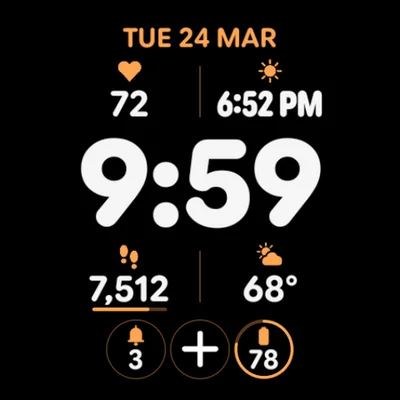
Waktu yang sangat besar dan berani serta data berlabel besar pada warna hitam pekat. Mudah dibaca sekilas.
Baca waktu dan jadwal hari Anda sekilas, bahkan tanpa kacamata.
Tampilan Sederhana menampilkan satu waktu besar dan tebal di layar hitam pekat, dengan grid data besar dan berlabel yang rapi di atas dan di bawahnya. Cetak Besar (standar) membuat setiap nilai, ikon, dan tanggal menjadi lebih besar; Standar menambahkan keterangan di bawah setiap nilai.
FITUR
• Waktu yang sangat besar yang membentang di seluruh lebar jam tangan, dalam 9 gaya huruf
• Dua ukuran teks: Cetak besar dan Standar (ikon, nilai, dan keterangan)
• 7 slot komplikasi: empat sel data besar dan tiga tombol bulat untuk pintasan dan nilai singkat
• Tidak ada tempat kosong: sel menampilkan detak jantung, kemungkinan hujan, langkah (dengan bilah target) dan cuaca hingga Anda memilih yang lain
• 45 warna, termasuk tema kontras tinggi (putih, kuning, amber, cyan atau hijau di atas hitam, dan merah malam dengan silau rendah) dan enam pasangan warna yang aman untuk penderita buta warna
• Gaya sel: garis tipis, ubin, bergaris luar, atau tanpa garis luar
• Tanggal dalam empat bentuk, termasuk nomor minggu dan fase bulan
• Titik detik opsional yang berdetik di sekeliling tepi
• Tiga gaya selalu aktif: garis luar dengan data, hanya garis luar, atau solid
DATA YANG DITAMPILKAN
Waktu, tanggal, detak jantung, matahari terbit atau terbenam berikutnya, langkah dengan target harian Anda, cuaca, dan Kemungkinan hujan, notifikasi, dan baterai, atau komplikasi apa pun yang Anda pilih.
PENGATURAN
Warna · Ukuran teks · Warna waktu · Sel · Tanggal · Font waktu · Detik · Selalu aktif · 7 komplikasi
HEMAT BATERAI
Tidak ada animasi, jadi tampilan jam hanya diperbarui sekali per menit. Latar belakangnya hitam pekat, dan tampilan selalu aktif menerangi sekitar 7% layar.
CARA MENYESUAIKAN
Sentuh dan tahan tampilan jam, lalu ketuk Sesuaikan (pada beberapa jam: Edit atau ikon roda gigi). Geser melalui pengaturan dan ketuk setiap tempat untuk memilih komplikasinya.
KOMPATIBILITAS
Berfungsi pada Wear OS 5 dan jam tangan yang lebih baru (Pixel Watch, Galaxy Watch, dan jam tangan Wear OS lainnya). Instal dari Play Store di ponsel Anda atau di jam tangan.
Plain Sight hanyalah tampilan jam. Tidak ada iklan dan tidak mengumpulkan data.
Tampilkan teks asli
Read the time and your day at a glance, even without your glasses.
Plain Sight puts one huge, bold time across a true-black screen, with a clean grid of big, labeled data above and below it. Large print (the default) makes every value, icon and the date bigger still; Standard adds a caption under each value.
FEATURES
• A huge time that spans the width of the watch, in 9 type styles
• Two text sizes: Large print and Standard (icon, value and caption)
• 7 complication slots: four large data cells and three round buttons for shortcuts and short values
• No empty spots: the cells show heart rate, rain chance, steps (with a goal bar) and weather until you choose something else
• 45 colors, including high-contrast themes (white, yellow, amber, cyan or green on black, and a low-glare night red) and six color-blind-safe pairs
• Cell styles: hairlines, tiles, outlined or none
• The date in four forms, including the week number and the moon phase
• An optional seconds dot that ticks around the rim
• Three always-on styles: outline with data, outline only, or solid
DATA SHOWN
Time, date, heart rate, the next sunrise or sunset, steps with your daily goal, weather and rain chance, notifications and battery, or any complication you choose.
SETTINGS
Color · Text size · Time color · Cells · Date · Time font · Seconds · Always-on · 7 complications
BATTERY FRIENDLY
Nothing animates, so the face redraws only once a minute. The background is true black, and the always-on view lights about 7% of the screen.
HOW TO CUSTOMIZE
Touch and hold the watch face, then tap Customize (on some watches: Edit or the gear icon). Swipe through the settings and tap each spot to choose its complication.
COMPATIBILITY
Works on Wear OS 5 and newer watches (Pixel Watch, Galaxy Watch and other Wear OS watches). Install it from the Play Store on your phone or on the watch.
Plain Sight is a watch face only. It has no ads and collects no data.
Keamanan data
Yang dinyatakan Hollingsworks di Google Play tentang data yang dikumpulkan dan dibagikan aplikasi ini.
- Tidak ada data yang dibagikan kepada pihak ketigaPelajari lebih lanjut cara developer menyatakan pembagian data
- Tidak ada data yang dikumpulkanPelajari lebih lanjut cara developer menyatakan pengumpulan data
Yang baru
Versi 1.2 · 16/10/2026
Weather, steps and moon readouts now open their apps when tapped, and more data comes pre-filled with the real complications.
Kontak pengembang
- Situs webjhworth8.github.io
- Emailjhworth8@gmail.com
- Kebijakan Privasihollingsworks.com
- Alamat1828 Bowers St Birmingham, MI 48009-6812 United States
Informasi
- Ditawarkan oleh
- Hollingsworks
- Kategori
- Personalisasi
- Versi
- 1.2
- Diperbarui
- 16/10/2026
- Dirilis
- 12/10/2026
- Batasan usia
- Rating 3+
- Harga
- Rp 18.000
- Nama paket
- com.hollingsworks.face.plainsight