Plain Sight: Large Print
Hollingsworks- 3 歳以上対象年齢
- カスタマイズカテゴリ
- 2026/10/16更新日
- ¥170価格
com.hollingsworks.face.plainsightのGoogle Play公式ページにリンクしています。最終確認:2026/11/13。
このアプリについて
Googleによる英語 (アメリカ合衆国)からの自動翻訳です。
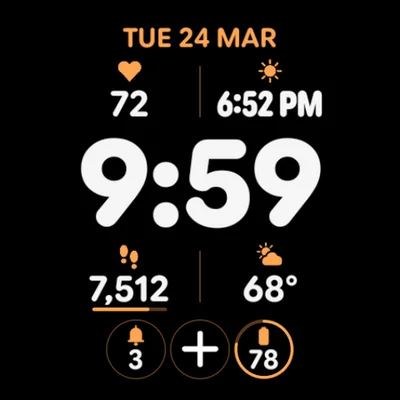
太字で大きく表示された時刻と、ラベル付きの大きなデータが、真っ黒な背景に表示されています。一目で読みやすいデザインです。
眼鏡なしでも、時間と日付が一目でわかります。
プレーンサイトモードでは、真っ黒な画面に大きく太字で時刻が表示され、その上下に大きくラベル付きのデータが整然とグリッド状に並びます。ラージプリント(デフォルト)では、すべての数値、アイコン、日付がさらに大きくなります。スタンダードモードでは、各数値の下にキャプションが追加されます。
特長
• 時計の幅いっぱいに広がる大きな時刻表示(9種類のフォントスタイルから選択可能)
• 2種類の文字サイズ:大判と標準(アイコン、数値、キャプション)
• 7つのコンプリケーションスロット:4つの大きなデータセルと、ショートカットや短い数値を表示する3つの丸型ボタン
• 空白なし:セルには、心拍数、降雨確率、歩数(目標バー付き)、天気予報が表示され、必要に応じて別の項目を選択すれば、常に最新の情報が表示されます。
• 45色のカラーバリエーション:高コントラストテーマ(黒地に白、黄、琥珀色、シアン、緑、低反射ナイトレッド)と、色覚異常の方にも安心な6色の組み合わせ
• セルスタイル:ヘアライン、タイル、アウトライン、またはなし
• 日付表示:週番号と月の満ち欠けを含む4種類の表示形式
• 外周を刻む秒針(オプション)
• 常時表示スタイル:データ付きアウトライン、データのみアウトライン、またはソリッド表示
表示データ
時刻、日付、心拍数、次の日の出または日の入り時刻、歩数と目標歩数、天気予報と降雨確率、通知とバッテリー残量、またはその他お好みのコンプリケーションをお選びください。
設定
カラー・文字サイズ・時刻の色・セル・日付・時刻のフォント・秒・常時表示・7種類のコンプリケーション
バッテリーに優しい
アニメーションは一切使用しないため、文字盤の再描画は1分に1回のみです。背景は完全な黒で、常時表示画面は画面の約7%を点灯します。
カスタマイズ方法
文字盤を長押しし、「カスタマイズ」(一部のウォッチでは「編集」または歯車アイコン)をタップします。設定項目をスワイプして、各項目をタップしてコンプリケーションを選択してください。
互換性
Wear OS 5以降を搭載したウォッチ(Pixel Watch、Galaxy Watch、その他のWear OSウォッチ)に対応しています。スマートフォンまたはウォッチのPlayストアからインストールしてください。
Plain Sightはウォッチフェイスのみです。広告は表示されず、データ収集も行いません。
原文を表示
Read the time and your day at a glance, even without your glasses.
Plain Sight puts one huge, bold time across a true-black screen, with a clean grid of big, labeled data above and below it. Large print (the default) makes every value, icon and the date bigger still; Standard adds a caption under each value.
FEATURES
• A huge time that spans the width of the watch, in 9 type styles
• Two text sizes: Large print and Standard (icon, value and caption)
• 7 complication slots: four large data cells and three round buttons for shortcuts and short values
• No empty spots: the cells show heart rate, rain chance, steps (with a goal bar) and weather until you choose something else
• 45 colors, including high-contrast themes (white, yellow, amber, cyan or green on black, and a low-glare night red) and six color-blind-safe pairs
• Cell styles: hairlines, tiles, outlined or none
• The date in four forms, including the week number and the moon phase
• An optional seconds dot that ticks around the rim
• Three always-on styles: outline with data, outline only, or solid
DATA SHOWN
Time, date, heart rate, the next sunrise or sunset, steps with your daily goal, weather and rain chance, notifications and battery, or any complication you choose.
SETTINGS
Color · Text size · Time color · Cells · Date · Time font · Seconds · Always-on · 7 complications
BATTERY FRIENDLY
Nothing animates, so the face redraws only once a minute. The background is true black, and the always-on view lights about 7% of the screen.
HOW TO CUSTOMIZE
Touch and hold the watch face, then tap Customize (on some watches: Edit or the gear icon). Swipe through the settings and tap each spot to choose its complication.
COMPATIBILITY
Works on Wear OS 5 and newer watches (Pixel Watch, Galaxy Watch and other Wear OS watches). Install it from the Play Store on your phone or on the watch.
Plain Sight is a watch face only. It has no ads and collects no data.
データ セーフティ
このアプリが収集・共有するデータについて、HollingsworksがGoogle Playで申告している内容です。
- 第三者と共有されるデータはありません詳しくは、デベロッパーが共有を申告する方法についての説明をご覧ください
- データは収集されません詳しくは、デベロッパーが収集を申告する方法についての説明をご覧ください
新機能
バージョン 1.2 · 2026/10/16
Weather, steps and moon readouts now open their apps when tapped, and more data comes pre-filled with the real complications.
開発元の連絡先
- ウェブサイトjhworth8.github.io
- メールjhworth8@gmail.com
- プライバシーポリシーhollingsworks.com
- 住所1828 Bowers St Birmingham, MI 48009-6812 United States
情報
- 提供元
- Hollingsworks
- カテゴリ
- カスタマイズ
- バージョン
- 1.2
- 更新日
- 2026/10/16
- リリース
- 2026/10/12
- 対象年齢
- 3 歳以上
- 価格
- ¥170
- パッケージ名
- com.hollingsworks.face.plainsight