Vector Art Watch Faces
Systorso Inc.Berisi iklan · Pembelian dalam aplikasi
- Rating 3+Batasan usia
- PersonalisasiKategori
- 29/1/2024Diperbarui
- GratisHarga
Tertaut ke halaman resmi vectoreartwatchfaces.vectorpatternwatchface.portraitvectorwatchfaces di Google Play. Terakhir diperiksa pada 25/11/2026.
Tentang aplikasi ini
Terjemahan otomatis oleh Google. Bahasa asli: Inggris (Amerika Serikat).
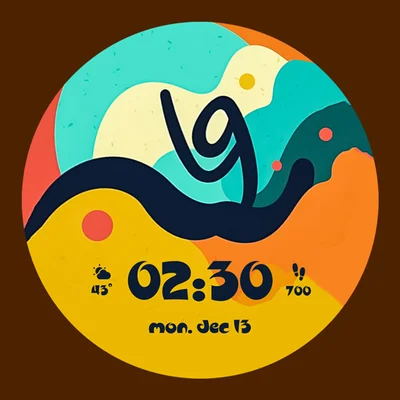
Hiasi dengan cara yang belum pernah ada sebelumnya: Keajaiban wajah Seni Vektor untuk tampilan Wear OS!
Mencari aplikasi tampilan jam bergaya seni vektor untuk jam tangan Wear OS?
Jika ya, maka inilah aplikasi Tampilan Jam Seni Vektor terbaik untuk Anda.
Ini mencakup desain tampilan jam yang kreatif dan artistik untuk jam tangan Wear OS. Ini akan meningkatkan pengalaman jam tangan pintar Wear OS Anda.
Kustomisasi pintasan adalah fitur utama aplikasi ini. Anda dapat mengatur pintasan di layar arloji. Anda harus memilih pintasan dari daftar dan mengaturnya di tampilan jam tangan. Selanjutnya, Anda akan mendapatkan alarm, terjemahan, senter, dan opsi lainnya. Ini akan membuat navigasi jam tangan menjadi mudah. Namun fitur kustomisasi Shortcut hanya tersedia untuk pengguna premium.
Aplikasi ini kompatibel dengan berbagai jam tangan pintar Wear OS. Ini mencakup merek populer seperti Huawei, Google Pixel, Fossil, Samsung Galaxy Watch, dan banyak lagi. Jadi sekarang Anda tidak perlu khawatir tentang kompatibilitasnya.
Kini saatnya mengubah jam tangan Wear OS Anda menjadi sebuah karya seni minimalis yang elegan dan unik. Unduh aplikasinya sekarang dan atur tampilan jam ilustrasi vektor kreatif di layar jam.
Tetapkan tema Retro Watchface untuk jam tangan OS Anda dan nikmatilah.
Bagaimana mengatur?
-> Instal aplikasi di perangkat seluler & kenakan aplikasi OS di jam tangan.
-> Pilih Tampilan jam di aplikasi seluler, itu akan menampilkan pratinjau di layar individual berikutnya. (Anda dapat melihat pratinjau tampilan jam yang dipilih di layar).
-> Klik Tombol "Terapkan Tema" pada aplikasi seluler untuk mengatur tampilan jam di Arloji.
Bagaimana Cara Membeli Premium Dalam Aplikasi?
Pembelian dalam aplikasi saat ini hanya dapat dilakukan melalui aplikasi seluler, jadi harap unduh aplikasi seluler terlebih dahulu. Untuk membeli produk dalam aplikasi dari aplikasi seluler, ikuti langkah-langkah berikut:
->Buka layar pembelian premium dan klik tombol "Lanjutkan" untuk melanjutkan pembelian dalam aplikasi.
->Sekarang pilih opsi pembayaran Anda & selesaikan pembayaran.
-> Hore !, Fitur Premium Tidak Terkunci.
Penafian: Awalnya kami hanya menyediakan satu tampilan jam di jam tangan wear os, tetapi untuk lebih banyak tampilan jam, Anda harus mengunduh aplikasi seluler juga dan dari aplikasi seluler itu Anda dapat menerapkan tampilan jam yang berbeda di jam tangan.
Catatan: Kami telah menggunakan beberapa tampilan jam premium dalam tampilan aplikasi sehingga mungkin tidak gratis di dalam aplikasi. Dan kami juga hanya menyediakan tampilan jam tunggal di dalam aplikasi jam tangan untuk menerapkan tampilan jam yang berbeda. Anda juga perlu mengunduh aplikasi seluler dari aplikasi seluler, Anda dapat mengatur tampilan jam yang berbeda di jam tangan Wear OS Anda.
Tampilkan teks asli
In search of vector art style watchfaces app for Wear OS watch?
If yes, then here is the best Vector Art Watch Faces app for you.
It includes creative and artistic watch face designs for Wear OS watches. It will enhance your Wear OS smartwatch experience.
Shortcut customization is the key feature of this application. You can set the shortcuts on the watchscreen. You will need to select the shortcuts from the list and set them on the watch display. Furthermore, you will get the alarm, translate, flashlight, and more other options. It will make the watch navigation easy. But Shortcut customization feature is only available for premium users.
The application is compatible with a wide range of Wear OS smartwatches. It includes popular brands such as Huawei, Google Pixel, Fossil, Samsung Galaxy Watch, and more. So now you will not need to worry about the compatibility.
Now it's time to turn your Wear OS watch into a minimalist elegance and unique piece of art. Download the app now and set the creative vector illustration watchface on the watchscreen.
Set Retro Watchface theme for your wear OS watch and enjoy.
How to Set?
-> Install app in mobile device & wear OS app in watch.
-> Select Watch face on mobile app it will show preview on next individual screen. (you can see selected watch face preview on screen).
-> Click on "Apply Theme" Button on mobile app to set watch face in Watch.
How to Buy Premium In-App?
In-app purchases are currently only possible through the mobile application, so please download the mobile app first. To purchase an in-app product from the mobile app, please follow these steps:
->Go to the premium purchase screen and click on the "Continue" button to proceed with the in-app purchase.
->Now choose your payment option & complete payment.
->Hurray!, Premium Features Unlocked.
Disclaimer : Initially we provide only single watch face on wear os watch but for more watchface you have to download mobile app as well and from that mobile app you can apply different watchface on watch.
Note: We have used some premium watchface in showcase of application so may it will be not free inside app. And we also only provide initially single watchface inside watch application for apply different watchface you need to download mobile application as well you from mobile application you can set different watchfaces on your Wear OS watch.
Keamanan data
Yang dinyatakan Systorso Inc. di Google Play tentang data yang dikumpulkan dan dibagikan aplikasi ini.
- Aplikasi ini dapat membagikan jenis data ini kepada pihak ketigaNomor telepon
- Tidak ada data yang dikumpulkanPelajari lebih lanjut cara developer menyatakan pengumpulan data
- Data dienkripsi saat dalam pengiriman
- Data tidak dapat dihapus
Kontak pengembang
- Situs websystorsoinc.blogspot.com
- Emailsarashvp18@gmail.com
- Kebijakan Privasisites.google.com
- AlamatD-404, Ram Laxman Appartment Behind Kharvar Nagar, Khatodra, Surat City Surat, Gujarat 395002 India
Informasi
- Ditawarkan oleh
- Systorso Inc.
- Kategori
- Personalisasi
- Diperbarui
- 29/1/2024
- Dirilis
- 6/11/2023
- Batasan usia
- Rating 3+
- Harga
- Gratis
- Pembelian dalam aplikasi
- Rp 31.000 per item
- Nama paket
- vectoreartwatchfaces.vectorpatternwatchface.portraitvectorwatchfaces