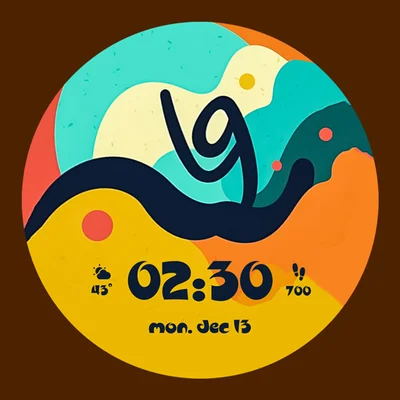
Vector Art Watch Faces
Systorso Inc.広告を含む · アプリ内課金
- 3 歳以上対象年齢
- カスタマイズカテゴリ
- 2024/1/29更新日
- 無料価格
vectoreartwatchfaces.vectorpatternwatchface.portraitvectorwatchfacesのGoogle Play公式ページにリンクしています。最終確認:2026/11/25。
このアプリについて
Googleによる英語 (アメリカ合衆国)からの自動翻訳です。
これまでにない装飾: Wear OS ディスプレイ用のベクター アートの顔の魔法!
Wear OS ウォッチ用のベクター アート スタイルのウォッチフェイス アプリをお探しですか?
「はい」の場合は、これがあなたに最適な Vector Art Watch Faces アプリです。
これには、Wear OS ウォッチ用の創造的で芸術的な文字盤デザインが含まれています。 Wear OS スマートウォッチのエクスペリエンスが向上します。
ショートカットのカスタマイズは、このアプリケーションの重要な機能です。ウォッチ画面にショートカットを設定できます。リストからショートカットを選択し、時計のディスプレイに設定する必要があります。さらに、アラーム、翻訳、懐中電灯、その他のオプションも利用できます。時計のナビゲーションが簡単になります。ただし、ショートカットのカスタマイズ機能はプレミアム ユーザーのみが利用できます。
このアプリケーションは、さまざまな Wear OS スマートウォッチと互換性があります。 Huawei、Google Pixel、Fossil、Samsung Galaxy Watch などの人気ブランドが含まれています。したがって、互換性について心配する必要はなくなります。
さあ、Wear OS ウォッチをミニマリストのエレガンスとユニークな芸術作品に変える時が来ました。今すぐアプリをダウンロードして、クリエイティブなベクターイラストのウォッチフェイスをウォッチスクリーンに設定してください。
Wear OS ウォッチにレトロ ウォッチフェイス テーマを設定してお楽しみください。
設定方法は?
-> モバイルデバイスにアプリをインストールし、時計に OS アプリを装着します。
-> モバイル アプリでウォッチフェイスを選択すると、次の個別の画面にプレビューが表示されます。 (選択したウォッチフェイスのプレビューが画面上に表示されます)。
-> モバイルアプリの「テーマを適用」ボタンをクリックして、Watch に文字盤を設定します。
アプリ内でプレミアムを購入するにはどうすればよいですか?
現在、アプリ内購入はモバイル アプリケーションを通じてのみ可能であるため、最初にモバイル アプリをダウンロードしてください。モバイル アプリからアプリ内製品を購入するには、次の手順に従ってください。
→プレミアム購入画面に移動し、「続行」ボタンをクリックしてアプリ内購入を続行します。
->支払いオプションを選択し、支払いを完了してください。
->万歳!プレミアム機能のロックが解除されました。
免責事項:当初、Wear OS Watchでは単一の文字盤のみを提供していましたが、より多くの文字盤を使用するには、モバイルアプリもダウンロードする必要があり、そのモバイルアプリから時計に別の文字盤を適用できます。
注: アプリケーションのショーケースでは一部のプレミアムウォッチフェイスを使用しているため、アプリ内では無料ではない可能性があります。また、最初はウォッチ アプリケーション内で単一のウォッチフェイスのみを提供し、モバイル アプリケーションをダウンロードする必要がある別のウォッチフェイスを適用するだけでなく、モバイル アプリケーションから Wear OS ウォッチに異なるウォッチフェイスを設定することもできます。
原文を表示
In search of vector art style watchfaces app for Wear OS watch?
If yes, then here is the best Vector Art Watch Faces app for you.
It includes creative and artistic watch face designs for Wear OS watches. It will enhance your Wear OS smartwatch experience.
Shortcut customization is the key feature of this application. You can set the shortcuts on the watchscreen. You will need to select the shortcuts from the list and set them on the watch display. Furthermore, you will get the alarm, translate, flashlight, and more other options. It will make the watch navigation easy. But Shortcut customization feature is only available for premium users.
The application is compatible with a wide range of Wear OS smartwatches. It includes popular brands such as Huawei, Google Pixel, Fossil, Samsung Galaxy Watch, and more. So now you will not need to worry about the compatibility.
Now it's time to turn your Wear OS watch into a minimalist elegance and unique piece of art. Download the app now and set the creative vector illustration watchface on the watchscreen.
Set Retro Watchface theme for your wear OS watch and enjoy.
How to Set?
-> Install app in mobile device & wear OS app in watch.
-> Select Watch face on mobile app it will show preview on next individual screen. (you can see selected watch face preview on screen).
-> Click on "Apply Theme" Button on mobile app to set watch face in Watch.
How to Buy Premium In-App?
In-app purchases are currently only possible through the mobile application, so please download the mobile app first. To purchase an in-app product from the mobile app, please follow these steps:
->Go to the premium purchase screen and click on the "Continue" button to proceed with the in-app purchase.
->Now choose your payment option & complete payment.
->Hurray!, Premium Features Unlocked.
Disclaimer : Initially we provide only single watch face on wear os watch but for more watchface you have to download mobile app as well and from that mobile app you can apply different watchface on watch.
Note: We have used some premium watchface in showcase of application so may it will be not free inside app. And we also only provide initially single watchface inside watch application for apply different watchface you need to download mobile application as well you from mobile application you can set different watchfaces on your Wear OS watch.
データ セーフティ
このアプリが収集・共有するデータについて、Systorso Inc.がGoogle Playで申告している内容です。
- このアプリはサードパーティと以下の種類のデータを共有することがありますファイル、ドキュメント
- データは収集されません詳しくは、デベロッパーが収集を申告する方法についての説明をご覧ください
- データは送信中に暗号化されます
- データを削除できません
開発元の連絡先
- ウェブサイトsystorsoinc.blogspot.com
- メールsarashvp18@gmail.com
- プライバシーポリシーsites.google.com
- 住所D-404, Ram Laxman Appartment Behind Kharvar Nagar, Khatodra, Surat City Surat, Gujarat 395002 India
情報
- 提供元
- Systorso Inc.
- カテゴリ
- カスタマイズ
- 更新日
- 2024/1/29
- リリース
- 2023/11/6
- 対象年齢
- 3 歳以上
- 価格
- 無料
- アプリ内課金
- ¥280/アイテム
- パッケージ名
- vectoreartwatchfaces.vectorpatternwatchface.portraitvectorwatchfaces