Boreal PDF
Scan, sign, compress PDFs
Dirancang untuk iPhone
Gratis · Pembelian dalam aplikasi
- Batasan usia4+
- KategoriProduktivitas
- PengembangBorealbit Technology Limited
- BahasaInggris+ 1 lainnya
- Ukuran6,9 MB
Tertaut ke halaman resmi App Store
Download.org tidak menyimpan file Boreal PDF apa pun. Tombol ini membuka halaman aplikasi di App Store, tempat Borealbit Technology Limited menerbitkannya. Halaman terakhir diperiksa pada 18/11/2026.
Tangkapan layar

Tentang
Pengembang belum menyediakan teks ini dalam bahasa Anda.
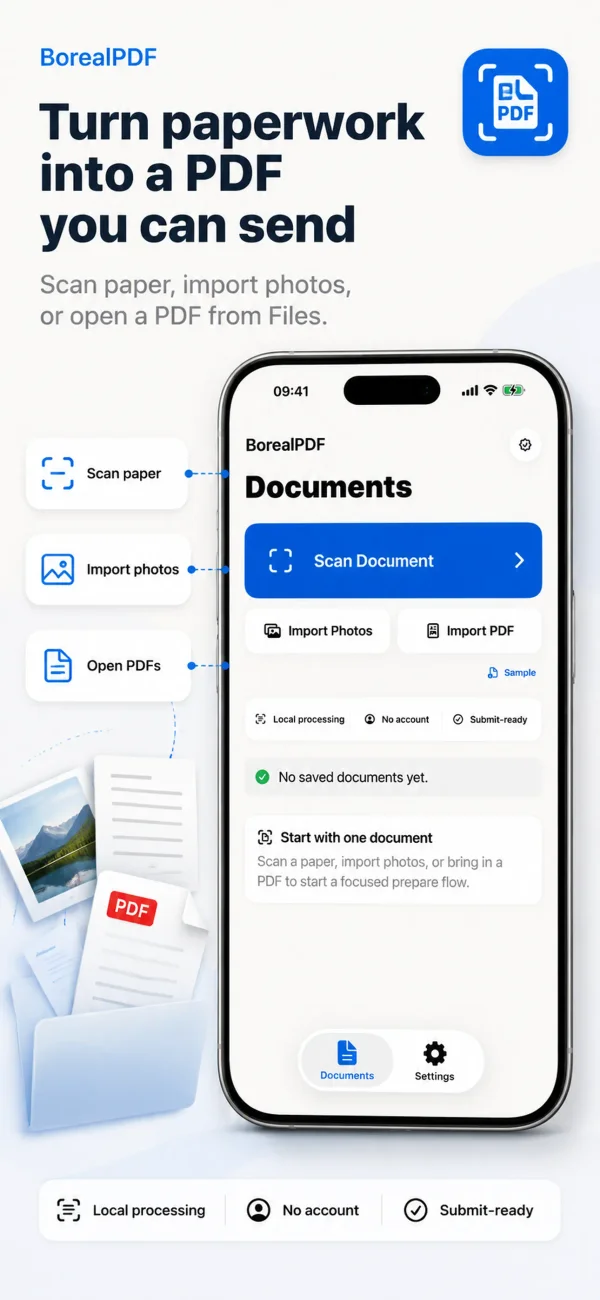
Boreal PDF helps you turn paper forms, receipts, certificates, contracts, and
application documents into cleaner PDFs from iPhone.
Start with a camera scan, selected photos, or an imported PDF. Boreal PDF keeps
the workflow focused on the practical steps before submission: straighten the
page, improve text readability, fill in missing marks, reduce file size, and
export a PDF you can review before sending.
Key tools:
- Scan paper documents or import photos and PDFs.
- Auto-crop, rotate, retake, reorder, merge, or split pages.
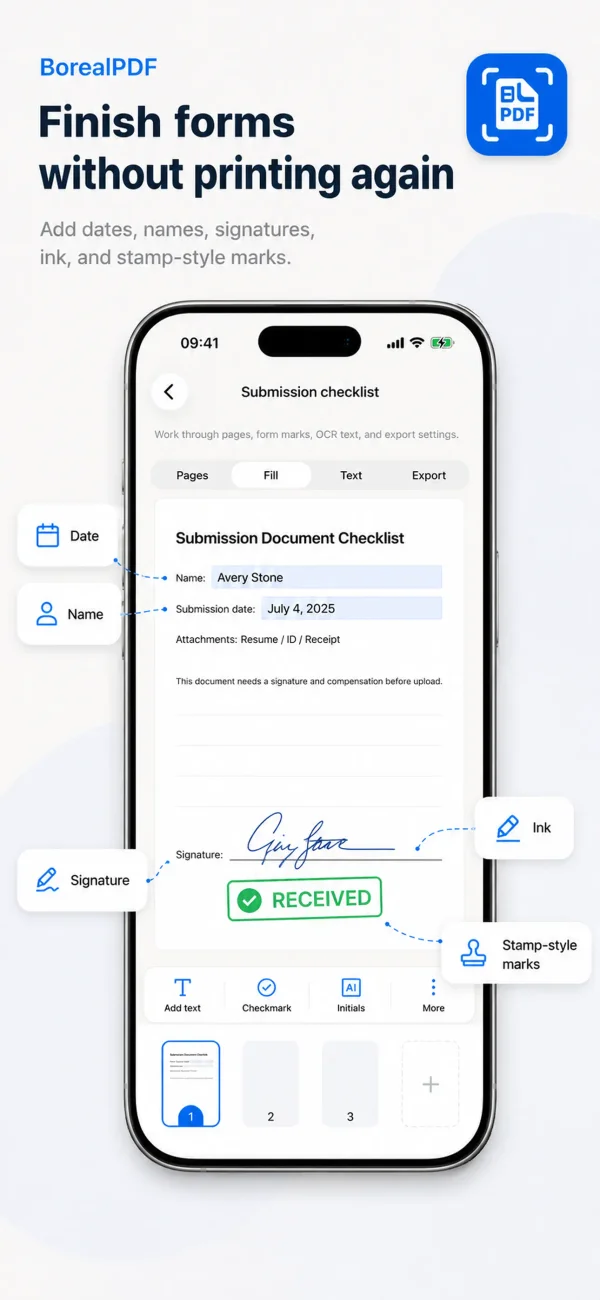
- Add dates, names, signatures, freehand ink, and stamp-style marks.
- Compress PDFs toward common upload limits.
- Run OCR for printed Japanese and English text.
- Preview the final PDF, then save, share, or print it from iOS.
Boreal PDF is local-first by design. The companion website does not provide
cloud document storage, account sync, or server-side PDF processing. OCR works
best on clear printed text; handwriting, glare, low light, and heavy skew can
reduce accuracy, so always review important documents before submitting them.
Boreal PDF is free to start with 5 documents per day. Within that allowance,
form marks, compression, OCR, searchable PDF, and watermarked export stay in
the workflow. Pro removes the daily document limit and unlocks watermark-free
final export. A 24-hour Pro Pass is available for short-term access, alongside
monthly and yearly Pro subscriptions. Current prices, trial availability,
renewal terms, and regional availability are shown on the App Store.
Privacy Policy: https://borealpdf.borealbit.com/privacy
Terms of Use (EULA): https://www.apple.com/legal/internet-services/itunes/dev/stdeula/
Terms of Service: https://borealpdf.borealbit.com/terms
Yang baru
Versi 1.0.5 · 16/7/2026
A smoother document workflow now guides you through page review, optional signing and form marks, PDF creation, and final preview. You can save exported PDFs to Files, reopen them from Saved Exports, and share or delete saved copies. This update also improves daily free-use tracking, preview navigation, and overall reliability.
Privasi aplikasi
Yang dinyatakan Borealbit Technology Limited di App Store tentang cara aplikasi ini menangani data.
-
Data tidak dikumpulkan
Pengembang tidak mengumpulkan data apa pun dari aplikasi ini.
Praktik privasi dapat bervariasi, misalnya berdasarkan fitur yang Anda gunakan atau usia Anda.
Informasi
- Penjual
- Borealbit Technology Limited
- Kategori
- Produktivitas
- Versi
- 1.0.5
- Diperbarui
- 16/7/2026
- Dirilis
- 14/7/2026
- Ukuran
- 6,9 MB
- Memerlukan
- iOS 17.0 atau yang lebih baru
- Batasan usia
- 4+
- Harga
- Gratis
- Pembelian dalam aplikasi
- Ya
- Bahasa
- Inggris, Jepang
- Hak cipta
- © 2026 Borealbit Technology Limited
Mungkin Anda juga suka
-
 BitEditorProduktivitas
-
 My Ideas BookProduktivitas
-
 Plotted: Planner & To Do ListProduktivitas
-
 TVAirScreenProduktivitas
-
 Handwritten Quick Notes: JotProduktivitas
-
 TenantDesk: Rental InspectionProduktivitas
-
 Reopen in PrivateProduktivitas
-
 Connect2VPN - Fast & Safe VPNProduktivitas
-
 Summary AI - QuickSummaryProduktivitas
-
 SpeedTest: WIFI Speed TestProduktivitas