FAC Clipper
Peaks Control Made Easy AUv3
Dirancang untuk iPhone, iPad, Mac
Rp 199ribu · Pembelian dalam aplikasi
- Batasan usia4+
- KategoriMusik
- PengembangFrederic Corvest
- BahasaInggris
- Ukuran2,5 MB
Tertaut ke halaman resmi App Store
Download.org tidak menyimpan file FAC Clipper apa pun. Tombol ini membuka halaman aplikasi di App Store, tempat Frederic Corvest menerbitkannya. Halaman terakhir diperiksa pada 13/11/2026.
Tangkapan layar


Tentang
Pengembang belum menyediakan teks ini dalam bahasa Anda.
• Enhances Mix Loudness and Adds Harmonic Warmth
• Full-Band and Two-Band Clipper in a Single Plugin
• Quick, lightweight, and designed for effortless flexibility!
• Precise Visual Metering for Fast Peak Control
• Knee Curve Adjustment, from Super Soft to Hard
• Shape Control of the Harmonic Profile
• Dry/Wet Mix for a Natural, Balanced Sound
• Low Latency with Optional Oversampling
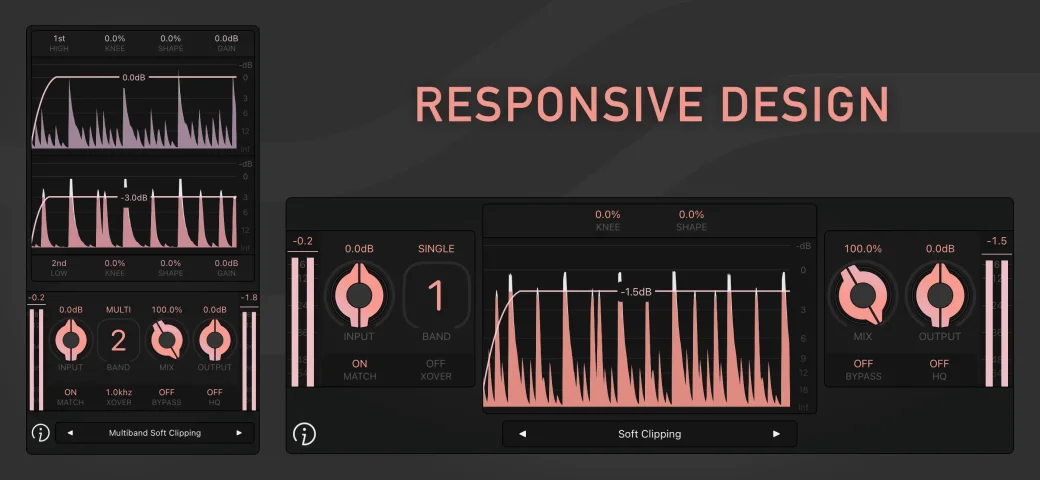
• Advanced Responsive Design, portrait and landscape views
• Universal Purchase: AUv3 for iOS (iPad/iPhone), macOS and Vision Pro
FAC Clipper is designed to enhance your mix's loudness and add signature harmonic warmth. While it is based on a similar DSP architecture to the Clip processor in FAC Punchlab, it takes a different approach to clipping control, featuring an advanced user interface with precise metering to track and manage the peaks of the audio signal.
The plugin also includes both a full-band clipper that processes the entire spectrum and a multi-band clipper, allowing you to independently clip low, high, or both frequency bands. This provides the flexibility to maintain transparent processing or experiment with creative adjustments, depending on your needs.
Built with simplicity and flexibility in mind, FAC Clipper is quick, lightweight, and highly intuitive. The clean, streamlined interface lets you focus on what matters most; controlling the peak levels to maximize loudness while preserving clarity and avoiding the pumping effects often associated with heavily limited signals.
Thanks to its precise waveform and level meters, using FAC Clipper is a breeze. Simply add the plugin to your track and adjust the input gain until the waveform meter reaches 0 dB. This gives you a clear view of the signal's dynamic range, making it easier to identify peaks. Next, set the ceiling just below the peaks you wish to control. You can also adjust the Knee parameter for smoother clipping and fine-tune the saturation to achieve the perfect warmth and character.
Use the Mix parameter to blend the clipped signal with the original audio, allowing you to control the amount of clipping applied. This helps preserve the natural character of the sound while enhancing loudness and harmonic warmth.
This is an AUv3 Effect and requires a compatible host to work
The documentation is available at fredantoncorvest.com/FAC_Clipper.html
Yang baru
Versi 1.0.2 · 25/7/2025
+ Maintenance update
How to support FAC? : Rate and Review ALL of your FAC apps • Buy a t-shirt • Tip...
Contact: support •• fredantoncorvest.com
Privasi aplikasi
Yang dinyatakan Frederic Corvest di App Store tentang cara aplikasi ini menangani data.
-
Data tidak dikumpulkan
Pengembang tidak mengumpulkan data apa pun dari aplikasi ini.
Praktik privasi dapat bervariasi, misalnya berdasarkan fitur yang Anda gunakan atau usia Anda.
Informasi
- Penjual
- Frederic Corvest
- Kategori
- Musik
- Versi
- 1.0.2
- Diperbarui
- 25/7/2025
- Dirilis
- 17/3/2025
- Ukuran
- 2,5 MB
- Memerlukan
- iOS 16.4 atau yang lebih baru
- Batasan usia
- 4+
- Harga
- Rp 199ribu
- Pembelian dalam aplikasi
- Ya
- Bahasa
- Inggris
- Hak cipta
- ©2017-2026 FAC Fred Anton Corvest