- 対象年齢4+
- カテゴリミュージック
- 開発元Frederic Corvest
- 言語英語
- サイズ2.5 MB
App Storeの公式ページにリンクしています
Download.orgはFAC Clipperのファイルを一切ホストしていません。ボタンを押すと、Frederic Corvestが公開しているApp Storeのアプリページが開きます。ページの最終確認:2026/11/13。
スクリーンショット


概要
開発元はこのテキストをお使いの言語で提供していません。
• Enhances Mix Loudness and Adds Harmonic Warmth
• Full-Band and Two-Band Clipper in a Single Plugin
• Quick, lightweight, and designed for effortless flexibility!
• Precise Visual Metering for Fast Peak Control
• Knee Curve Adjustment, from Super Soft to Hard
• Shape Control of the Harmonic Profile
• Dry/Wet Mix for a Natural, Balanced Sound
• Low Latency with Optional Oversampling
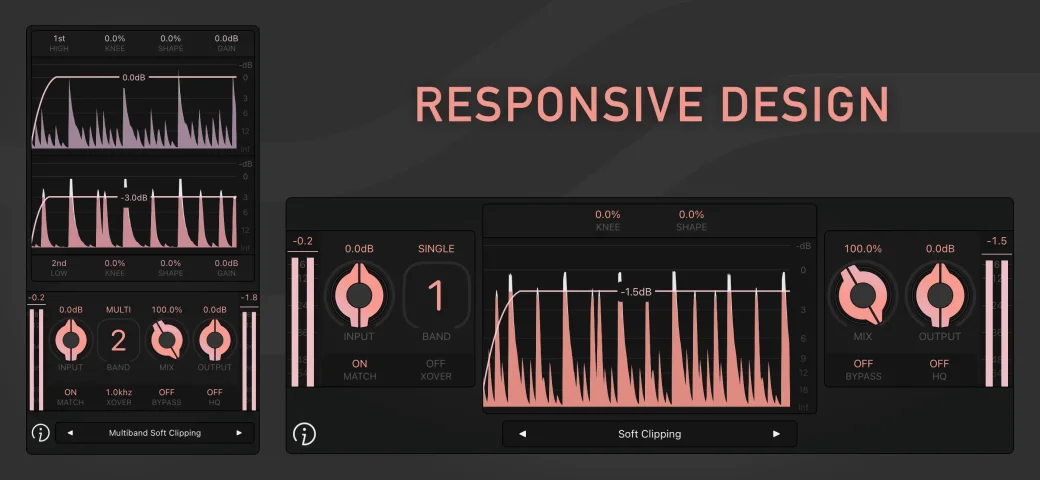
• Advanced Responsive Design, portrait and landscape views
• Universal Purchase: AUv3 for iOS (iPad/iPhone), macOS and Vision Pro
FAC Clipper is designed to enhance your mix's loudness and add signature harmonic warmth. While it is based on a similar DSP architecture to the Clip processor in FAC Punchlab, it takes a different approach to clipping control, featuring an advanced user interface with precise metering to track and manage the peaks of the audio signal.
The plugin also includes both a full-band clipper that processes the entire spectrum and a multi-band clipper, allowing you to independently clip low, high, or both frequency bands. This provides the flexibility to maintain transparent processing or experiment with creative adjustments, depending on your needs.
Built with simplicity and flexibility in mind, FAC Clipper is quick, lightweight, and highly intuitive. The clean, streamlined interface lets you focus on what matters most; controlling the peak levels to maximize loudness while preserving clarity and avoiding the pumping effects often associated with heavily limited signals.
Thanks to its precise waveform and level meters, using FAC Clipper is a breeze. Simply add the plugin to your track and adjust the input gain until the waveform meter reaches 0 dB. This gives you a clear view of the signal's dynamic range, making it easier to identify peaks. Next, set the ceiling just below the peaks you wish to control. You can also adjust the Knee parameter for smoother clipping and fine-tune the saturation to achieve the perfect warmth and character.
Use the Mix parameter to blend the clipped signal with the original audio, allowing you to control the amount of clipping applied. This helps preserve the natural character of the sound while enhancing loudness and harmonic warmth.
This is an AUv3 Effect and requires a compatible host to work
The documentation is available at fredantoncorvest.com/FAC_Clipper.html
新機能
バージョン 1.0.2 · 2025/7/25
+ Maintenance update
How to support FAC? : Rate and Review ALL of your FAC apps • Buy a t-shirt • Tip...
Contact: support •• fredantoncorvest.com
アプリのプライバシー
このアプリのデータの取り扱いについて、Frederic CorvestがApp Storeで申告している内容です。
-
データの収集なし
開発元はこのアプリからデータを収集しません。
プライバシーの取り扱いは、ご利用の機能やお客様の年齢などに応じて異なる場合があります。
情報
- 販売元
- Frederic Corvest
- カテゴリ
- ミュージック
- バージョン
- 1.0.2
- 更新日
- 2025/7/25
- リリース
- 2025/3/17
- サイズ
- 2.5 MB
- 必要条件
- iOS 16.4以降
- 対象年齢
- 4+
- 価格
- ¥1,500
- アプリ内課金
- あり
- 言語
- 英語
- 著作権
- ©2017-2026 FAC Fred Anton Corvest