
FourCropper - Split images
Split big image into 4 images!
Dirancang untuk iPhone
Gratis · Pembelian dalam aplikasi
- Batasan usia4+
- KategoriKegunaan
- PengembangKENJI WADA
- BahasaInggris+ 17 lainnya
- Ukuran20,6 MB
Tertaut ke halaman resmi App Store
Download.org tidak menyimpan file FourCropper - Split images apa pun. Tombol ini membuka halaman aplikasi di App Store, tempat KENJI WADA menerbitkannya. Halaman terakhir diperiksa pada 25/11/2026.
Tangkapan layar
Tentang
Pengembang belum menyediakan teks ini dalam bahasa Anda.
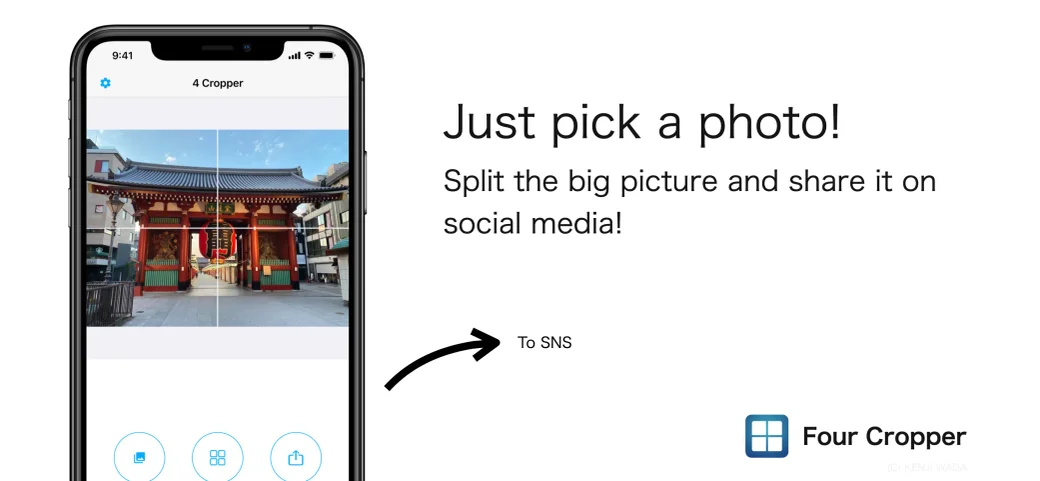
Just select a photo, split it into four, and easily share it directly to Twitter! You don't have to go to the trouble of saving the image and then launching the Twitter application.
Have you ever uploaded your favorite photo to a social networking site only to have it resized to a smaller size without your permission? Don't worry about it!
With Four Cropper, you can prevent the photo from being resized by dividing it into four parts beforehand, and display the photo in a larger size.
The principle of 'Four Cropper' is very simple.
Twitter's web and applications display images in a 16:9 ratio.You can also quadrant the image while doing the calculations, but Four Cropper will crop the photo to a 16:9 ratio and then split the photo. Your photos will display nicely on the Twitter platform!
You can choose any number of divisions: 4, 3, or 2. Choose the number of divisions that makes your photo look the best!
The evolution of smartphone cameras is amazing. Photos are getting higher resolution every year. Let's divide your prized photo into four sections and let everyone see all the details that would otherwise be omitted!
# About Premium Plan
The free version displays advertisements. There is no difference between the free version and the paid version except for advertisements. If you like it, please use the paid version.
## Premium Plan
Annual payment 120 yen / year
Ads are hidden by subscribing to the premium plan.
## Restoration when changing models
When you change your phone model, you can restore the previously purchased paid version for free. Go to [Premium] on the Settings screen and select [Restore Purchase History]. Your purchase history is tied to your Apple ID, so please make sure you are logged in with the same Apple ID as when you made the purchase.
## About automatic recurring billing
If you do not cancel your subscription at least 24 hours prior to the billing close date, you will be billed on the start of each new billing period.
## Confirmation and Cancellation
Launch the Settings app on iOS and select Users->Subscription->Four Cropper at the top of the screen. You can check your subscription renewal date. You can also set/unset auto-renewal.
## Notes
- If you wish to cancel your subscription, please follow the instructions above.
- The billing is done through your Apple ID account.
## Privacy Policy
https://products.ch3cooh.net/entry/fourcropper/privacy_policy
## Terms of Use
https://products.ch3cooh.net/entry/fourcropper/terms_of_use_ios
Yang baru
Versi 5.0.0 · 16/7/2026
- Redesigned the split-count picker as a menu, so your current selection is visible at a glance.
- Refined the image source selection dialog.
- Polished and unified the in-app wording throughout the app.
- Modernized the app's internals for improved stability and performance.
Privasi aplikasi
Yang dinyatakan KENJI WADA di App Store tentang cara aplikasi ini menangani data.
-
Data yang digunakan untuk melacak Anda
Dapat digunakan untuk melacak Anda di aplikasi dan situs web milik perusahaan lain.
- Lokasi
- Pengenal
- Data penggunaan
- Diagnostik
-
Data yang ditautkan dengan Anda
Dapat dikumpulkan dan ditautkan dengan identitas Anda.
- Pembelian
- Lokasi
- Pengenal
- Data penggunaan
- Diagnostik
-
Data yang tidak ditautkan dengan Anda
Dapat dikumpulkan, tetapi tidak ditautkan dengan identitas Anda.
- Diagnostik
Praktik privasi dapat bervariasi, misalnya berdasarkan fitur yang Anda gunakan atau usia Anda.
Informasi
- Penjual
- KENJI WADA
- Kategori
- Kegunaan
- Versi
- 5.0.0
- Diperbarui
- 16/7/2026
- Dirilis
- 31/5/2020
- Ukuran
- 20,6 MB
- Memerlukan
- iOS 16.0 atau yang lebih baru
- Batasan usia
- 4+
- Harga
- Gratis
- Pembelian dalam aplikasi
- Ya
- Bahasa
- Inggris, Cheska (Republik Cheska), Belanda, Suomi (Finlandia), Prancis, Jerman, Yunani, Italia, Jepang, Korea, Polski (Polandia), Portugis + 6 lainnya
- Hak cipta
- © 2020-2026 KENJI WADA
Mungkin Anda juga suka
-
 Tile PosterBagi Foto Jadi Poster PDF
-
 Aspose.PDF – Converter, ViewerKonversi, Pindai, Tanda PDF
-
 PDF ke Gambar - JPG, PNG, HEICKonversi file PDF jadi gambar
-
 Photo Blur: Motion EffectsKegunaan
-
 Aspose.WordsRead and work with Word, PDF
-
 Poster Printer: Tile PrintKegunaan
-
 ID Photo Maker document photosKegunaan
-
 Mesin BingoEdisi Bingo 75 bola
-
 Peredam DerauPenghilang Kebisingan
-
 Pisahkan video untuk InstagramPembuat cerita dari klip besar