
FourCropper - Split images
Split big image into 4 images!
iPhone için tasarlandı
Ücretsiz · Uygulama içi satın alma
- Yaş sınırı4+
- KategoriYardımcılar
- GeliştiriciKENJI WADA
- Dillerİngilizce+ 17 dil daha
- Boyut20,6 MB
Resmi App Store sayfasına bağlanır
Download.org, FourCropper - Split images için hiçbir dosya barındırmaz. Düğme, uygulamanın App Store üzerindeki sayfasını açar; uygulamayı orada KENJI WADA yayınlar. Sayfanın son kontrolü: 25.11.2026.
Ekran görüntüleri
Hakkında
Geliştirici bu metni dilinizde sunmamış.
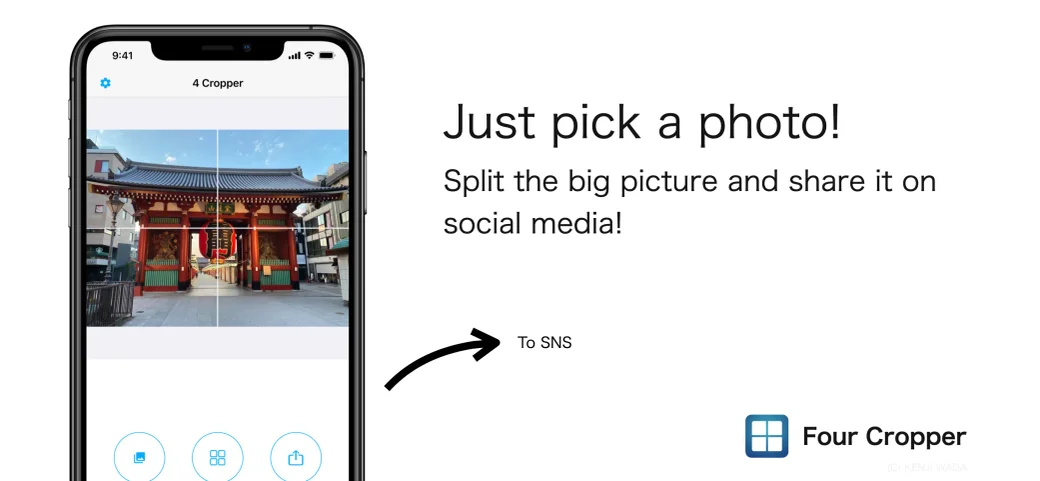
Just select a photo, split it into four, and easily share it directly to Twitter! You don't have to go to the trouble of saving the image and then launching the Twitter application.
Have you ever uploaded your favorite photo to a social networking site only to have it resized to a smaller size without your permission? Don't worry about it!
With Four Cropper, you can prevent the photo from being resized by dividing it into four parts beforehand, and display the photo in a larger size.
The principle of 'Four Cropper' is very simple.
Twitter's web and applications display images in a 16:9 ratio.You can also quadrant the image while doing the calculations, but Four Cropper will crop the photo to a 16:9 ratio and then split the photo. Your photos will display nicely on the Twitter platform!
You can choose any number of divisions: 4, 3, or 2. Choose the number of divisions that makes your photo look the best!
The evolution of smartphone cameras is amazing. Photos are getting higher resolution every year. Let's divide your prized photo into four sections and let everyone see all the details that would otherwise be omitted!
# About Premium Plan
The free version displays advertisements. There is no difference between the free version and the paid version except for advertisements. If you like it, please use the paid version.
## Premium Plan
Annual payment 120 yen / year
Ads are hidden by subscribing to the premium plan.
## Restoration when changing models
When you change your phone model, you can restore the previously purchased paid version for free. Go to [Premium] on the Settings screen and select [Restore Purchase History]. Your purchase history is tied to your Apple ID, so please make sure you are logged in with the same Apple ID as when you made the purchase.
## About automatic recurring billing
If you do not cancel your subscription at least 24 hours prior to the billing close date, you will be billed on the start of each new billing period.
## Confirmation and Cancellation
Launch the Settings app on iOS and select Users->Subscription->Four Cropper at the top of the screen. You can check your subscription renewal date. You can also set/unset auto-renewal.
## Notes
- If you wish to cancel your subscription, please follow the instructions above.
- The billing is done through your Apple ID account.
## Privacy Policy
https://products.ch3cooh.net/entry/fourcropper/privacy_policy
## Terms of Use
https://products.ch3cooh.net/entry/fourcropper/terms_of_use_ios
Yenilikler
Sürüm 5.0.0 · 16.07.2026
- Redesigned the split-count picker as a menu, so your current selection is visible at a glance.
- Refined the image source selection dialog.
- Polished and unified the in-app wording throughout the app.
- Modernized the app's internals for improved stability and performance.
Uygulama gizliliği
Bu uygulamanın verileri nasıl işlediği hakkında KENJI WADA tarafından App Store üzerinde yapılan beyan.
-
Sizi izlemek için kullanılan veriler
Başka şirketlere ait uygulamalarda ve web sitelerinde sizi izlemek için kullanılabilir.
- Konum
- Tanımlayıcılar
- Kullanım verileri
- Tanılama
-
Sizinle ilişkilendirilen veriler
Toplanabilir ve kimliğinizle ilişkilendirilebilir.
- Satın alımlar
- Konum
- Tanımlayıcılar
- Kullanım verileri
- Tanılama
-
Sizinle ilişkilendirilmeyen veriler
Toplanabilir ancak kimliğinizle ilişkilendirilmez.
- Tanılama
Gizlilik uygulamaları, örneğin kullandığınız özelliklere veya yaşınıza göre değişiklik gösterebilir.
Bilgiler
- Satıcı
- KENJI WADA
- Kategori
- Yardımcılar
- Sürüm
- 5.0.0
- Güncellendi
- 16.07.2026
- Yayın tarihi
- 31.05.2020
- Boyut
- 20,6 MB
- Gereksinim
- iOS 16.0 veya sonrası
- Yaş sınırı
- 4+
- Fiyat
- Ücretsiz
- Uygulama içi satın alma
- Evet
- Diller
- İngilizce, Çekçe, Hollandaca, Fince, Fransızca, Almanca, Yunanca, İtalyanca, Japonca, Korece, Lehçe, Portekizce + 6 dil daha
- Telif hakkı
- © 2020-2026 KENJI WADA
Bunları da beğenebilirsiniz
-
 Tile PosterFotoğrafları Poster PDF'i Yap
-
 Aspose.PDF – Converter, ViewerPDF Dönüştür, Tara, İmzala
-
 PDF'den Görüntüye JPG PNG HEICPDF'yi görüntülere dönüştürün
-
 Photo Blur: Motion EffectsYardımcılar
-
 Aspose.WordsWord, PDF okuyun ve çalışın
-
 Poster Printer: Tile PrintYardımcılar
-
 ID Photo Maker document photosYardımcılar
-
 Bingo Machine75 toplu Bingo sürümü
-
 Gürültü AzaltıcıGürültü Giderme
-
 Instagram için videoları bölmeDüzenleyici, Hikaye yaratıcısı