
Leaf: Document Scanner & PDF
Edit, Sign, Stamp & Fill Forms
Dirancang untuk iPhone
Gratis
- Batasan usia4+
- KategoriProduktivitas
- PengembangIvan Kotlyar
- BahasaArab+ 10 lainnya
- Ukuran7,5 MB
Tertaut ke halaman resmi App Store
Download.org tidak menyimpan file Leaf: Document Scanner & PDF apa pun. Tombol ini membuka halaman aplikasi di App Store, tempat Ivan Kotlyar menerbitkannya. Halaman terakhir diperiksa pada 12/11/2026.
Tangkapan layar

Tentang
Pengembang belum menyediakan teks ini dalam bahasa Anda.
Leaf is a document scanner and a PDF editor in one app. Scan, edit and send documents right on your phone — no subscription and no ads.
EDIT A DOCUMENT LIKE PAPER
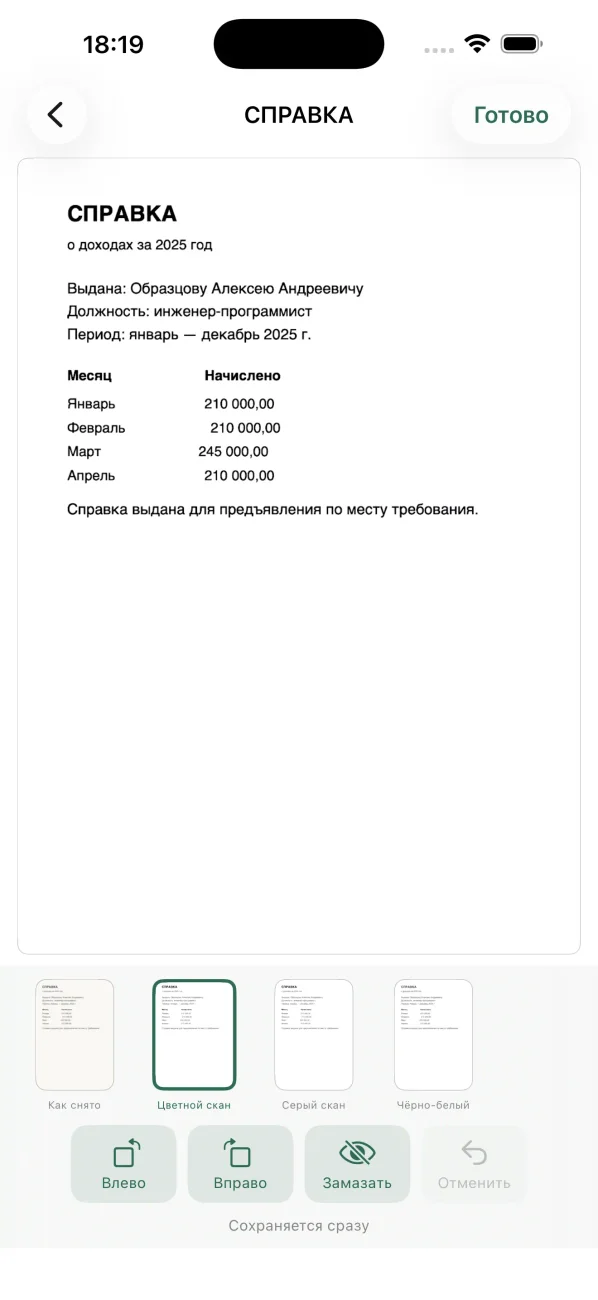
• Fix a date, an amount or a name on a scan — the new letters are taken from the document itself, so the edit looks native
• Move a line somewhere else or erase it
• Add a stamp and a signature at their real size. Take a photo of a stamp or sign with your finger — the background is removed automatically
• Add text, a date, a check mark, a cross, a highlighter, an arrow or a box
• Pinch to zoom the page — small text is edited precisely
PDF WITHOUT QUALITY LOSS
• Open PDFs you receive: text stays text and remains searchable, the file does not turn into a picture
• Fill in forms — fields, check boxes and lists
• Send with the values filled in, or keep the fields fillable for the recipient
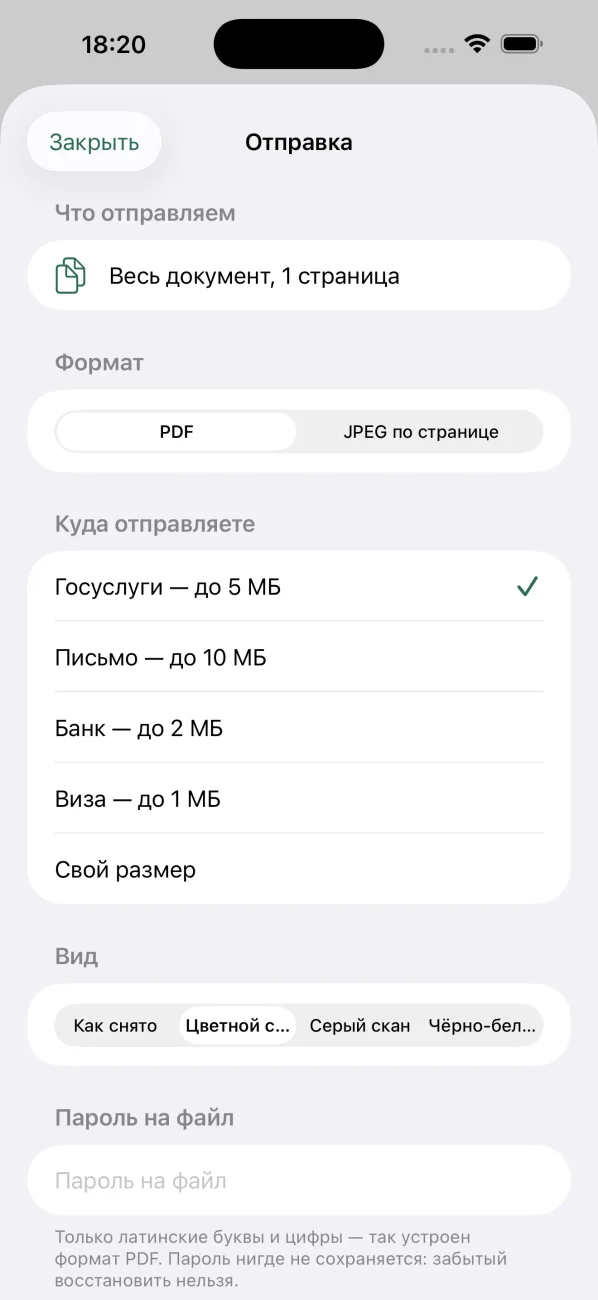
• Password-protect the file, forbid printing and copying
A FILE OF THE RIGHT SIZE
Choose where you are sending it — a government portal, email, a bank, a visa application — or set your own limit. The app picks the quality by itself and shows the final size before saving. If the file does not fit, it tells you how to make it lighter.
LIKE A REAL SCANNER
• Automatic page edge detection and batch scanning
• Two-sided documents: scan the fronts, flip the stack, scan the backs — the pages are put in order automatically
• Hand shadows, yellowed paper and uneven light are removed
• Colour, grey and black-and-white looks — you see the difference on your own document
REAL REDACTION
What you cover is destroyed, not hidden under a black box: in the file you send there is neither image nor text left under the redaction. The app finds card, passport and phone numbers by itself and offers to cover them with a single tap.
ORDER IN YOUR DOCUMENTS
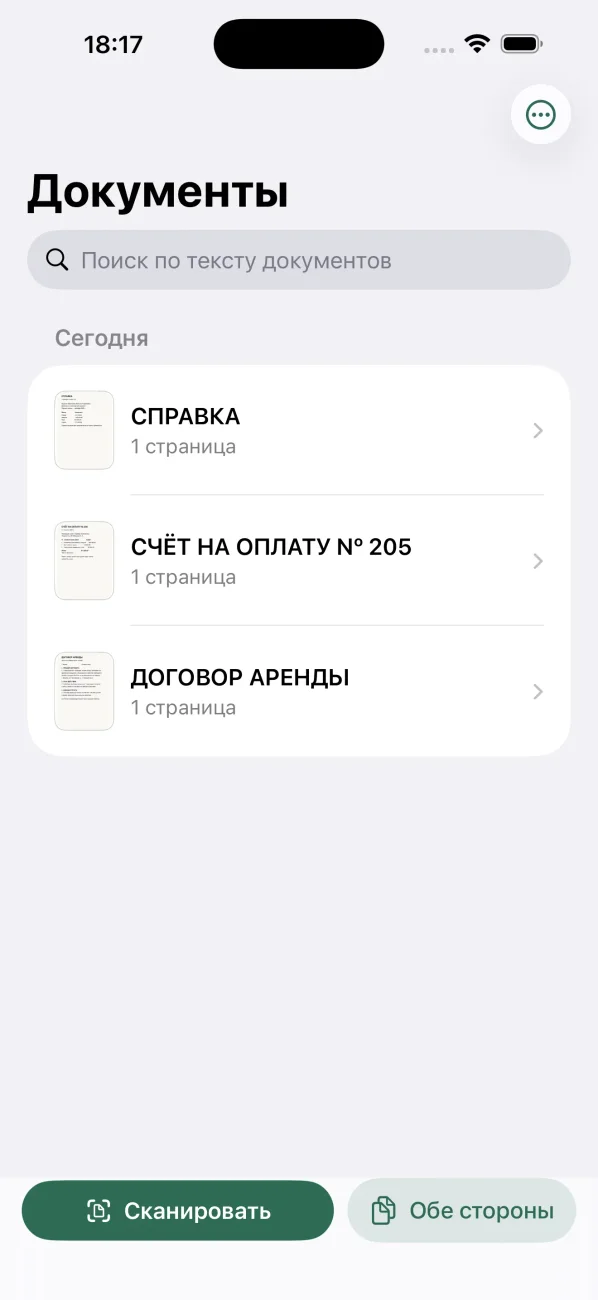
• Search the text of all documents, PDFs included
• Sort by date, name or page count; list, grid or compact view
• Folders, merging and splitting documents, page order
• The title is picked up from the page heading
• Import from Photos and Files, share and print
YOUR DOCUMENTS STAY WITH YOU
Documents are stored only on your phone: no sign-up and no cloud. Text recognition runs right on the device. Face ID lock.
Free, with no ads and no limit on the number of documents. 11 languages, light and dark themes.
Yang baru
Versi 1.2.1 · 25/10/2026
Editor fixes.
• In PDFs you receive, an edited line no longer swaps letters: a typed “i” no longer turns into “t” or “o” or comes out smaller
• The text field types exactly what you press: no autocorrect and no automatic capital after a full stop
Privasi aplikasi
Yang dinyatakan Ivan Kotlyar di App Store tentang cara aplikasi ini menangani data.
-
Data tidak dikumpulkan
Pengembang tidak mengumpulkan data apa pun dari aplikasi ini.
Praktik privasi dapat bervariasi, misalnya berdasarkan fitur yang Anda gunakan atau usia Anda.
Informasi
- Penjual
- Ivan Kotlyar
- Kategori
- Produktivitas
- Versi
- 1.2.1
- Diperbarui
- 25/10/2026
- Dirilis
- 6/9/2026
- Ukuran
- 7,5 MB
- Memerlukan
- iOS 26.0 atau yang lebih baru
- Batasan usia
- 4+
- Harga
- Gratis
- Bahasa
- Arab, Tionghoa Sederhana, Prancis, Inggris, Kazakh, Portugis, Rusia, Spanyol, Jerman, Turki, Ukraina
- Hak cipta
- © 2026 Ivan Kotlyar
Mungkin Anda juga suka
-
 Bayran Office: PDF EditorProduktivitas
-
 OCR, Read & Convert DocumentsProduktivitas
-
 PDF Editor - Pindai & UbahBaca, Isi & Tanda Tangan
-
 PDF Editor - No Ads, Read ScanProduktivitas
-
 BossPDF: PDF Editor & ScannerProduktivitas
-
 ScanDoc: Pemindai PDFPindai dokumen ke PDF
-
 PDFWorldEditor: PDF EditorProduktivitas
-
 PlainPDF: Scanner & PDF EditorProduktivitas
-
 BookyAIEdit teks PDF & tanda tangan
-
 PDFWise – PDF Reader & ToolsProduktivitas