
- Batasan usia4+
- KategoriKegunaan
- PengembangPTK Ventures LLC
- BahasaInggris
- Ukuran5,8 MB
Tertaut ke halaman resmi App Store
Download.org tidak menyimpan file Mochi NetProbe apa pun. Tombol ini membuka halaman aplikasi di App Store, tempat PTK Ventures LLC menerbitkannya. Halaman terakhir diperiksa pada 20/11/2026.
Tangkapan layar

Tentang
Pengembang belum menyediakan teks ini dalam bahasa Anda.
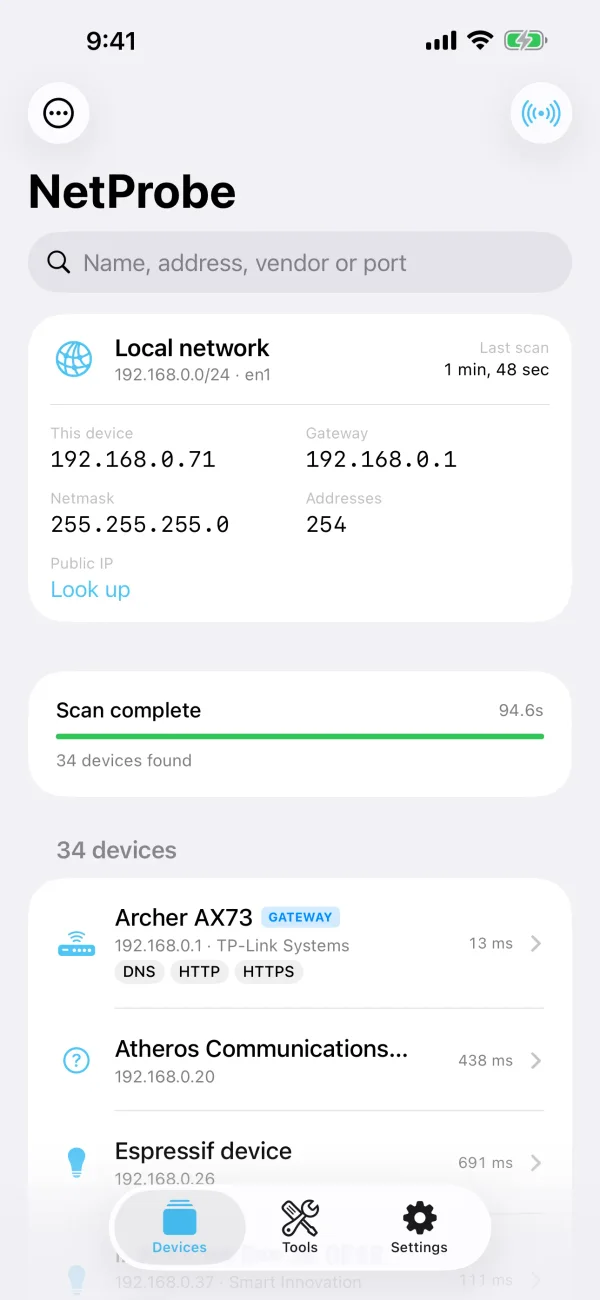
NetProbe shows you every device on your Wi-Fi — what each one is, and what it's running.
Tap scan and it finds the devices sharing your network, then names them: the printer, the thermostat, the TV, the one you don't recognise. For anything with a web interface, it reports the software behind it too.
AN INVENTORY THAT READS LIKE ONE
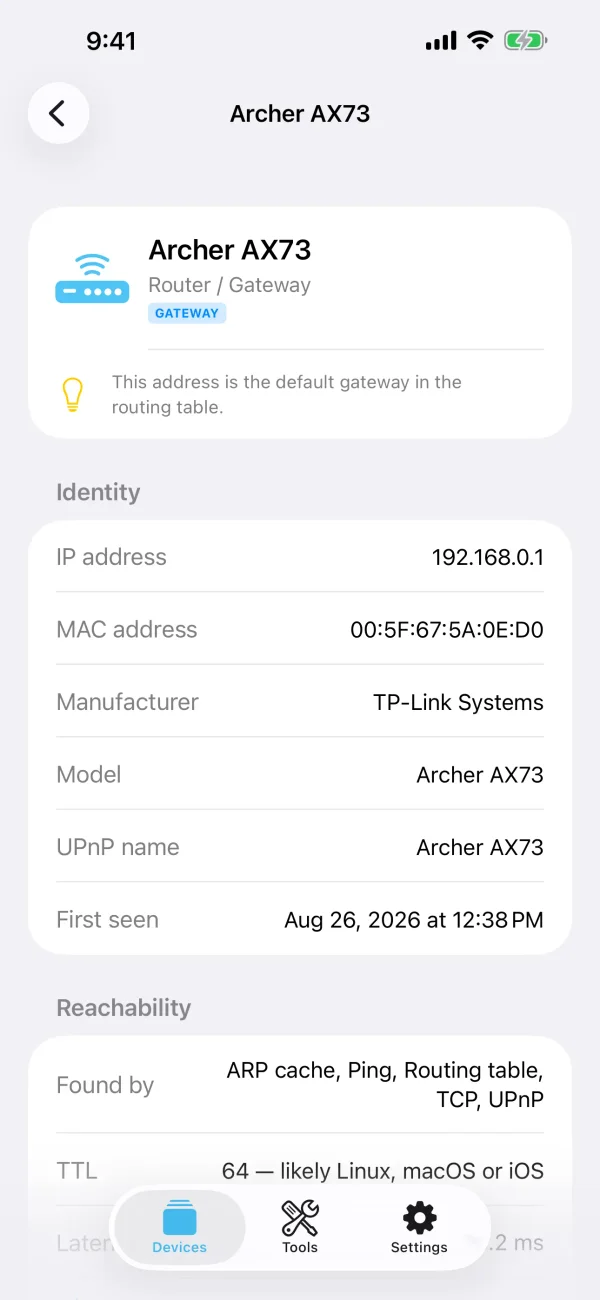
Not "192.168.0.94" but the office printer, with its manufacturer, its model, and the fact that it accepts print jobs three different ways. NetProbe asks the network five ways at once — ping, TCP, Bonjour, UPnP and the address table — because no single method finds everything.
IT TELLS YOU WHAT CHANGED
Anything that wasn't there last time you scanned is marked NEW. Name a device once and the name sticks, so next time you're only looking at what you haven't already accounted for.
WHAT THAT BOX IS RUNNING
For devices with a web interface, NetProbe reads the response the way a developer would: the web server and its version, the language and framework behind it, the security certificate and when it expires. Routers, storage boxes and cameras all give this up readily.
IT SHOWS ITS WORKING
Every finding carries the evidence it came from and how strongly it is held — Declared when the service named itself, Likely when it is inferred from a header or a cookie, Possible when it is only a hint in the page. A guess is never dressed up as a fact.
THE USUAL TOOLS, PROPERLY DONE
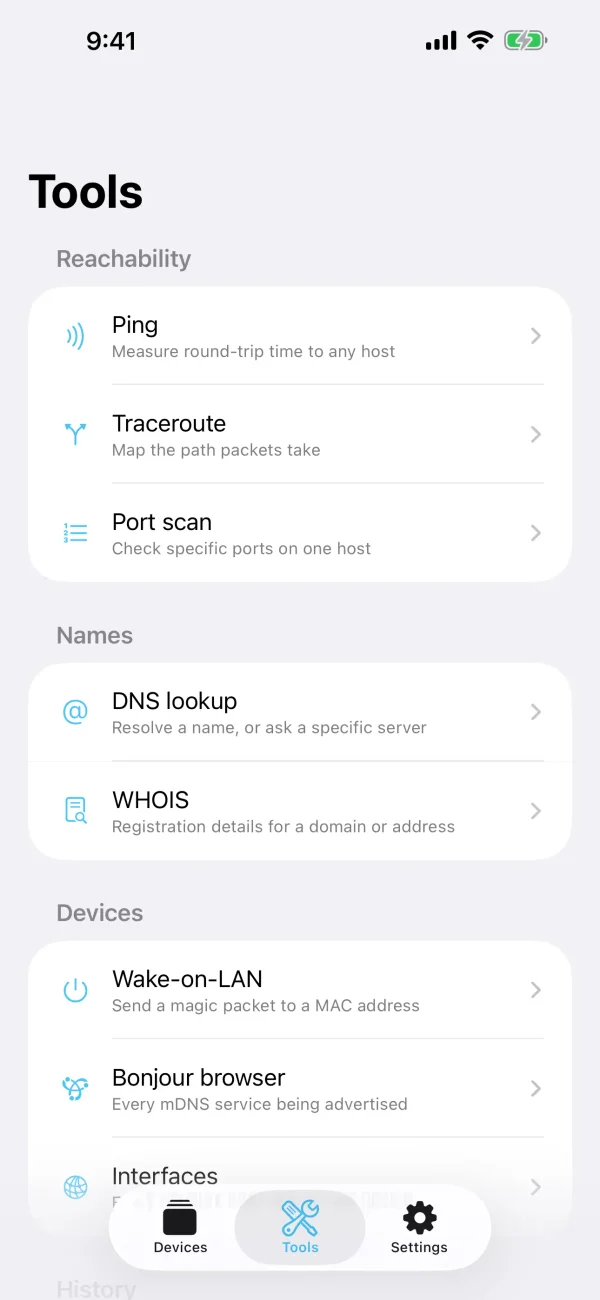
Ping, traceroute, port scan, DNS lookup, WHOIS, Wake-on-LAN, a Bonjour browser, and a plain view of your interfaces and routes. Custom address ranges for looking somewhere other than your own subnet. Export any scan as a report, CSV or JSON.
IT STAYS ON YOUR PHONE
The scan runs on the device and the results stay there: device names, addresses and what they run are never sent anywhere. No account, no sign-up, no ads. To fix problems and see which features get used, NetProbe sends anonymous usage counts (for example, that a scan finished and roughly how many devices it found) and crash reports to Google Firebase; they are not linked to you. Otherwise it goes online only when you ask: WHOIS, the public IP check, and the network tools when you point them at an address outside your network.
WHAT IT ISN'T
NetProbe reads; it does not reach in. It asks each device what it will freely say about itself and reports the answer. It does not try passwords, does not exploit anything, and cannot block a device from your network — no iPhone app can. It is a tool for understanding a network you are responsible for.
Yang baru
Versi 1.2.1 · 19/11/2026
A clearer App Store description of what NetProbe sends: anonymous usage counts and crash reports, never your device names or addresses. No other changes.
Privasi aplikasi
Yang dinyatakan PTK Ventures LLC di App Store tentang cara aplikasi ini menangani data.
-
Data yang tidak ditautkan dengan Anda
Dapat dikumpulkan, tetapi tidak ditautkan dengan identitas Anda.
- Lokasi
- Pengenal
- Data penggunaan
- Diagnostik
Praktik privasi dapat bervariasi, misalnya berdasarkan fitur yang Anda gunakan atau usia Anda.
Informasi
- Penjual
- PTK Ventures LLC
- Kategori
- Kegunaan
- Versi
- 1.2.1
- Diperbarui
- 19/11/2026
- Dirilis
- 9/9/2026
- Ukuran
- 5,8 MB
- Memerlukan
- iOS 17.0 atau yang lebih baru
- Batasan usia
- 4+
- Harga
- Gratis
- Bahasa
- Inggris
- Hak cipta
- © 2026 PTK Studio
Mungkin Anda juga suka
-
 NetProbe: LAN ScannerKegunaan
-
 NetScanPro: Network ScannerKegunaan
-
 Radien: Network ToolboxKegunaan
-
 Wifi Router Tools - ScannerKegunaan
-
 Cari Kamera TersembunyiDeteksi Perangkat Tersembunyi
-
 PacketLoss & SpeedScanping,traceroute,dig,vpn,tool
-
 What’s My IP? Network InfoKegunaan
-
 Lan Scanner || Wifi MonitorKegunaan
-
 DetectirKegunaan
-
 Simply IP ScannerKegunaan