MultiPhoto2
多重露光写真をスマホで簡単に体験できます
Dirancang untuk iPhone, iPad, iPod touch
Gratis
- Batasan usia4+
- KategoriFoto & Video
- PengembangAtsushi Yamada
- BahasaInggris
- Ukuran1,9 MB
Tertaut ke halaman resmi App Store
Download.org tidak menyimpan file MultiPhoto2 apa pun. Tombol ini membuka halaman aplikasi di App Store, tempat Atsushi Yamada menerbitkannya. Halaman terakhir diperiksa pada 12/11/2026.
Tangkapan layar
Tentang
Pengembang belum menyediakan teks ini dalam bahasa Anda.
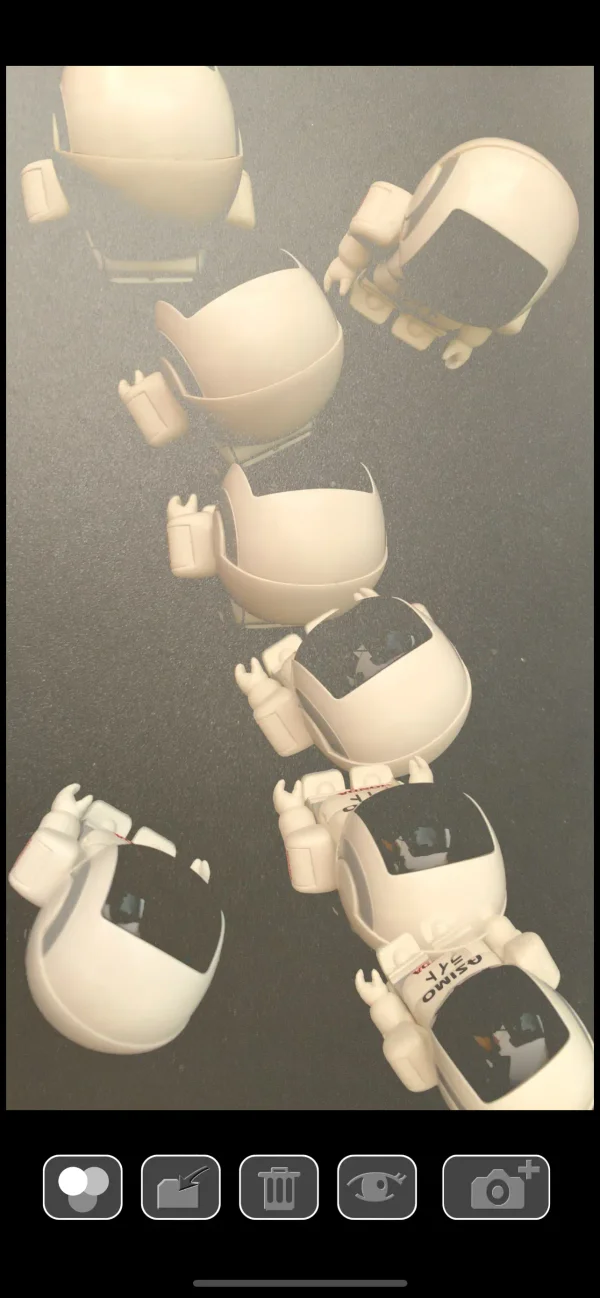
Do you know about multiple exposure in photography?
This is a technique that exposes a single photograph by releasing the shutter many times.
MultiPhoto is software that realizes multiple exposure with the iPhone camera.
Usage is simple.
1. Take a base photo.
2. I will make multiple exposures on the base photo.
3. Save the photo created by multiple exposure.
■ Base photo shoot ■
Press the camera+ mark on the right corner of the menu.
When you take a base photo, it will be displayed in halftone.
(It can be used as a reference for alignment when performing multiple exposures.)
■ Add multiple exposure photos ■
Press the camera+ mark on the right corner of the menu.
■ Saving photos ■
Press the second folder mark from the left of the menu.
Photos are saved to your camera roll.
■ Deleting an image currently being created ■
If you press the third trash can mark from the left of the menu, the data currently being shot will be deleted.
■ Checking the image currently being created ■
You can check the data currently being captured by pressing the second eye mark from the right of the menu.
■ Image composition mode switching ■
The button in the left corner toggles the blending mode.
B&W synthesizes the bright parts of the captured image.
For the three light colors, 90% of the bright areas are combined.
For the three skelton colors, 70% of the bright part is synthesized.
The three colors of the color background synthesize an image with changes. Keep your smartphone stationary.
In the compositing process, brighter parts are added to the photo.
Challenge yourself to take some fun pictures.
Yang baru
Versi 1.5 · 5/6/2026
Security Update
Privasi aplikasi
Yang dinyatakan Atsushi Yamada di App Store tentang cara aplikasi ini menangani data.
-
Data tidak dikumpulkan
Pengembang tidak mengumpulkan data apa pun dari aplikasi ini.
Praktik privasi dapat bervariasi, misalnya berdasarkan fitur yang Anda gunakan atau usia Anda.
Informasi
- Penjual
- Atsushi Yamada
- Kategori
- Foto & Video
- Versi
- 1.5
- Diperbarui
- 5/6/2026
- Dirilis
- 30/10/2022
- Ukuran
- 1,9 MB
- Memerlukan
- iOS 15.5 atau yang lebih baru
- Batasan usia
- 4+
- Harga
- Gratis
- Bahasa
- Inggris
- Hak cipta
- © 2022-2026 ayama