PlanToSim
Flight plans to MSFS & X-Plane
Dirancang untuk iPhone, iPad
Rp 99ribu
- Batasan usia4+
- KategoriKegunaan
- PengembangRaul Heredia
- Ukuran25,4 MB
Tertaut ke halaman resmi App Store
Download.org tidak menyimpan file PlanToSim apa pun. Tombol ini membuka halaman aplikasi di App Store, tempat Raul Heredia menerbitkannya. Halaman terakhir diperiksa pada 20/11/2026.
Tangkapan layar

Tentang
Pengembang belum menyediakan teks ini dalam bahasa Anda.
Share a flight plan from ForeFlight, Garmin Pilot, or FlyQ — and it lands in your simulator's GPS in seconds.
PlanToSim sends your EFB flight plans straight to Microsoft Flight Simulator 2020 and 2024, X-Plane 11 and 12, and the most popular add-on GPS navigators — complete with departures, arrivals, approaches, and airways.
Plan on your iPad. Fly it on your PC. No file copying, no folder digging, no cables.
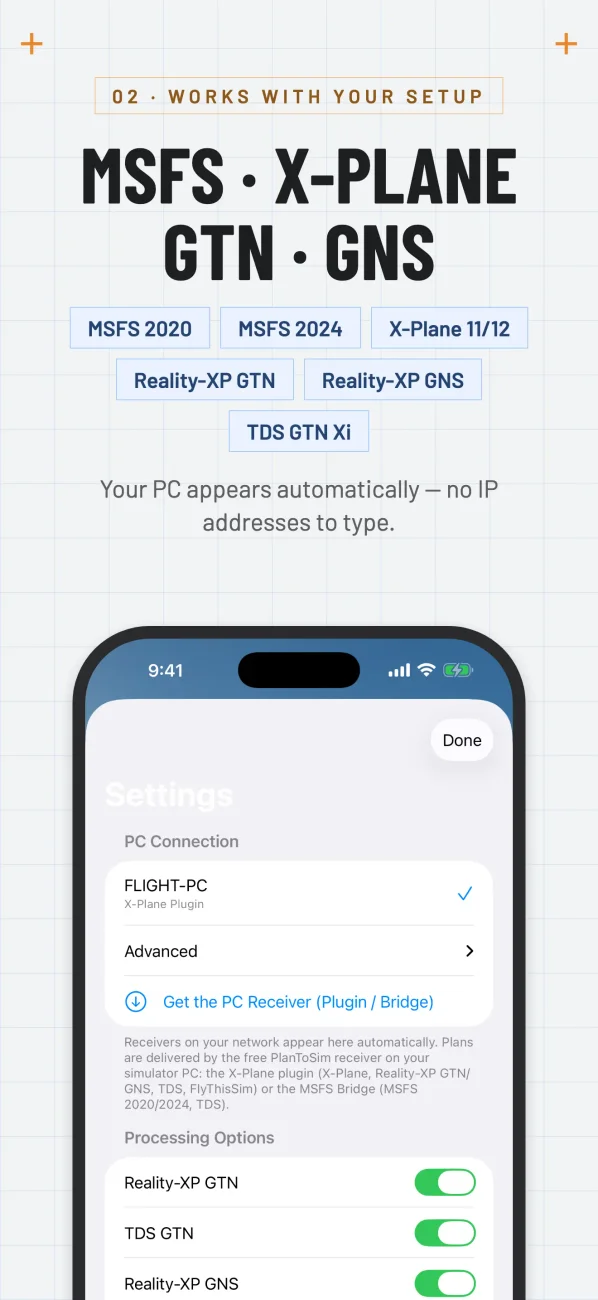
WORKS WITH YOUR SIMULATOR
• Microsoft Flight Simulator 2020 & 2024 — native .pln flight plans, delivered by the free PlanToSim MSFS Bridge
• X-Plane 11 & 12 — native FMS flight plans, delivered by the free PlanToSim X-Plane plugin
• TDS GTN Xi — native procedures (.gfp)
• Reality-XP GTN 750/650 (.gfp)
• Reality-XP GNS 530/430 (Garmin .fpl)
• SimAVIO / FlyThisSim TouchTrainer (beta) — plans land in a GNS 530/430 flight-plan slot
REAL PROCEDURES, INTACT
• Full SID, STAR, and approach support — procedures arrive as procedures, not flattened waypoint strings
• Waypoint-only files from ForeFlight and Garmin Pilot are matched against the navigation database to restore named procedures and airways (Rebuild Procedures — on by default, one toggle to turn off)
• Runway-aware departure and arrival matching
• Airway expansion (Victor, Jet, T- and Q-routes)
• Cruise and per-fix altitudes carried through
FRESH NAVIGATION DATA
• Built-in database: 47,000+ airports, 72,000+ fixes, 1,800+ procedures
• Updated every AIRAC cycle — refresh in the app with one tap
FAST, PRIVATE, LOCAL
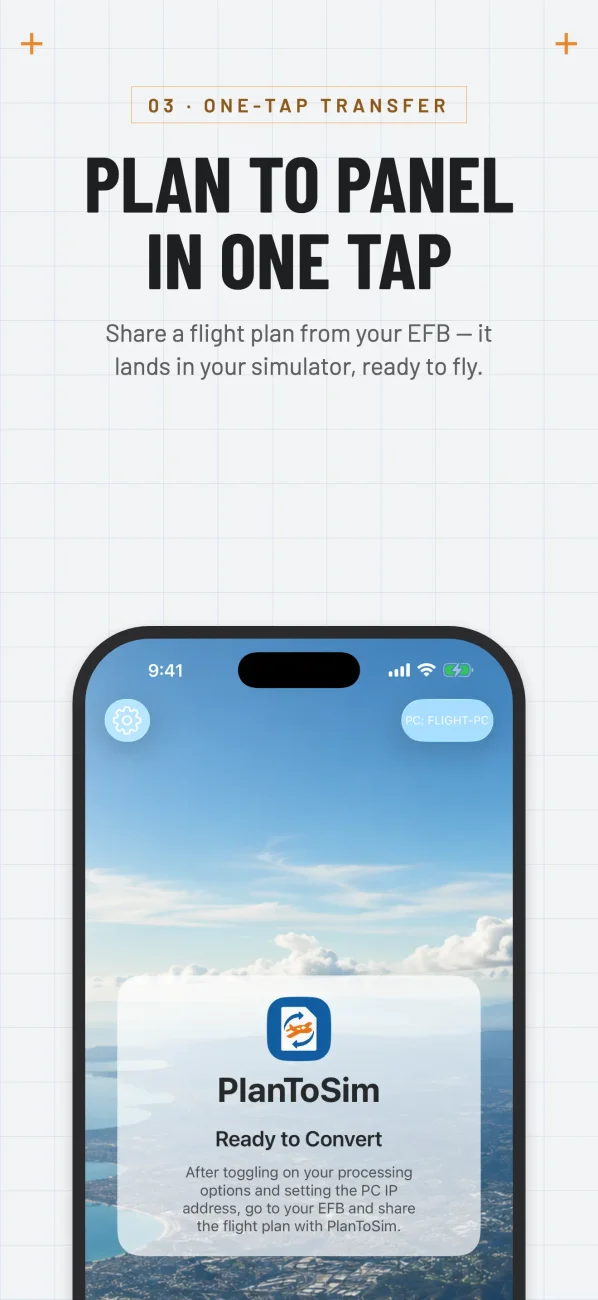
• Your simulator PC appears in the app automatically — no IP addresses to find or type
• Transfers over your own Wi-Fi — plans go from your iPad to your PC and nowhere else
• No account, no subscription, no tracking, no data collection
• Clear delivery confirmation for every transfer — and if your PC can't be reached, the app tells you within seconds and offers one-tap retry
HOW IT WORKS
1. Install the free receiver on your flight-sim PC: the PlanToSim X-Plane plugin or the PlanToSim MSFS Bridge (both linked from the app's Settings).
2. Open PlanToSim — your PC appears automatically. Then share a flight plan from ForeFlight (.fpl), Garmin Pilot, or FlyQ to PlanToSim.
3. Pick your destinations once in Settings — every send converts and delivers automatically.
SIMAVIO NOTE (beta)
SimAVIO loads its flight-plan store when it starts. Send your plan first, then start SimAVIO (or close and reopen its panel) — your plan is waiting when you sit down.
One $4.99 purchase covers every simulator and every format — no add-ons, no subscriptions, no unlocks.
REQUIREMENTS
• iPhone or iPad with iOS 17.6 or later
• A Windows flight-sim PC on the same local network
• One free PlanToSim receiver on that PC: the X-Plane plugin or the MSFS Bridge (free downloads, linked in Settings)
Yang baru
Versi 1.4 · 27/7/2026
PlanToSim 1.4 makes setup disappear — and brings full procedures to ForeFlight and Garmin Pilot files.
• Zero-setup connection: your simulator PC now appears in the app automatically — no more typing IP addresses. Tap it once and you're connected. (Manual entry is still there if you want it.)
• Rebuild Procedures: ForeFlight and Garmin Pilot files carry waypoints only — PlanToSim now matches them against its navigation database and restores your named SIDs, STARs, approaches, and airways for TDS GTN, X-Plane, and MSFS. Reality-XP and SimAVIO still receive your waypoints exactly as filed.
• Garmin flight plan files: open .fpl and .gfp flight plans directly — from the Files app, email, or anywhere you keep them.
• Resend Last Plan: one tap re-sends your most recent flight plan — after a settings change, a sim restart, or relaunching the app.
• SimAVIO (beta): delivery confirmations now tell you whether to restart SimAVIO — or that your plan will load when it starts.
• Clearer delivery feedback: if a send fails, the app now says exactly what went wrong for each destination — and when your PC is visible on the network, one tap sends to it.
Requires the free PlanToSim receiver v1.1.0 (X-Plane plugin or MSFS Bridge) for automatic discovery — older receivers keep working with a manual IP address.
Privasi aplikasi
Yang dinyatakan Raul Heredia di App Store tentang cara aplikasi ini menangani data.
-
Data tidak dikumpulkan
Pengembang tidak mengumpulkan data apa pun dari aplikasi ini.
Praktik privasi dapat bervariasi, misalnya berdasarkan fitur yang Anda gunakan atau usia Anda.
Informasi
- Penjual
- Raul Heredia
- Kategori
- Kegunaan
- Versi
- 1.4
- Diperbarui
- 27/7/2026
- Dirilis
- 5/12/2025
- Ukuran
- 25,4 MB
- Memerlukan
- iOS 17.6 atau yang lebih baru
- Batasan usia
- 4+
- Harga
- Rp 99ribu
- Hak cipta
- © 2025 Raul Heredia