PrismOwn
Your client for PhotoPrism
Dirancang untuk iPhone, iPad, iPod touch
Gratis · Pembelian dalam aplikasi
- Batasan usia4+
- KategoriFoto & Video
- PengembangJoerg Staege
- BahasaInggris+ 3 lainnya
- Ukuran48,6 MB
Tertaut ke halaman resmi App Store
Download.org tidak menyimpan file PrismOwn apa pun. Tombol ini membuka halaman aplikasi di App Store, tempat Joerg Staege menerbitkannya. Halaman terakhir diperiksa pada 23/11/2026.
Tangkapan layar




Tentang
Pengembang belum menyediakan teks ini dalam bahasa Anda.
Your photos. Your server.
PrismOwn puts your own PhotoPrism server on your iPhone and iPad: back up the photos and videos you choose, explore your library.
ROTATE AND CROP PHOTOS
In Upload, open a photo and tap Edit: rotate by 90°, straighten by up to ±45°, crop freely or to 1:1, 4:3, 16:9 … in portrait or landscape – for all common photo formats, RAW and Live Photos with their motion. The edit is saved in Apple Photos, and “Revert to original” undoes it. Upload a photo you backed up before, and PrismOwn replaces the old version on your server without deleting anything.
PLACES ON A GLOBE
In Places, your photos appear with a preview and a count on a globe you can turn, with Apple Maps satellite imagery down to street level; tap a place to open its photos.
AUTOMATIC BACKUP
Optionally, PrismOwn backs up new photos in the background whenever iOS starts the transfer; it is confirmed the next time you open the app. Off by default; iOS 26.1 or later; only unedited photos (including Live Photos) taken after you turn it on; no videos, RAW or portrait shots; no deletion prompt.
BACK UP FIRST, THEN DELETE
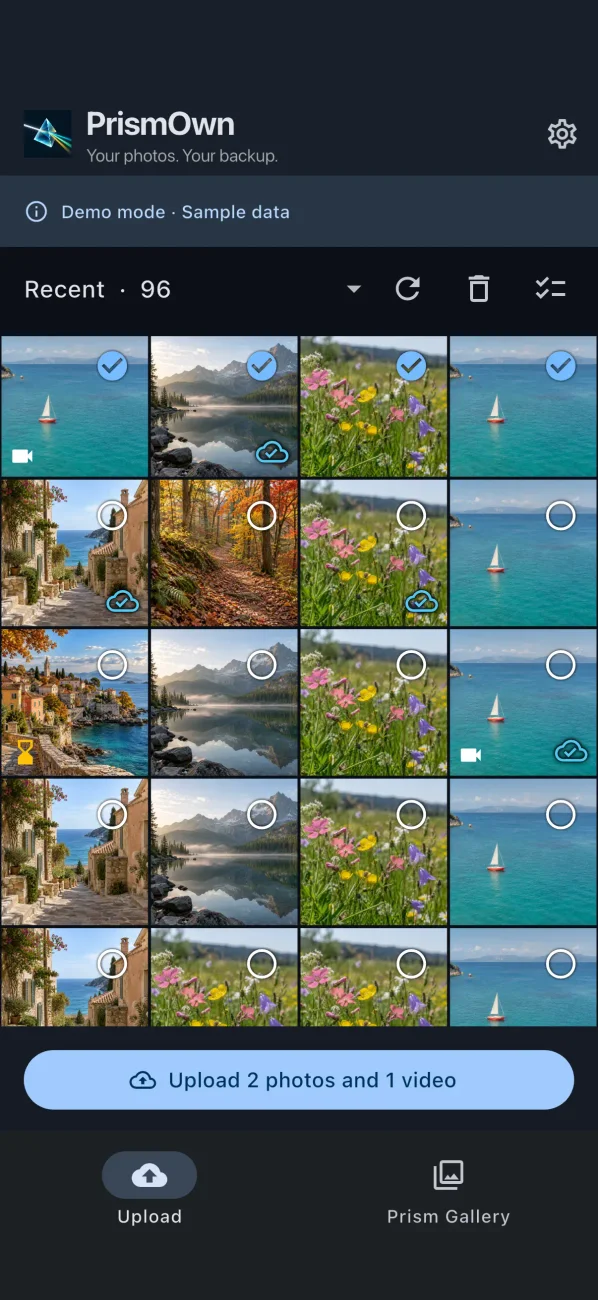
The cloud mark appears only once your server has confirmed complete and correct receipt. The trash can atop Upload opens the delete view: confirmed items still on your device. Nothing is deleted unless you request it and approve it in iOS; files on PhotoPrism are kept. Deletion removes the entire item, including originals and raw data that were not backed up – with iCloud Photos, also from iCloud and connected devices.
YOUR WHOLE LIBRARY
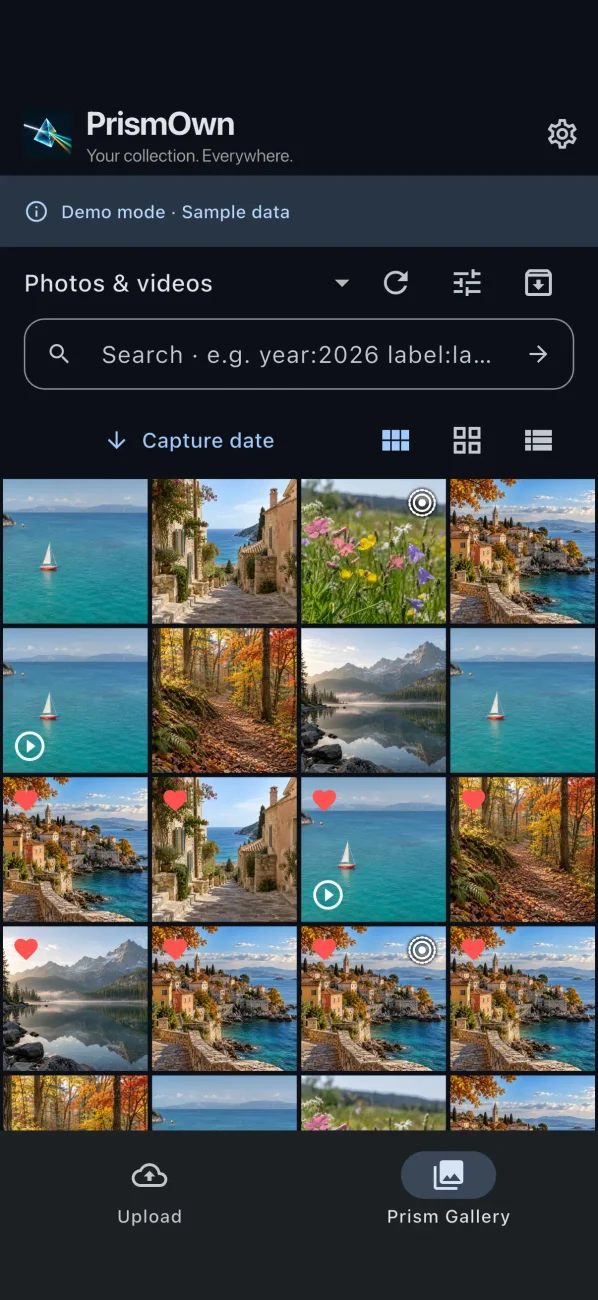
Albums, folders, calendar, moments, people, places, labels, Media (videos, Live Photos, animated items) and Private (marked private on your server), depending on server and rights, sortable. Tap the search field for advanced search: country, category, camera and lens from lists on your server, plus date taken, color, Videos only and PhotoPrism filters. Favorites; share via iOS, also up to 50 items at once. Archive several items without deleting: Undo brings them back, later the PhotoPrism archive.
AS YOU SEE IT
PrismOwn backs up the current version you see in Apple Photos: for edited photos, Live Photos, portraits and RAW photos, without the originals and raw data from before editing; for slow motion without a finished version, one PrismOwn computes itself, without the high-frame-rate original. Unedited items are backed up completely. Anything that cannot yet be backed up reliably is not uploaded, is marked with a no-entry symbol and is never offered for deletion.
YOUR PHOTOS STAY YOURS
Photos and videos go only to your own server over HTTPS; there is no PrismOwn cloud. Map imagery comes from Apple, and PrismOwn never asks for your location. Diagnostics: optional, off by default.
FULL VERSION
The download is free. New uploads, editing and the server gallery require the full version – as an annual auto-renewing subscription or a one-time purchase, both shareable with up to five family members via Family Sharing. The App Store shows prices and any trial offer before you buy.
REQUIREMENTS
You need your own compatible PhotoPrism server, sign-in credentials, network access and iOS permissions; hosting and server storage are not included. iOS decides whether and how long background tasks run. PrismOwn is an independent client compatible with PhotoPrism, not an official PhotoPrism app.
SUPPORT AND BUG REPORTS
There is no personal support and no help with PhotoPrism, hosting, networks or other third-party software. You can report app bugs and accessibility barriers, without an individual reply. Reports may be reviewed at our sole discretion; no reply, fix or timeframe is promised. Statutory rights and the communication they require remain unaffected.
TERMS OF USE AND PRIVACY
Terms of Use (Apple Standard EULA): https://www.apple.com/legal/internet-services/itunes/dev/stdeula/
Privacy Policy: https://techluminai.de/prismown/datenschutz
Yang baru
Versi 1.3.5 · 22/11/2026
New in 1.3.5:
• Server gallery: now keeps loading by itself until the screen is filled. Before, it sometimes showed only a few items after opening until you tapped one
Since 1.3.4:
• Delete view: now lists all confirmed backups, no matter how far you have scrolled
• Upload: items whose name has no file extension are transferred correctly
• An interrupted backup check resumes by itself when you open the app; the display says how many items the server has confirmed
• If the server does not take a file, the app says so instead of waiting
• Items that iOS reports as changed after the backup keep their cloud if the content is the same; only items that really changed carry their own mark
• “Recents” in the upload view now shows the most recently added items first, like Apple Photos
• The app now recognises photos that are already on your server: automatically after “Save to Photos” and via “Reconcile library with server” in Settings. They count as backed up and are not uploaded again
• Checking existing transfers now names items that are not on the server and offers to transfer them again
• Album picker: “Recents” no longer appears twice in the menu
• Live Photos uploaded a second time keep their preview in the server gallery
Since 1.3.3:
• Gallery: new sort option “Date added” – the items most recently added to your server come first, or last if you prefer
• The optional diagnostics use a current Sentry library; consent and the data sent stay the same
Privasi aplikasi
Yang dinyatakan Joerg Staege di App Store tentang cara aplikasi ini menangani data.
-
Data yang ditautkan dengan Anda
Dapat dikumpulkan dan ditautkan dengan identitas Anda.
- Pembelian
- Data penggunaan
- Diagnostik
Praktik privasi dapat bervariasi, misalnya berdasarkan fitur yang Anda gunakan atau usia Anda.
Informasi
- Penjual
- Joerg Staege
- Kategori
- Foto & Video
- Versi
- 1.3.5
- Diperbarui
- 22/11/2026
- Dirilis
- 18/10/2026
- Ukuran
- 48,6 MB
- Memerlukan
- iOS 15.0 atau yang lebih baru
- Batasan usia
- 4+
- Harga
- Gratis
- Pembelian dalam aplikasi
- Ya
- Bahasa
- Inggris, Prancis, Jerman, Spanyol
- Hak cipta
- © 2026 Jörg Staege (TechLuminAI)
Mungkin Anda juga suka
-
 Photo SpectraFoto & Video
-
 OrangePicFoto & Video
-
 Photo Collage Maker - PictureFoto & Video
-
 Prismatic: A PhotoPrism ClientFoto & Video
-
 Sync Photo - SmugMugFoto & Video
-
 Stream - Manage & Find PhotosFoto & Video
-
 Edit Video: Musik & EfekReels, TikTok Video Kreator
-
 Kolase Foto - Edit FotoFoto Grid - Aplikasi Edit Foto
-
 ContentCam: Kamera GandaSekali rekam, dua format
-
 Radiant Foto: edit dengan AIFoto.Potret.Video.Penyempurna.