Scan2List: Multi Barcode Scan
Excel Export, Inventory & PDF
Dirancang untuk iPhone
Gratis · Pembelian dalam aplikasi
- Batasan usia4+
- KategoriKegunaan
- PengembangLaurin von Brandt
- BahasaInggris+ 6 lainnya
- Ukuran11,5 MB
Tertaut ke halaman resmi App Store
Download.org tidak menyimpan file Scan2List: Multi Barcode Scan apa pun. Tombol ini membuka halaman aplikasi di App Store, tempat Laurin von Brandt menerbitkannya. Halaman terakhir diperiksa pada 23/11/2026.
Tangkapan layar


Tentang
Pengembang belum menyediakan teks ini dalam bahasa Anda.
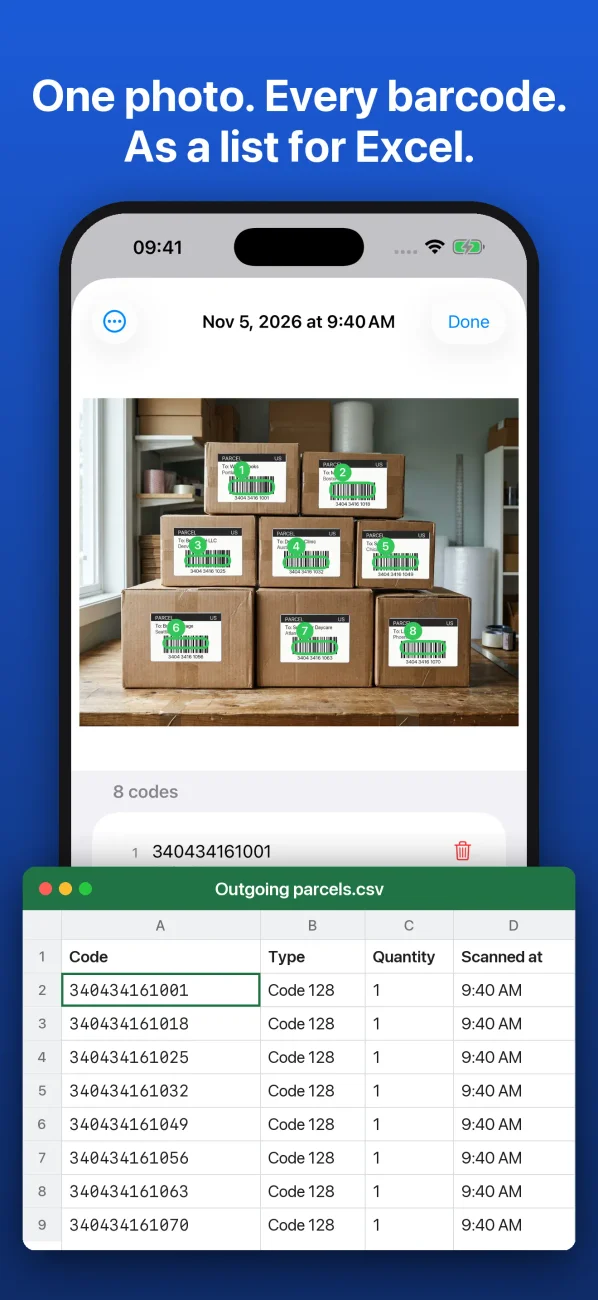
One photo, every barcode: Scan2List reads many barcodes at once and turns them into a list for Excel. You capture a whole shelf with a few photos instead of scanning every code one by one. It also has an inventory mode that shows what is missing, and a scanner for documents as PDF. All features are free.
MULTI SCAN: MANY BARCODES IN ONE PHOTO
You take a photo of a shelf, a box or a stack of parcels, and the app reads every barcode and QR code in the photo at once. You add single items with the live scan by holding the camera on the code for a moment. If you scan the same item more than once, the app counts up the quantity instead of listing it twice. The app reads all common codes, for example EAN, UPC, Code 128, QR and Data Matrix.
EXPORT TO EXCEL
You create a separate list for every shelf, room or job. You share the list as a CSV file, for example via AirDrop or email, and open it in Excel, Numbers or Google Sheets. You choose which columns go into the file, such as code, quantity, time or note. The file opens correctly in Excel, special characters included. The export is free and has no limits.
INVENTORY: SEE WHAT IS MISSING
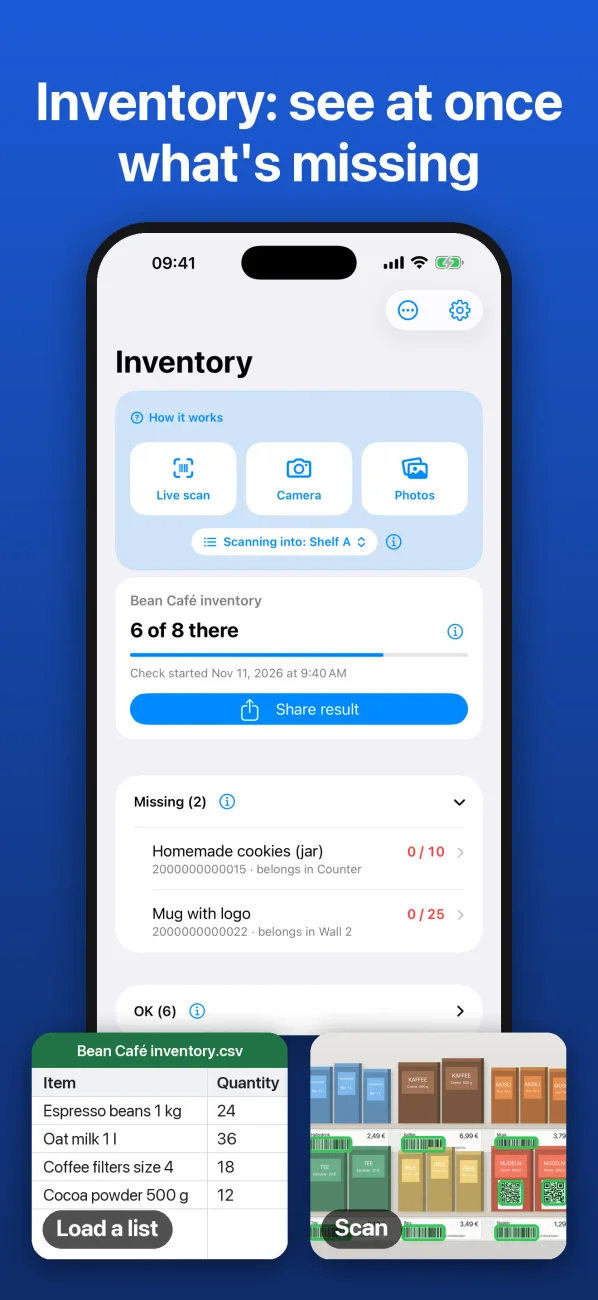
You load a list of what should be there, for example from your till, from Excel or from scan2list.de. You can also open a CSV file in Scan2List straight from Files, Mail or AirDrop. While you take photos, the app shows what is missing, where the quantity is off and what is not on the list. For things without a barcode, you create numbers and print labels.
SCAN DOCUMENTS, FILL THEM IN AND SHARE THEM AS PDF
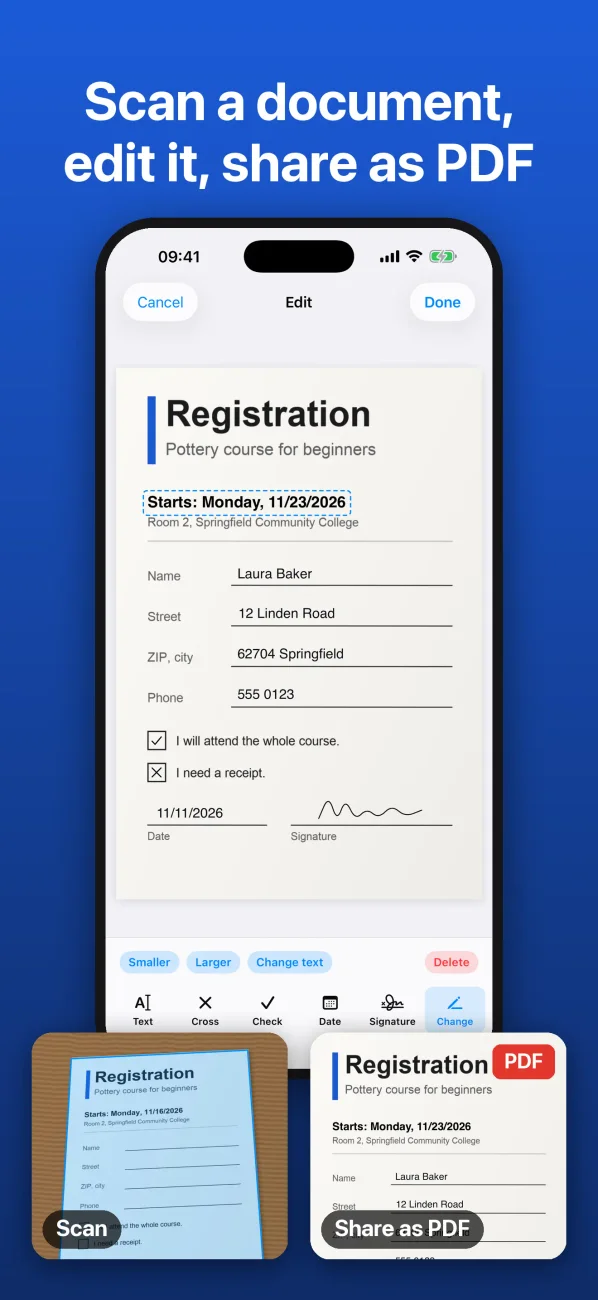
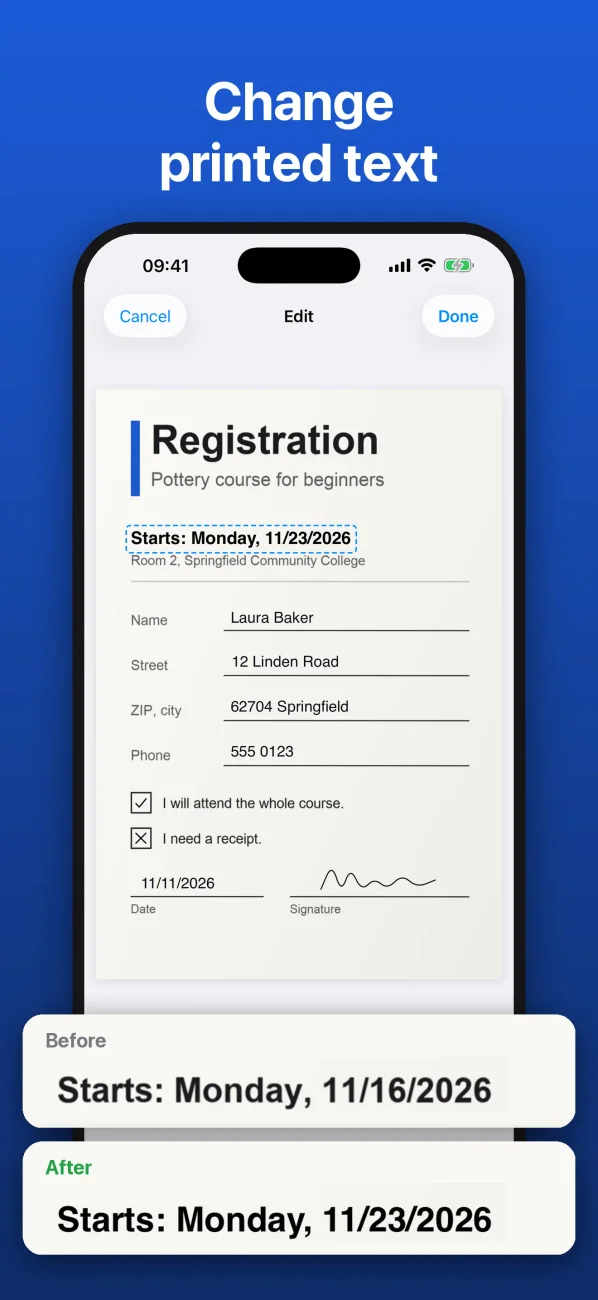
In Scan2PDF mode you scan letters, invoices or forms with the camera. The app crops and straightens every page, in color or black and white. Then you can type text, tick boxes, add the date and sign. You can even change printed text, for example a date.
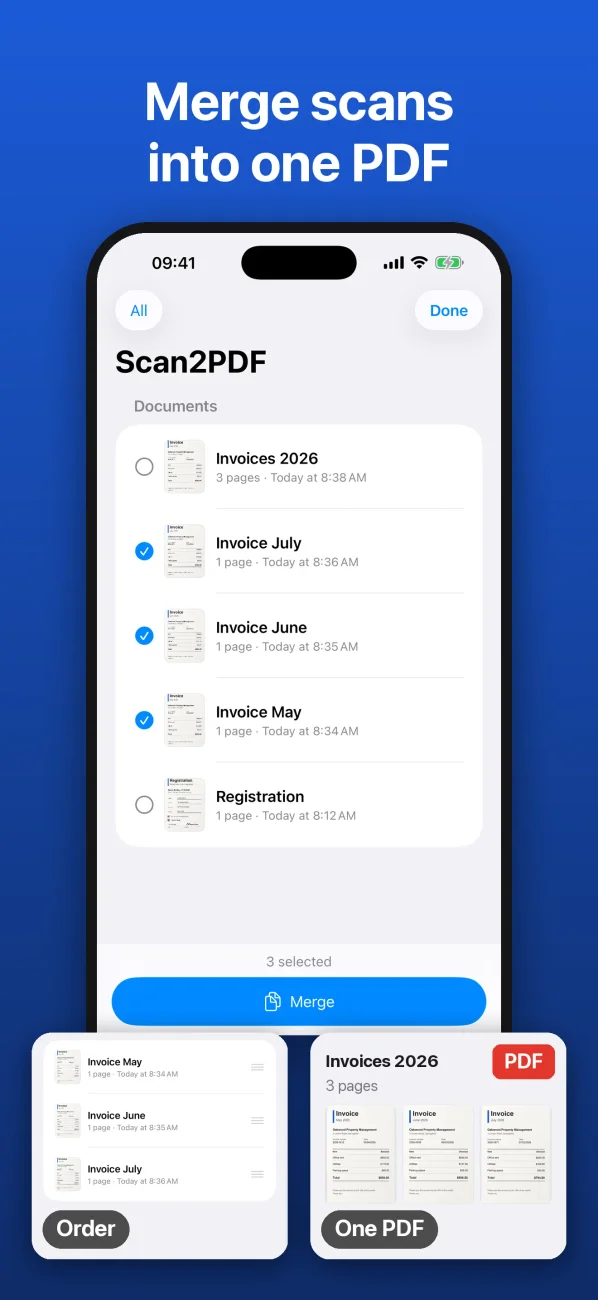
You merge several scans into one PDF. You send the PDF by email or save it to Files, and the text in it is searchable.
FREE, NO ACCOUNT, NO INTERNET NEEDED
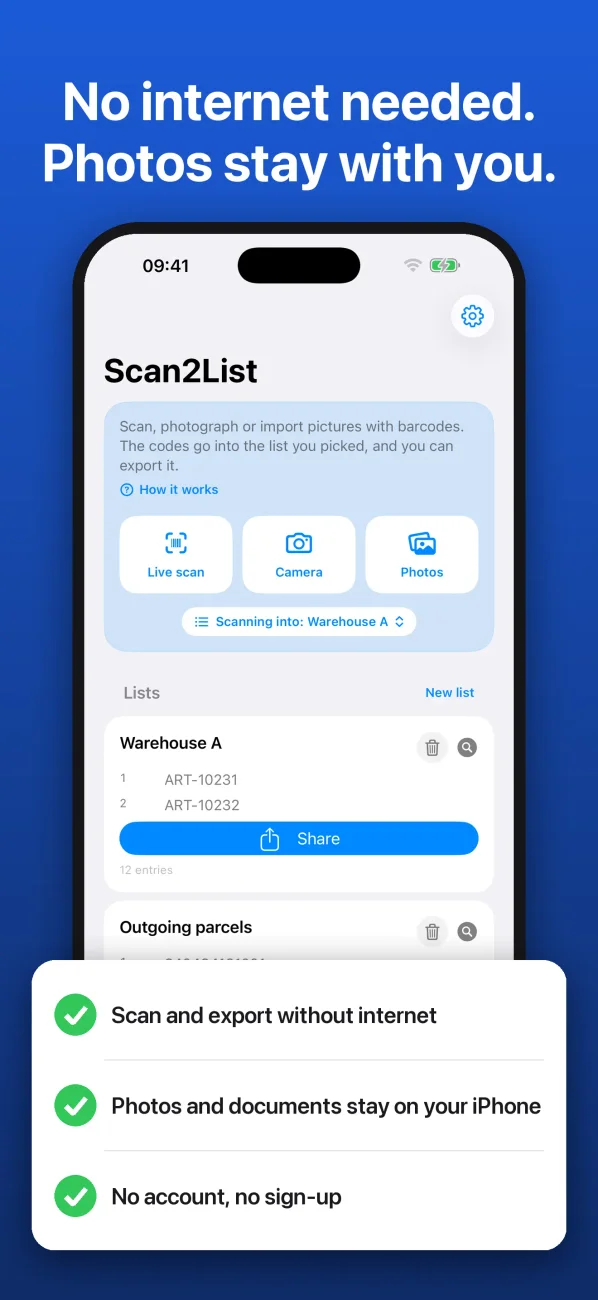
All features are free with no limits. The free version shows ads. With Scan2List Pro the ads are gone, as a monthly or yearly subscription. You don't need an account, and the app works without internet. Your photos and documents stay on your iPhone.
Scan2List works well for shops, warehouses, restaurants, clubs, event organizers, IT departments, libraries, your home office and your move.
Missing something or have a question? Write to us right from the app under “Settings”. We reply as quickly as we can and try to build your wishes in.
Terms of Use (EULA): https://www.apple.com/legal/internet-services/itunes/dev/stdeula/
Privacy Policy: https://streetbingo.net/en/apps/scan2list/privacy
Yang baru
Versi 1.4.3 · 19/11/2026
• New: open PDFs. Bring a PDF into Scan2PDF with “Files”, or open it with Scan2List straight from Mail and Files. Then fill it in, sign it and merge it with your scans.
• New: remove crosses and check marks. Switch “Cross” or “Check” to “Remove” and tap a cross or a check mark that is already on the document. The box stays.
• “Change” now replaces printed text without laying a patch over it. The background stays as it is.
• The camera in Scan2PDF takes a page as soon as it detects a document, so no pages without a document are made.
• Picture files from “Files” can be added as pages too.
• Finished pages from “Photos”, for example a saved form, stay complete and are no longer cropped.
• Small improvements and fixes.
Privasi aplikasi
Yang dinyatakan Laurin von Brandt di App Store tentang cara aplikasi ini menangani data.
-
Data yang digunakan untuk melacak Anda
Dapat digunakan untuk melacak Anda di aplikasi dan situs web milik perusahaan lain.
- Lokasi
- Pengenal
- Data penggunaan
-
Data yang tidak ditautkan dengan Anda
Dapat dikumpulkan, tetapi tidak ditautkan dengan identitas Anda.
- Lokasi
- Pengenal
- Data penggunaan
- Diagnostik
Praktik privasi dapat bervariasi, misalnya berdasarkan fitur yang Anda gunakan atau usia Anda.
Informasi
- Penjual
- Laurin von Brandt
- Kategori
- Kegunaan
- Versi
- 1.4.3
- Diperbarui
- 19/11/2026
- Dirilis
- 6/4/2026
- Ukuran
- 11,5 MB
- Memerlukan
- iOS 16.0 atau yang lebih baru
- Batasan usia
- 4+
- Harga
- Gratis
- Pembelian dalam aplikasi
- Ya
- Bahasa
- Inggris, Prancis, Jerman, Italia, Portugis, Spanyol, Vietnamese
- Hak cipta
- © Laurin von Brandt
Mungkin Anda juga suka
-
 Barcode Scanner: Inventory CSVKegunaan
-
 BatchScanKegunaan
-
 Inventory Scanner: OrganizerKegunaan
-
 StockScan – Inventory ScannerKegunaan
-
 qrXcode: Pemindai QR & BarcodeBuat, Cek Link, Sambung Wi-Fi
-
 ScanBatch · QR Code ScannerKegunaan
-
 PhotoScan: QR & Barcode ReaderKegunaan
-
 Scanhop - Scan to PC & WebhookKegunaan
-
 QR Code Reader · Fast ScannerKegunaan
-
 Serial CollectorKegunaan