- 対象年齢4+
- カテゴリユーティリティ
- 開発元Laurin von Brandt
- 言語英語ほか6言語
- サイズ11.5 MB
App Storeの公式ページにリンクしています
Download.orgはScan2List: Multi Barcode Scanのファイルを一切ホストしていません。ボタンを押すと、Laurin von Brandtが公開しているApp Storeのアプリページが開きます。ページの最終確認:2026/11/23。
スクリーンショット


概要
開発元はこのテキストをお使いの言語で提供していません。
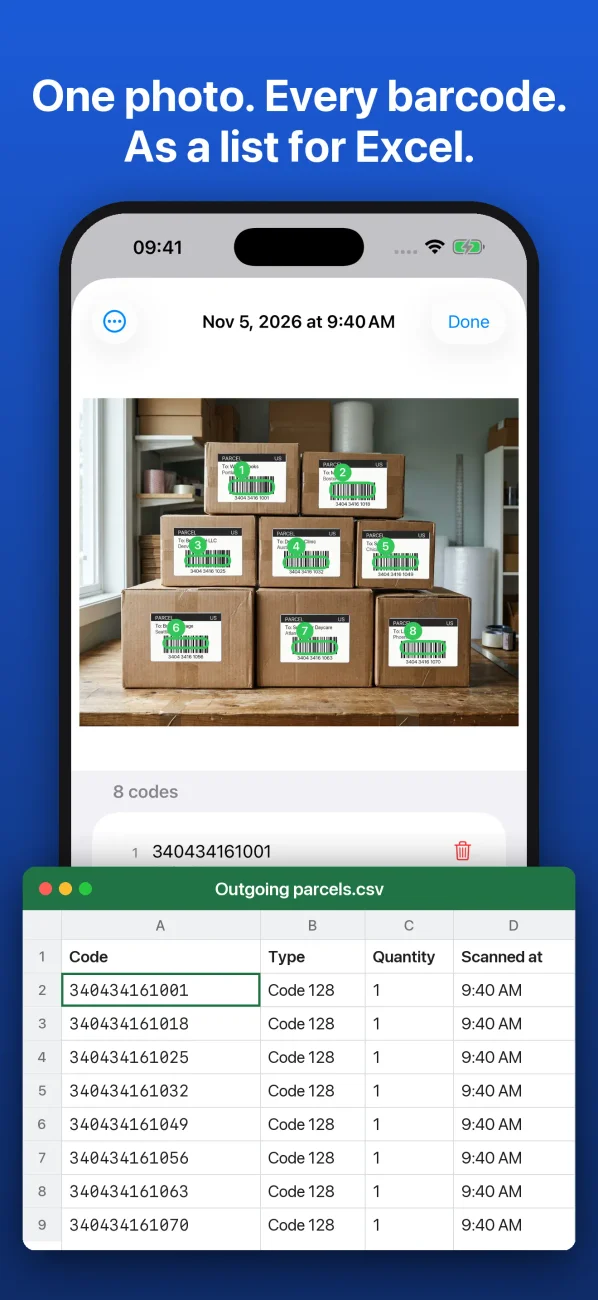
One photo, every barcode: Scan2List reads many barcodes at once and turns them into a list for Excel. You capture a whole shelf with a few photos instead of scanning every code one by one. It also has an inventory mode that shows what is missing, and a scanner for documents as PDF. All features are free.
MULTI SCAN: MANY BARCODES IN ONE PHOTO
You take a photo of a shelf, a box or a stack of parcels, and the app reads every barcode and QR code in the photo at once. You add single items with the live scan by holding the camera on the code for a moment. If you scan the same item more than once, the app counts up the quantity instead of listing it twice. The app reads all common codes, for example EAN, UPC, Code 128, QR and Data Matrix.
EXPORT TO EXCEL
You create a separate list for every shelf, room or job. You share the list as a CSV file, for example via AirDrop or email, and open it in Excel, Numbers or Google Sheets. You choose which columns go into the file, such as code, quantity, time or note. The file opens correctly in Excel, special characters included. The export is free and has no limits.
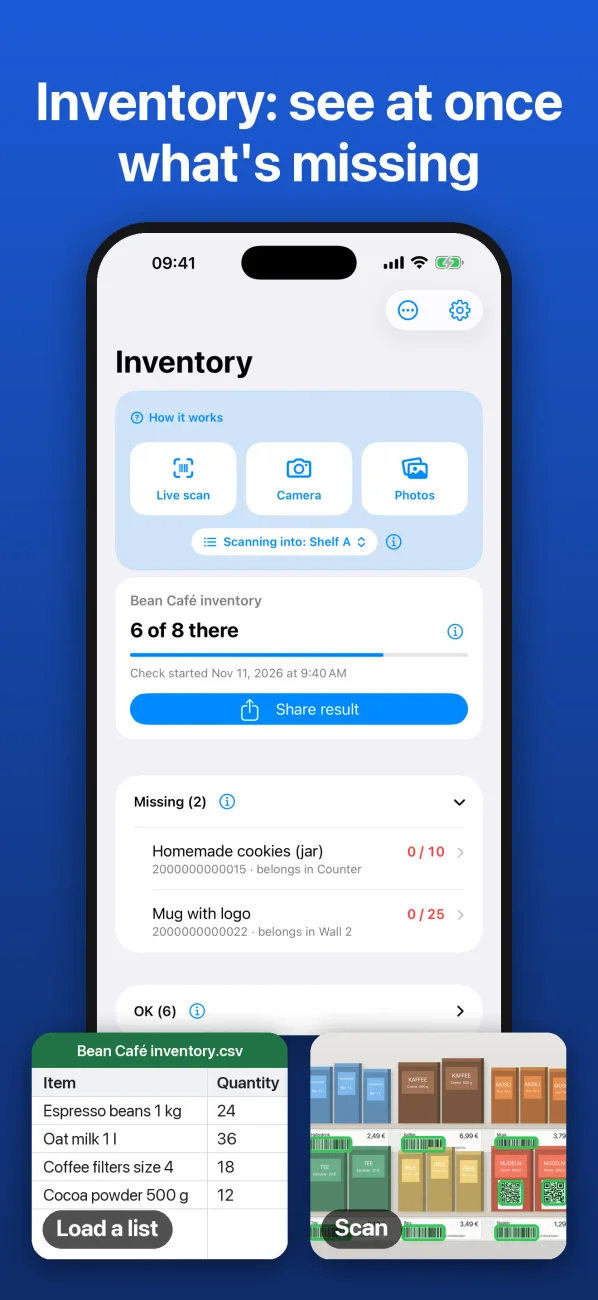
INVENTORY: SEE WHAT IS MISSING
You load a list of what should be there, for example from your till, from Excel or from scan2list.de. You can also open a CSV file in Scan2List straight from Files, Mail or AirDrop. While you take photos, the app shows what is missing, where the quantity is off and what is not on the list. For things without a barcode, you create numbers and print labels.
SCAN DOCUMENTS, FILL THEM IN AND SHARE THEM AS PDF
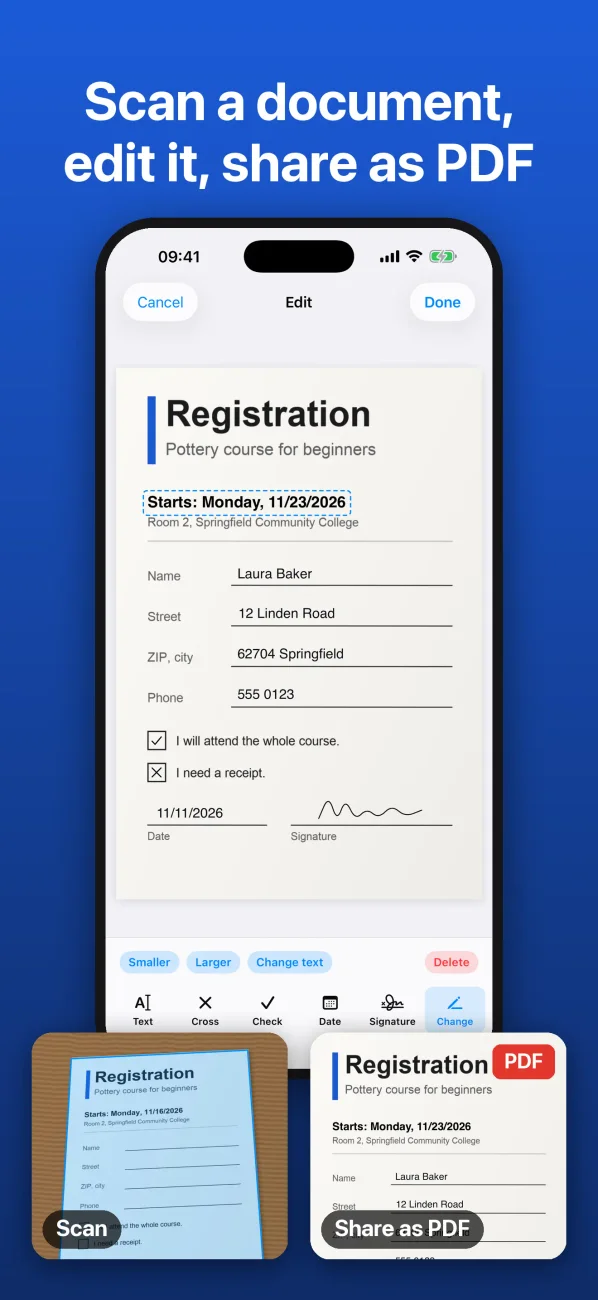
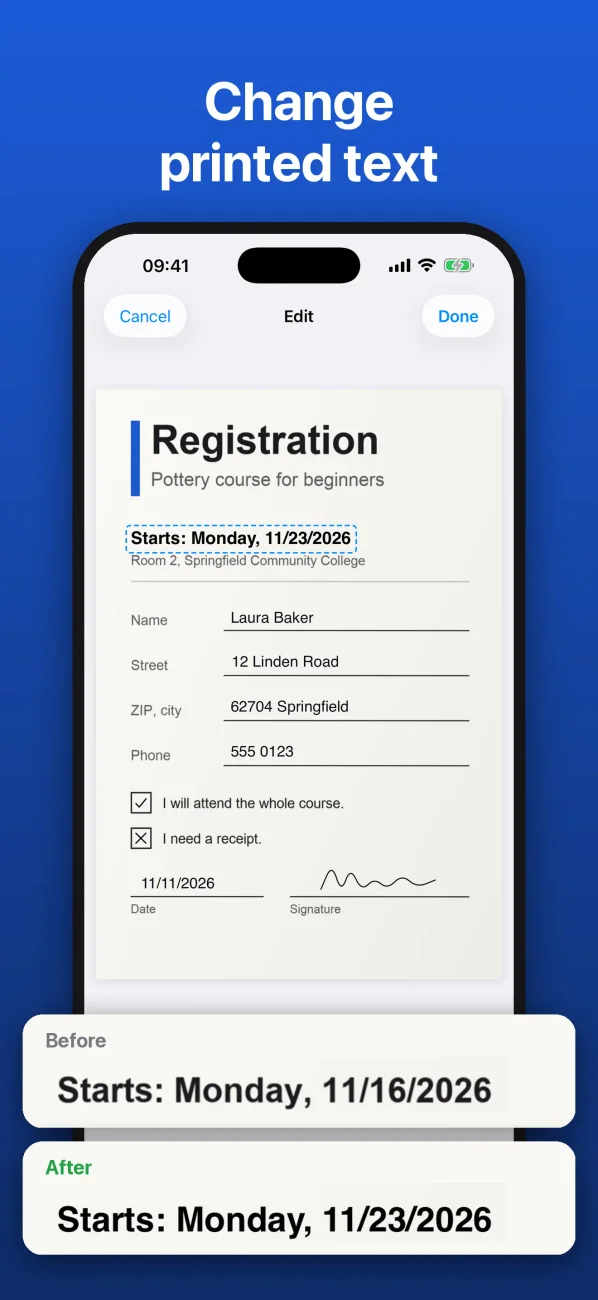
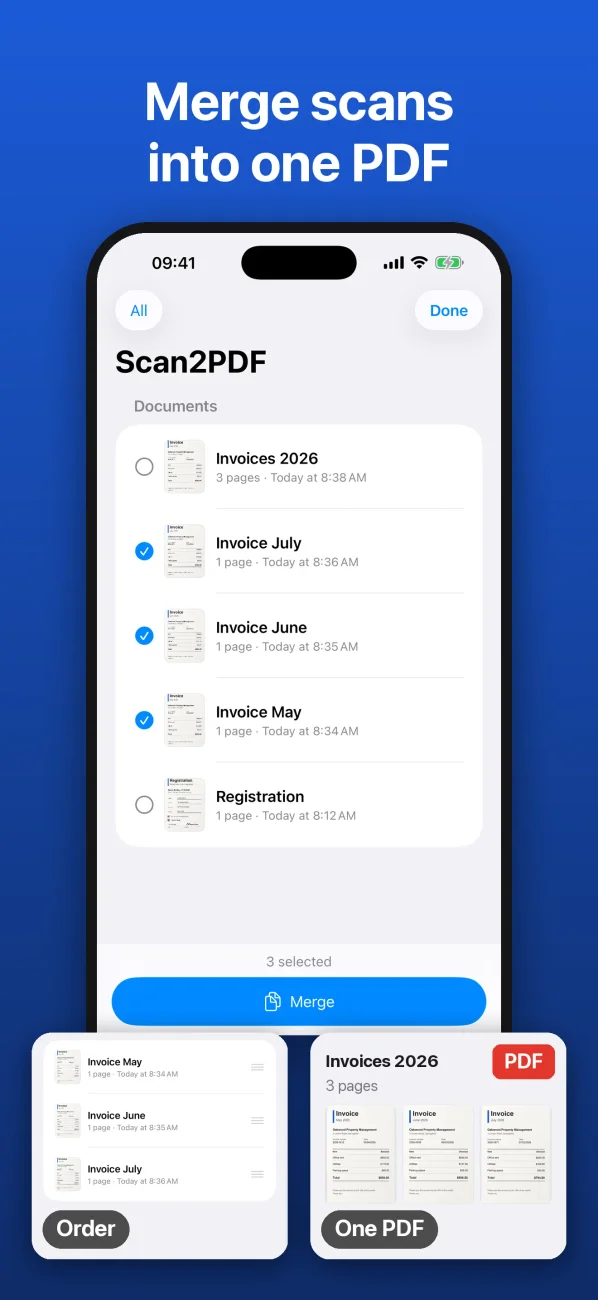
In Scan2PDF mode you scan letters, invoices or forms with the camera. The app crops and straightens every page, in color or black and white. Then you can type text, tick boxes, add the date and sign. You can even change printed text, for example a date.
You merge several scans into one PDF. You send the PDF by email or save it to Files, and the text in it is searchable.
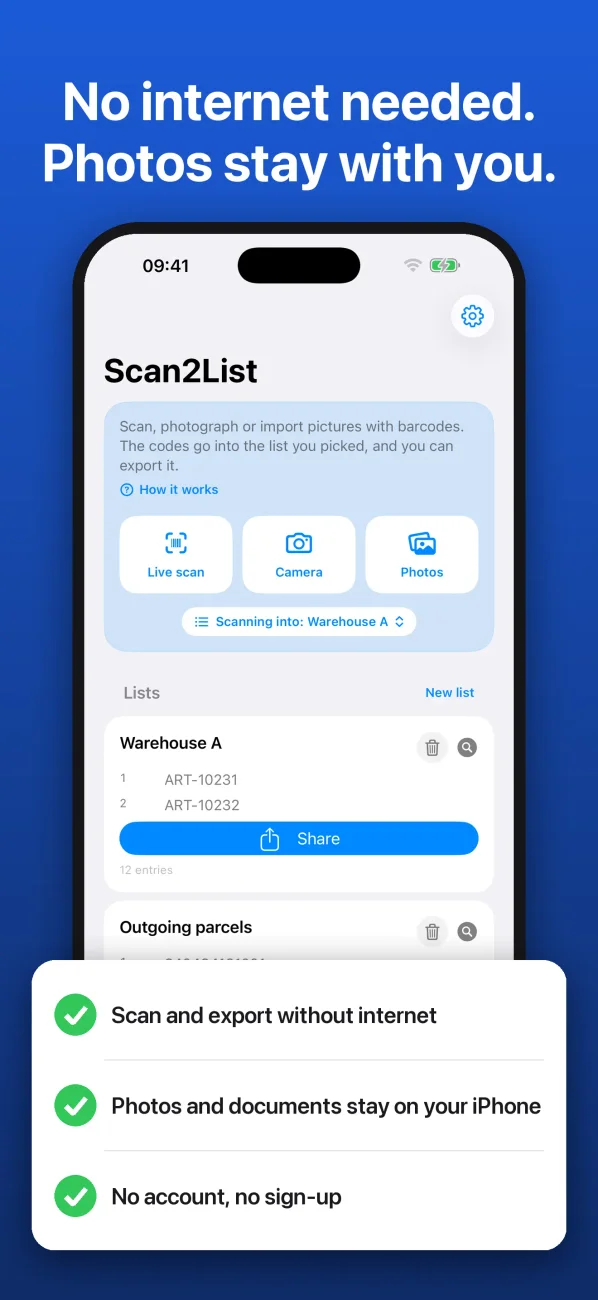
FREE, NO ACCOUNT, NO INTERNET NEEDED
All features are free with no limits. The free version shows ads. With Scan2List Pro the ads are gone, as a monthly or yearly subscription. You don't need an account, and the app works without internet. Your photos and documents stay on your iPhone.
Scan2List works well for shops, warehouses, restaurants, clubs, event organizers, IT departments, libraries, your home office and your move.
Missing something or have a question? Write to us right from the app under “Settings”. We reply as quickly as we can and try to build your wishes in.
Terms of Use (EULA): https://www.apple.com/legal/internet-services/itunes/dev/stdeula/
Privacy Policy: https://streetbingo.net/en/apps/scan2list/privacy
新機能
バージョン 1.4.3 · 2026/11/19
• New: open PDFs. Bring a PDF into Scan2PDF with “Files”, or open it with Scan2List straight from Mail and Files. Then fill it in, sign it and merge it with your scans.
• New: remove crosses and check marks. Switch “Cross” or “Check” to “Remove” and tap a cross or a check mark that is already on the document. The box stays.
• “Change” now replaces printed text without laying a patch over it. The background stays as it is.
• The camera in Scan2PDF takes a page as soon as it detects a document, so no pages without a document are made.
• Picture files from “Files” can be added as pages too.
• Finished pages from “Photos”, for example a saved form, stay complete and are no longer cropped.
• Small improvements and fixes.
アプリのプライバシー
このアプリのデータの取り扱いについて、Laurin von BrandtがApp Storeで申告している内容です。
-
ユーザーのトラッキングに使用されるデータ
他社のアプリやウェブサイトを横断してユーザーをトラッキングする目的で使用される場合があります。
- 位置情報
- ID
- 使用状況データ
-
ユーザーに関連付けられないデータ
収集される場合がありますが、ユーザーの識別情報には関連付けられません。
- 位置情報
- ID
- 使用状況データ
- 診断
プライバシーの取り扱いは、ご利用の機能やお客様の年齢などに応じて異なる場合があります。
情報
- 販売元
- Laurin von Brandt
- カテゴリ
- ユーティリティ
- バージョン
- 1.4.3
- 更新日
- 2026/11/19
- リリース
- 2026/4/6
- サイズ
- 11.5 MB
- 必要条件
- iOS 16.0以降
- 対象年齢
- 4+
- 価格
- 無料
- アプリ内課金
- あり
- 言語
- 英語, フランス語, ドイツ語, イタリア語, ポルトガル語, スペイン語, ベトナム語
- 著作権
- © Laurin von Brandt
こちらもおすすめ
-
 バーコードリーダー・QRコード読み取り広告なし|棚卸・数量カウント・CSV出力
-
 BatchScanユーティリティ
-
 Inventory Scanner: Organizerユーティリティ
-
 StockScanバーコードで棚卸・数量管理
-
 qrXcode: QRコード・バーコード読み取り作成・リンク確認・Wi-Fi接続
-
 ScanBatch · Batch Code ToolBatch scan & generate barcodes
-
 PhotoScan: QR & Barcode Readerユーティリティ
-
 Scanhop - Scan to PC & Webhookユーティリティ
-
 QR Code Reader · Fast ScannerFast QR · Barcode Scanner
-
 Serial Collectorユーティリティ