SyncFlow - Devices Data Sync
Wi-Fi clipboard, files, screen
Dirancang untuk iPhone, iPad, Mac, iPod touch
Gratis · Pembelian dalam aplikasi
- Batasan usia4+
- KategoriKegunaan
- Pengembangying lu
- BahasaInggris+ 12 lainnya
- Ukuran41,1 MB
Tertaut ke halaman resmi App Store
Download.org tidak menyimpan file SyncFlow - Devices Data Sync apa pun. Tombol ini membuka halaman aplikasi di App Store, tempat ying lu menerbitkannya. Halaman terakhir diperiksa pada 12/11/2026.
Tangkapan layar
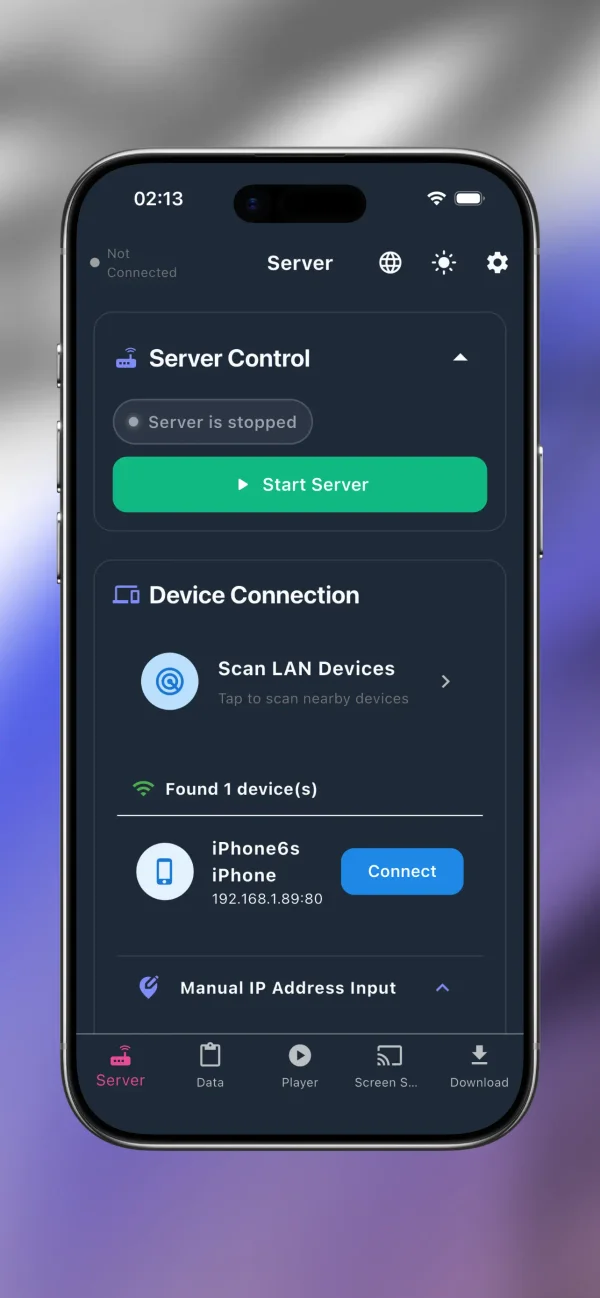

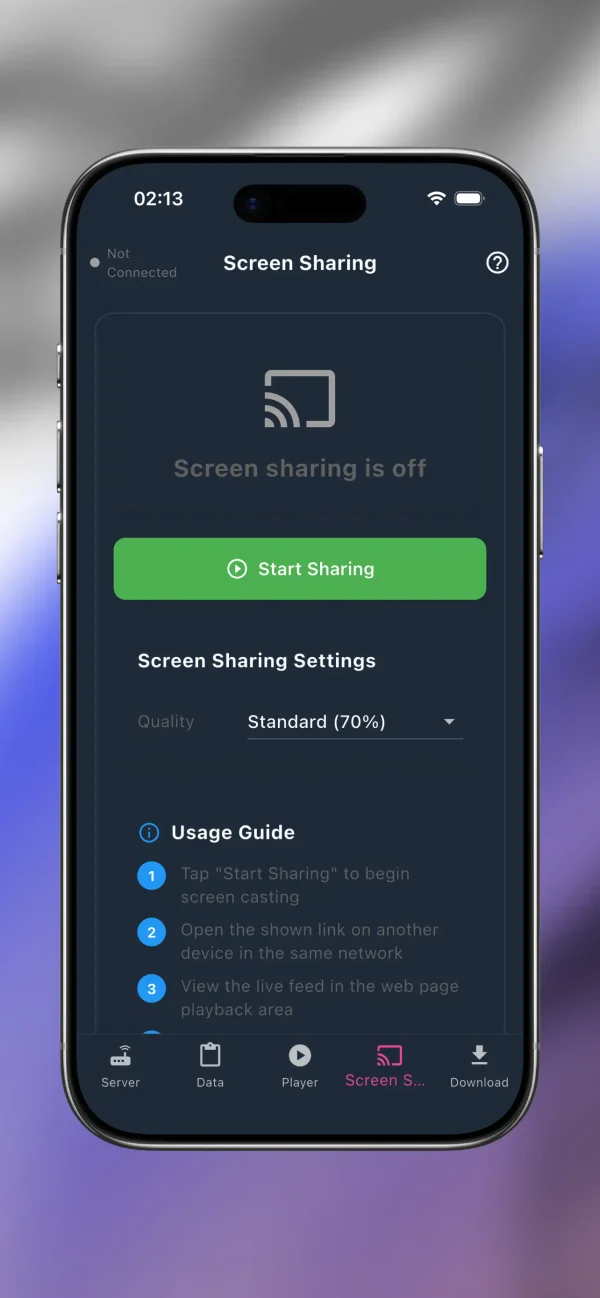


Tentang
Pengembang belum menyediakan teks ini dalam bahasa Anda.
【PRODUCT OVERVIEW】
SyncFlow is a cross-device sync tool for local networks. Move text, files, and screens between phones, tablets, and computers—without routing data through cloud accounts.
【NETWORK REQUIREMENTS】
Make sure all devices are on the same local network first: connect to the same Wi‑Fi, or have one device turn on its personal hotspot and connect the other devices to it before pairing and transferring.
【WHAT YOU GET】
Privacy & local-first
• Traffic stays on your local network—no cloud server in the middle
• No sign-up or login required—open the app and go
• Content stays between your devices—great for privacy and productivity
Connection & pairing
• Automatically discovers devices on the same network with less manual setup
• Any device running SyncFlow can be the connection hub; install the same app on other devices to join—no separate “server” vs “client” apps
• QR pairing for quick connection
• Multi-device workflows for work and sharing
Sync & transfer
• Copy on your phone, paste on your computer—smoother cross-device workflows
• Transfer files over the LAN—no cables
• Share your screen to a larger display in real time
【CORE FEATURES】
Clipboard sync
• Copy on your phone, paste on your computer—less retyping
• Real-time two-way text sync with clipboard monitoring
• QR-based quick sync and connection
File sharing
• Send files between phones, tablets, and computers
• Common formats supported; large files streamed for stability
• Preview images, videos, PDFs; source-aware organization
Screen sharing
• Mirror your phone to a computer or larger display
• Low latency for demos, teaching, and daily viewing; full-screen supported
• Great for presentations, teaching, gaming, and video
【USE CASES】
Work
• Copy links or codes on your phone and paste on your computer
• Send spreadsheets, screenshots, and links without logging into WeChat or other chat apps—transfer directly over the same Wi-Fi
• Sync documents, screenshots, and materials across devices
Entertainment
• Play mobile games or videos on a larger PC screen
• Move screenshots and recordings to your computer for editing
• Share photos and videos between home devices
Team collaboration
• Distribute files quickly without uploading to cloud drives first
• Sync materials and links during presentations
• Share temporary content instantly for smoother communication
【PLATFORMS & HOW CONNECTION WORKS】
• Works across phones, tablets, computers, and the web
• One app is enough for LAN connection and sharing
• Open the web address this device provides in a browser, or scan a QR code to join
【PRIVACY & SECURITY】
We take your privacy and security seriously.
No cloud relay
• Data travels only on your local network
• Nothing is uploaded to our servers
• No third-party relay in the middle
No account required
• No phone number or email required
• Connect without registration or login
Your data stays local
• Transfers stay on your devices
• No unnecessary personal data collection
• Works in offline LAN scenarios in many cases
【WHY SYNCFLOW】
More private: local network—no cloud dependency
More efficient: copy, send, and view in one flow
Easier setup: auto discovery and QR pairing
More practical: clipboard, files, and screen sharing in one place
Works everywhere: major mobile and desktop platforms
Flexible: clipboard, files, and screen sharing in one workflow across your devices
Download SyncFlow for a faster, more private way to sync across devices.
Yang baru
Versi 2.5.0 · 22/8/2026
1. Fixed known issues
2. Optimized features
Privasi aplikasi
Yang dinyatakan ying lu di App Store tentang cara aplikasi ini menangani data.
-
Data yang tidak ditautkan dengan Anda
Dapat dikumpulkan, tetapi tidak ditautkan dengan identitas Anda.
- Lokasi
- Konten pengguna
- Pengenal
- Data lainnya
Praktik privasi dapat bervariasi, misalnya berdasarkan fitur yang Anda gunakan atau usia Anda.
Informasi
- Penjual
- ying lu
- Kategori
- Kegunaan
- Versi
- 2.5.0
- Diperbarui
- 22/8/2026
- Dirilis
- 29/12/2025
- Ukuran
- 41,1 MB
- Memerlukan
- iOS 13.0 atau yang lebih baru
- Batasan usia
- 4+
- Harga
- Gratis
- Pembelian dalam aplikasi
- Ya
- Bahasa
- Inggris, Arab, Belanda, Prancis, Jerman, Italia, Jepang, Korea, Portugis, Rusia, Tionghoa Sederhana, Spanyol + 1 lainnya
- Hak cipta
- © NM.TEAM