
WiFiPhoto
Photo Transfer Toolkit
Dirancang untuk iPhone, iPad
Gratis · Pembelian dalam aplikasi
- Batasan usia4+
- KategoriFoto & Video
- PengembangMatteo Rossi
- BahasaInggris+ 9 lainnya
- Ukuran2,2 MB
Tertaut ke halaman resmi App Store
Download.org tidak menyimpan file WiFiPhoto apa pun. Tombol ini membuka halaman aplikasi di App Store, tempat Matteo Rossi menerbitkannya. Halaman terakhir diperiksa pada 16/11/2026.
Tangkapan layar

Tentang
Pengembang belum menyediakan teks ini dalam bahasa Anda.
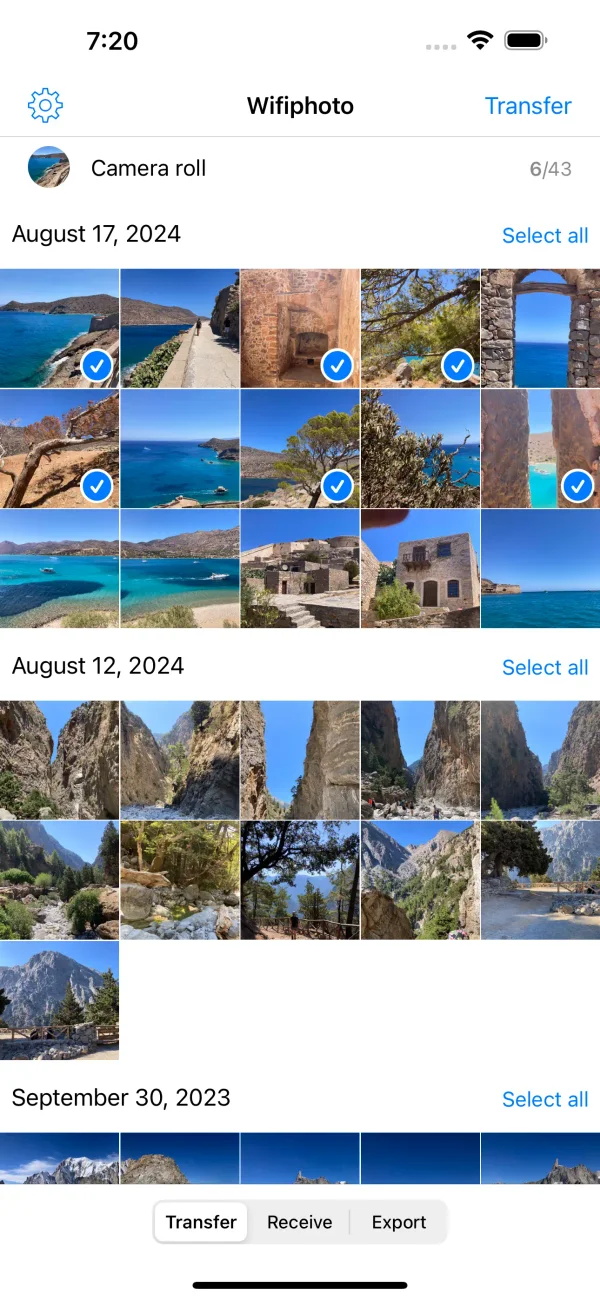
WiFiPhoto is more than a photo transfer app — it's a complete image processing and batch export toolkit. Build custom templates to resize, convert formats, add timestamps or watermarks, then process hundreds of photos at once. Share the results via Wi-Fi to any browser, AirDrop, Files, Mail, or save directly to your Photo Library.
IMAGE PROCESSING WORKFLOW
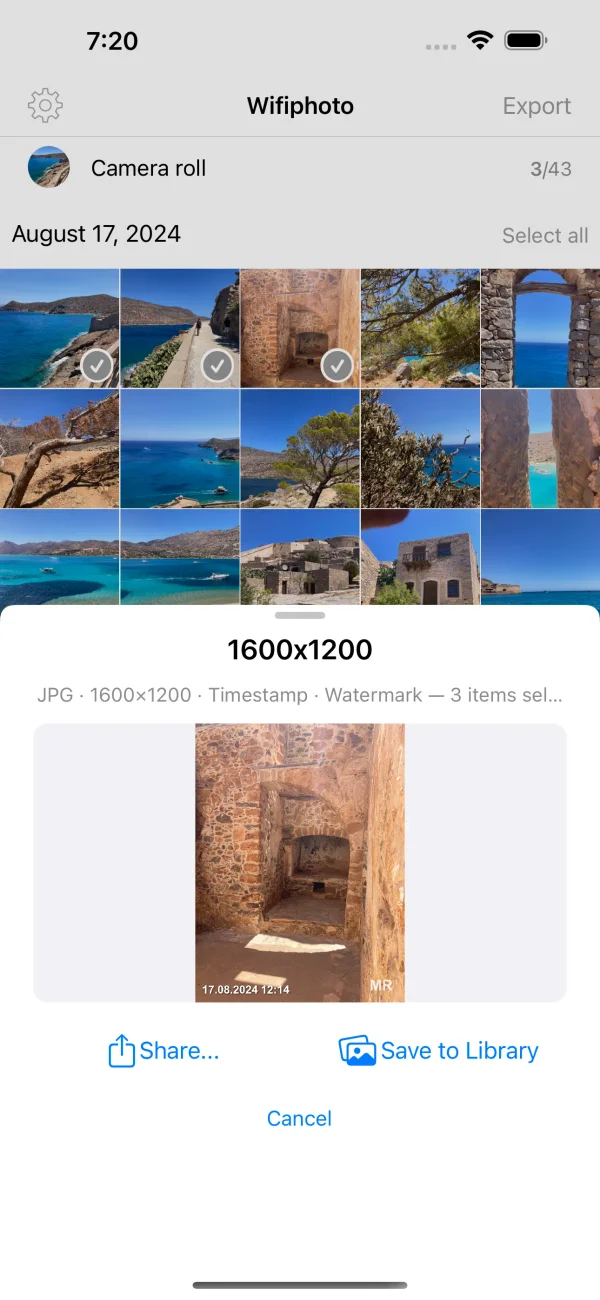
Create export templates with format conversion (JPEG/PNG), resize, timestamp and watermark overlays — then batch-process your entire selection. Preview the result with overlays applied before committing. Pick your destination: Share via AirDrop or Mail, Save to Library as a named album, or Transfer over Wi-Fi.
WI-FI TRANSFER & WEB GALLERY
Scan the QR code or type the URL on any computer. Download instantly as a zip or browse a beautiful web gallery where the receiver picks exactly which photos to download.
TWO-WAY TRANSFER
Not only can you send photos — you can receive them too. Open the upload page on any browser and drag files directly into your Camera Roll.
FREE FEATURES — NO LIMITS
- Unlimited photo & video transfers and exports
- Export to Files, AirDrop, Mail, Messages, and more
- Save processed photos to Library with named albums
- Web Gallery with selective download or Zip download
- Receive photos from any browser
- QR code for instant connection
- Metadata viewer (long-press any photo for EXIF, GPS, camera info)
- Background processing for large batches
- iPad drag & drop with haptic feedback
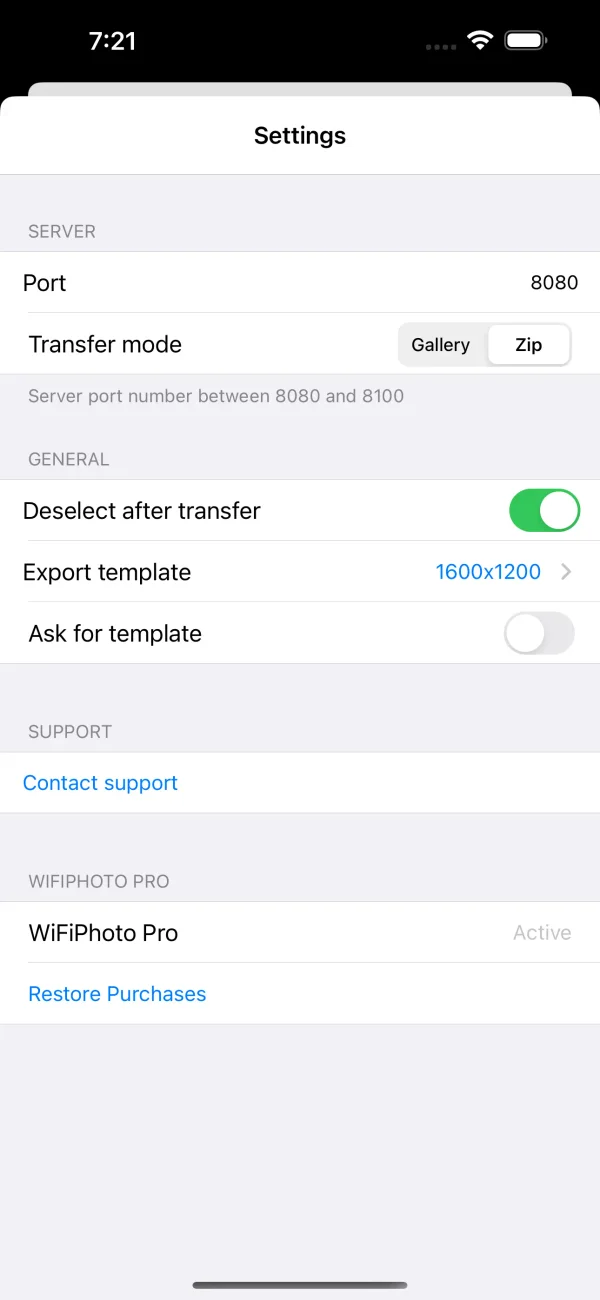
- 1 export template included
- Available in 11 languages
WIFIPHOTO PRO — $2.99 ONE-TIME UPGRADE
Unlock powerful export tools for professionals and enthusiasts:
- Unlimited export templates (create, edit, duplicate)
- Image format conversion (JPEG/PNG with quality control)
- Image resize (Size to Fit / Size to Fill, custom dimensions)
- Custom filename patterns with placeholders ({date}, {counter}, {original})
- Timestamp overlay (choose font, color, and position)
- Watermark overlay (text or image, adjustable opacity, tiled mode)
- H.264 video conversion for universal compatibility
- Live Photo export (Still + Video or Video only)
- Strip metadata to protect your privacy (EXIF, GPS, camera info)
- Template picker and preview before batch processing
YOUR PRIVACY MATTERS
WiFiPhoto works entirely on your local network. No files are uploaded to any server. No account needed. No tracking. Your photos stay yours.
Yang baru
Versi 2.2.0 · 31/3/2026
WiFiPhoto 2.2 transforms from a simple transfer tool into a full image processing workflow with batch support.
New export & processing features:
- Export to Files, AirDrop, Mail, Messages — not just Wi-Fi
- Save processed photos to Library with automatic album creation
- Timestamp overlay: burn date/time with custom font, color, and position (Pro)
- Watermark overlay: text or image with opacity, tiling, and positioning (Pro)
- Custom filename patterns with {date}, {counter}, {original} placeholders (Pro)
- Placeholder toolbar for quick filename editing
- H.264 video conversion for universal compatibility (Pro)
- Live Photo export: Still + Video or Video only (Pro)
- Strip metadata: remove EXIF, GPS, camera info for privacy (Pro)
- Template picker and preview with overlays before batch processing
New transfer features:
- Web Gallery: browse and selectively download photos from any browser
- Receive Photos: upload files from any browser directly to Camera Roll
Stability & performance:
- Streaming zip for large transfers — no more crashes with GB-sized videos
- Background processing continues when app is minimized
- Network auto-retry and memory pressure handling
UI & platform:
- iPad drag & drop support with checkmark selection badges
- Haptic feedback and accessibility improvements
- Metadata viewer: long-press any photo for EXIF, camera, GPS info
- New languages: Portuguese (Brazil) and Korean
- Requires iOS 17
Privasi aplikasi
Yang dinyatakan Matteo Rossi di App Store tentang cara aplikasi ini menangani data.
-
Data tidak dikumpulkan
Pengembang tidak mengumpulkan data apa pun dari aplikasi ini.
Praktik privasi dapat bervariasi, misalnya berdasarkan fitur yang Anda gunakan atau usia Anda.
Informasi
- Penjual
- Matteo Rossi
- Kategori
- Foto & Video
- Versi
- 2.2.0
- Diperbarui
- 31/3/2026
- Dirilis
- 4/9/2009
- Ukuran
- 2,2 MB
- Memerlukan
- iOS 17.0 atau yang lebih baru
- Batasan usia
- 4+
- Harga
- Gratis
- Pembelian dalam aplikasi
- Ya
- Bahasa
- Inggris, Belanda, Prancis, Jerman, Italia, Jepang, Korea, Portugis, Tionghoa Sederhana, Spanyol
- Hak cipta
- © 2026 Matteo Rossi
Mungkin Anda juga suka
-
 SCameraFoto & Video
-
 enhanceAlFoto & Video
-
 Camera Zoom 4Foto & Video
-
 Kompressor - Compress imagesFoto & Video
-
 Audio SauceFoto & Video
-
 Modipix: Film Lab & 3D LUTFilm Camera & Color Grading
-
 F-captions: auto subtitlesFoto & Video
-
 AmberTime: USB Photo BackupFoto & Video
-
 Squeeze - Kompres VideoPerkecil ukuran, hemat memori
-
 Zee Cast: DLNA & UPnP ServerFoto & Video