10-minute Planner
Your daily handwritten planner
Designed for iPad
Free · In-app purchases
- Age rating4+
- CategoryProductivity
- DeveloperBlinkar
- LanguagesEnglish
- Size68.2 MB
Links to the official App Store page
Download.org hosts no file of 10-minute Planner. The button opens its official App Store page, published by Blinkar. Listing last checked on Nov 12, 2026.
Screenshots



About
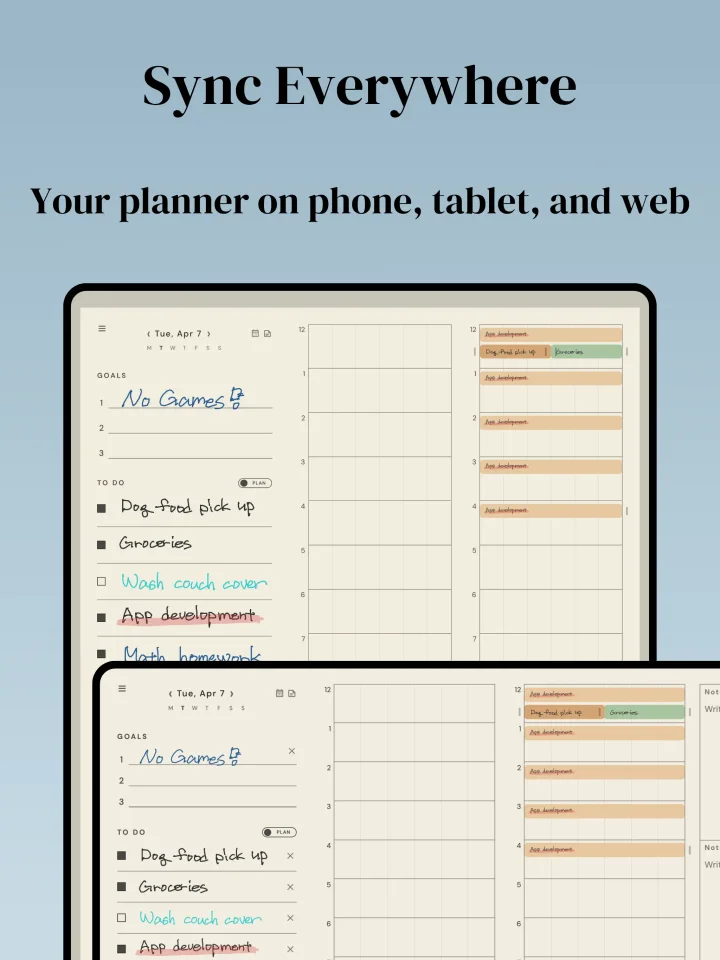
A paper planner in your iPad.
Write your daily plans with Apple Pencil, just like you would on paper. 10-minute Planner brings the natural feel of a
handwritten planner to your iPad — with time blocks, plan-vs-reality tracking, and AI that reads your handwriting
overnight.
HANDWRITE YOUR TODOS
Write tasks directly on the screen with Apple Pencil. No typing, no menus — just pick up your pencil and write.
Your handwriting is the content, not an annotation on top of it.
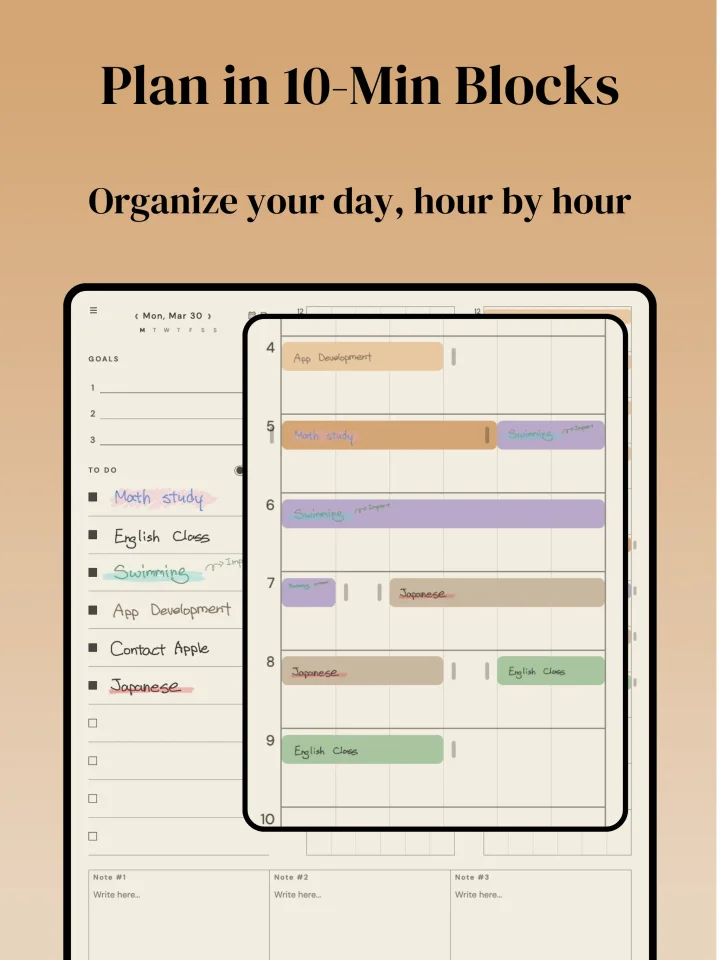
PLAN IN 10-MINUTE BLOCKS
Schedule your day on a timetable grid where each slot is 10 minutes. Tap a time slot, pick a task, and drag to set the duration.
See your entire day at a glance, from morning to night.
PLAN VS. REALITY
Toggle between Plan and Review mode. Check off your tasks and record what you actually did.
Your planned schedule appears faded behind your real day — an honest look at where your time goes.
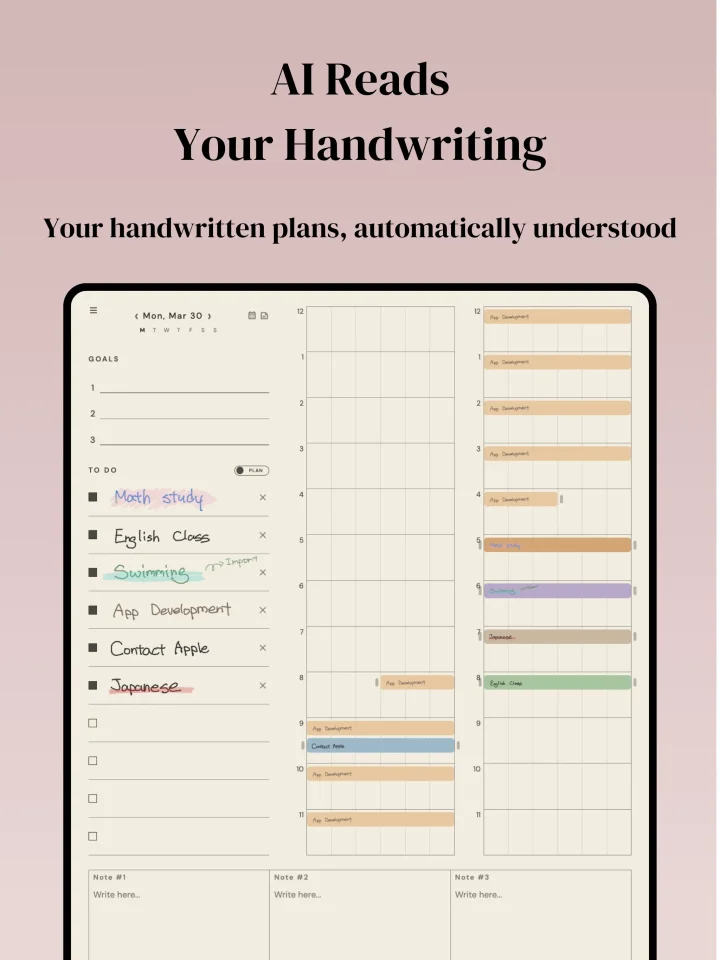
AI READS YOUR HANDWRITING
Your handwriting is automatically recognized and categorized overnight. Wake up to neatly labeled time blocks and personal stats — without lifting a finger.
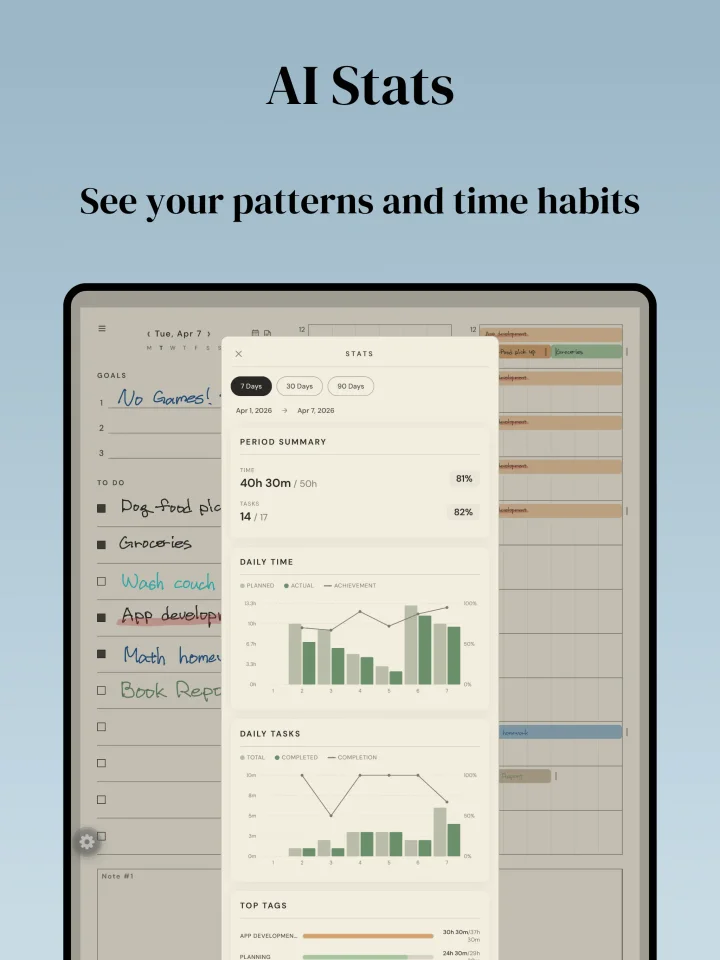
TRACK YOUR PATTERNS
See daily, weekly, and monthly patterns with AI-generated categories. Task completion rates, time allocation charts,
and tag trends show you how your days really look.
DAILY MEMOS
Jot down notes, sketches, or quick thoughts on memo pages. Choose plain, lined, or grid paper backgrounds.
SYNC ACROSS DEVICES
Your planner syncs across iPad, iPhone, and web. Start on iPad with Apple Pencil, check your schedule on iPhone, or review your week from any browser.
NO ACCOUNT NEEDED
Start planning immediately — no sign-up required. Create an account later if you want to sync across devices.
FREE
- Handwritten todos with Apple Pencil
- 10-minute time block scheduling
- Plan vs. Reality review
- Cloud sync across all devices
- 1 daily memo page
PRO ($1.99/mo or $19.99/yr, 14-day free trial)
- AI-powered stats and pattern tracking
- Unlimited memo pages
Terms of Use: https://planner.blinkar.dev/terms
Privacy Policy: https://planner.blinkar.dev/privacy
What’s new
Version 1.0.1 · Apr 29, 2026
Fixed an issue where changing the date range in Stats could cause an unexpected error.
App privacy
What Blinkar declares on the App Store about how this app handles data.
-
Data linked to you
May be collected and linked to your identity.
- Contact info
- Identifiers
- Usage data
- Diagnostics
Privacy practices may vary, for example with the features you use or your age.
Information
- Seller
- Blinkar
- Category
- Productivity
- Version
- 1.0.1
- Updated
- Apr 29, 2026
- Released
- Apr 23, 2026
- Size
- 68.2 MB
- Requires
- iOS 15.1 or later
- Age rating
- 4+
- Price
- Free
- In-app purchases
- Yes
- Languages
- English
- Copyright
- © 2026 Blinkar
You might also like
-
 Acto|Handwritten PlannerPlan by Hand, Think Clearly
-
 Interleaf: Digital PlannerJournal, Stickers & Notes
-
 InkThink - Handwritten PlannerDiary, To-Do List & Calendar
-
 Ajanda: Write Daily NotesCalendar Journal with Pencil
-
 Handwriting Journal PlannerCalendar, Journal & Daily Memo
-
 Plana - Handwriting PlannerHandwritten planner & calendar
-
 iPlan Today - Pencil PlannerDaily Journal & Habit Tracker
-
 Pencil Planner: PencilTimeWrite, Type & Plan Your Way
-
 Dayfold: Planner & JournalYour whole day, one calm place
-
 Busy B Planner: To-Do ListBrain Dump & Daily Reminders