
Advanced Port Scanner
TCP scanner for any host or IP
Designed for iPhone, iPad, iPod touch
Free
- Age rating4+
- CategoryDeveloper Tools
- DeveloperChun Yu Leung
- LanguagesEnglish
- Size23.7 MB
Links to the official App Store page
Download.org hosts no file of Advanced Port Scanner. The button opens its official App Store page, published by Chun Yu Leung. Listing last checked on Nov 12, 2026.
Screenshots

About
Scan TCP ports on any host or IP — and see what’s actually open.
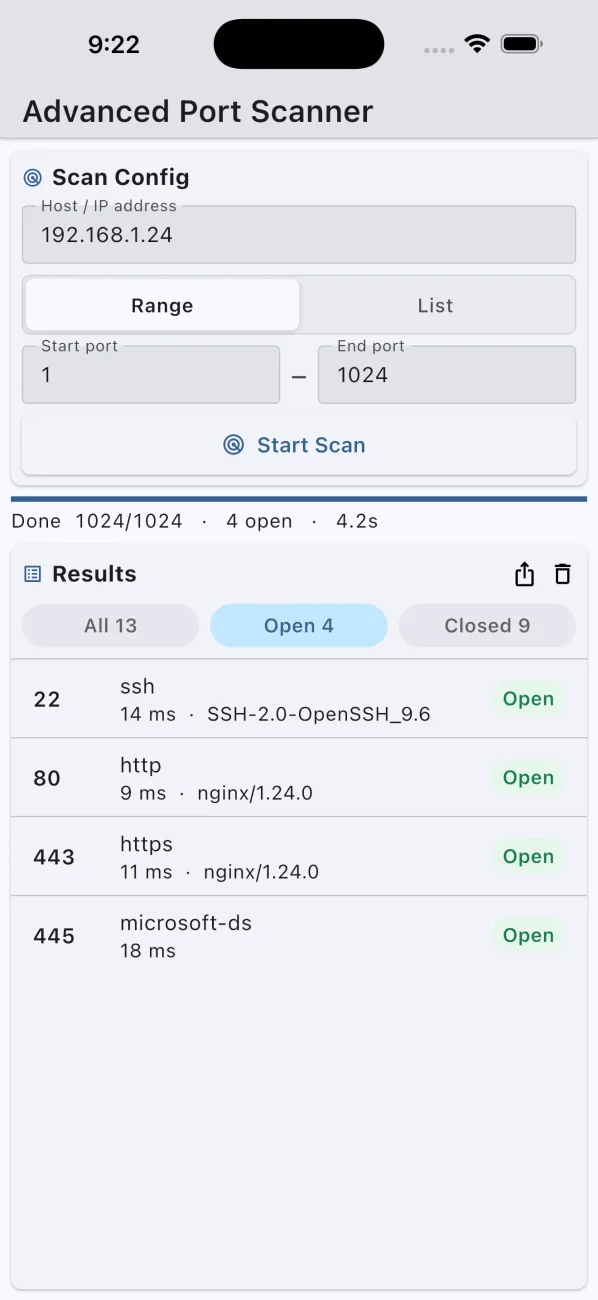
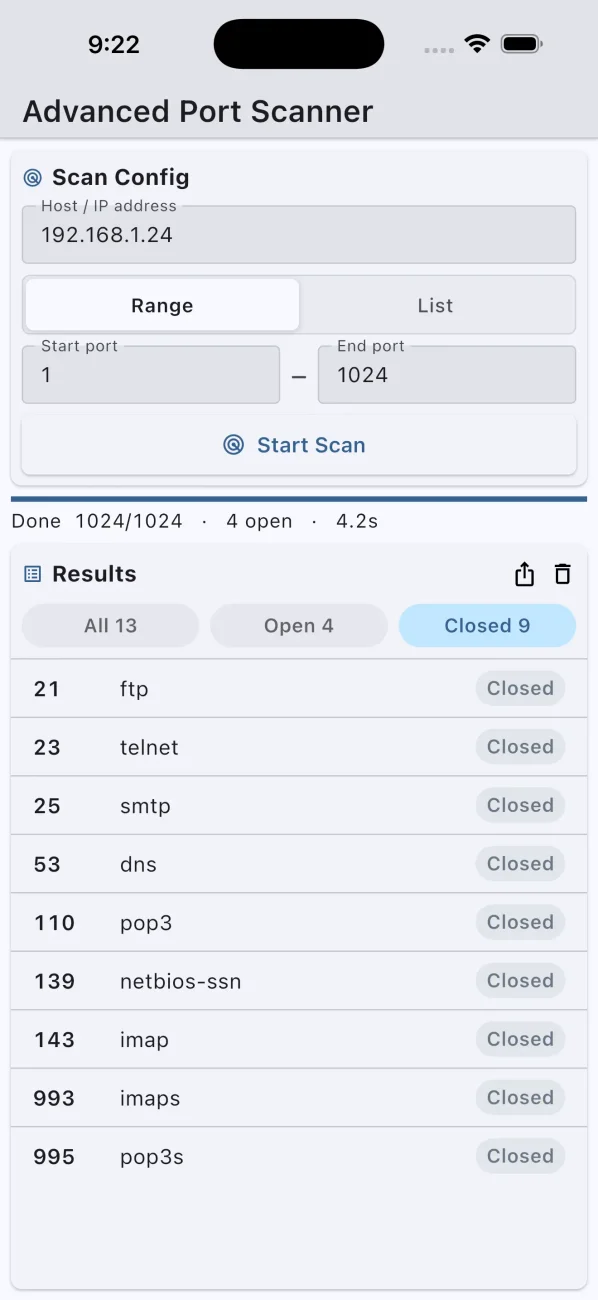
Advanced Port Scanner is a fast, clear TCP port scanner for iPhone and iPad. Enter a hostname, domain, or IP address, choose a port range or a custom port list, then watch live results: open or closed, service name, response time.
Use it to check a home server, verify a firewall rule, or confirm that SSH, HTTP, HTTPS, FTP, DNS, or Remote Desktop (RDP) is reachable.
KEY FEATURES
• Fast TCP port scanning
Scan any host or IP address. Domain names are resolved automatically. Check TCP ports from 1 to 65535 with concurrent workers so large ranges finish quickly.
• Range or custom port list
Scan a continuous range such as 1–1024 or 8000–8100, or paste a mixed list like 22,80,443,3306,3389,8000-8010.
• Live progress
See scanned vs total ports, how many are open, and elapsed time while the scan runs. Stop at any time.
• Open / closed filters
Filter results to All, Open, or Closed. Open ports show latency in milliseconds so you can spot slow services.
• Service identification
Well-known ports are labeled with common TCP services — including SSH, HTTP, HTTPS, FTP, SMTP, DNS, SMB, RDP, VNC, MySQL, and more.
• Banner and server hints
On common web ports (80, 8080, 8000, and similar), the scanner can read a short banner or HTTP Server header so you can tell what software answered.
• Share and copy
Share a text summary of open ports with a teammate, or tap a result to copy the port number.
• Built for control
A warning appears before very large scans. Clear results when you are done and start another host immediately.
WHO IT’S FOR
• Homelab and self-hosted server owners
• Developers checking if an app or API port is listening
• IT and network admins verifying firewall and NAT rules
• Anyone who needs a simple network port checker for troubleshooting
HOW TO USE
1. Enter a host, domain, or IP (URLs are accepted and cleaned automatically).
2. Choose Range or List and set the TCP ports to scan.
3. Tap Start Scan.
4. Filter to Open ports, review services and latency, then share if needed.
RESPONSIBLE USE
Scan only devices and networks you own or have permission to test. Unauthorized port scanning can violate laws and network policies. This app is a TCP connect checker for legitimate troubleshooting — it does not exploit services, crack passwords, or scan your local Wi‑Fi for other people’s devices.
Download Advanced Port Scanner and check open TCP ports in seconds.
What’s new
Version 2.0 · Oct 10, 2026
bug fix
App privacy
What Chun Yu Leung declares on the App Store about how this app handles data.
-
Data used to track you
May be used to track you across apps and websites owned by other companies.
- Location
- Identifiers
- Usage data
- Diagnostics
-
Data linked to you
May be collected and linked to your identity.
- Location
- Identifiers
- Usage data
- Diagnostics
-
Data not linked to you
May be collected but is not linked to your identity.
- Diagnostics
Privacy practices may vary, for example with the features you use or your age.
Information
- Seller
- Chun Yu Leung
- Category
- Developer Tools
- Version
- 2.0
- Updated
- Oct 10, 2026
- Released
- Oct 8, 2026
- Size
- 23.7 MB
- Requires
- iOS 13.0 or later
- Age rating
- 4+
- Price
- Free
- Languages
- English
- Copyright
- © 2026 lcyu
You might also like
-
 TCP Port ScannerDetecting open TCP ports.
-
 Localhost Web Server & HTMLWiFi File Transfer & Preview
-
 CMD: SSH, Terminal, DOS, PingSSH client & network tools
-
 RestForge: Client for PostmanAPI & HTTP Tester, GraphQL
-
 WiFi Tester & Network AnalyzerInternet & Cellular Scanner
-
 SSH Client - Terminal & TermuxSFTP, iSH, PuTTY, Telnet & Cmd
-
 WebProxyToolHTTPS web traffic Debug Proxy
-
 ServerCat - SSH Terminal & VPSDeveloper Tools
-
 SubtextSimple, elegant text editor
-
 Bluetooth InspectorDiscover what's around you