AES Crypt
Encrypt & Decrypt Files
Designed for iPhone, iPad, iPod touch
Free · In-app purchases
- Age rating4+
- CategoryProductivity
- DeveloperIsland Time Innovations
- LanguagesEnglish
- Size19.7 MB
Links to the official App Store page
Download.org hosts no file of AES Crypt. The button opens its official App Store page, published by Island Time Innovations. Listing last checked on Nov 17, 2026.
Screenshots



About
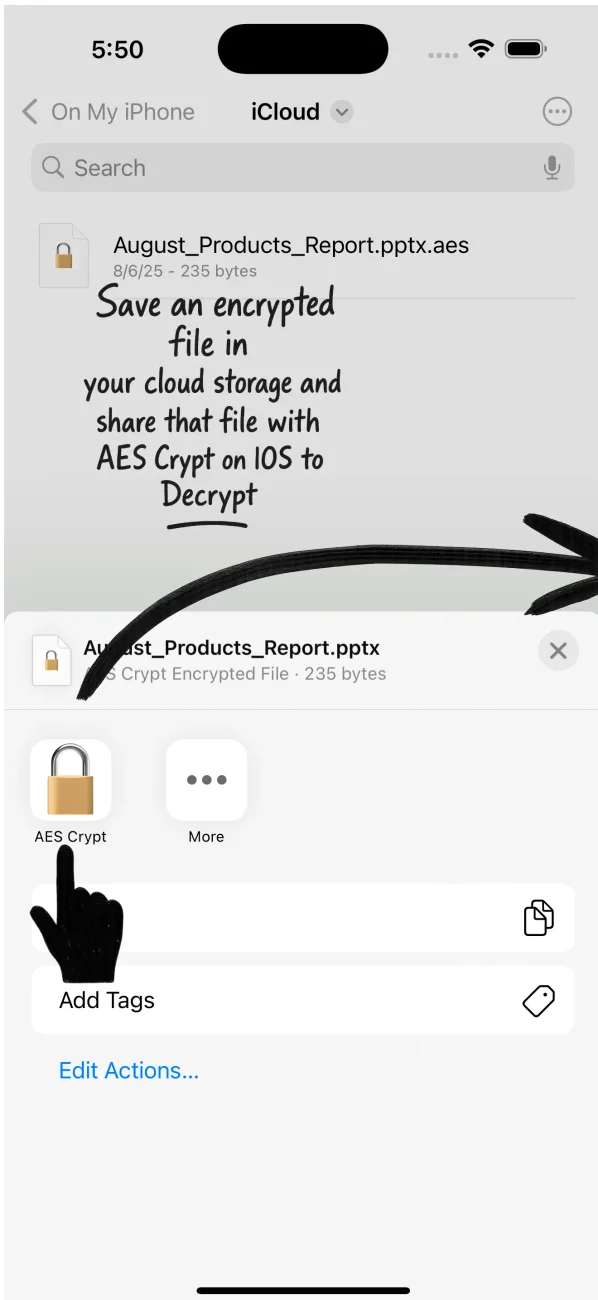
AESCrypt for iOS lets you decrypt and preview files encrypted with AESCrypt.com on your iPhone or iPad. Open encrypted files from Dropbox, Drive, Email, and other apps with ease.
An in-app upgrade enables encryption directly from your device — protect documents, photos, and more, then share securely to your favorite cloud service.
AESCrypt uses the industry-standard Advanced Encryption Standard (AES) to provide strong, cross-platform file security across Windows, macOS, Linux, and mobile devices.
Whether you’re backing up sensitive files to the cloud or storing private documents locally, AESCrypt gives you simple, powerful protection.
Free Features (Decryption)
• Adds AESCrypt as an “Open In…” option for .aes files, allowing you to decrypt files stored in Dropbox, Drive, Email, and other apps
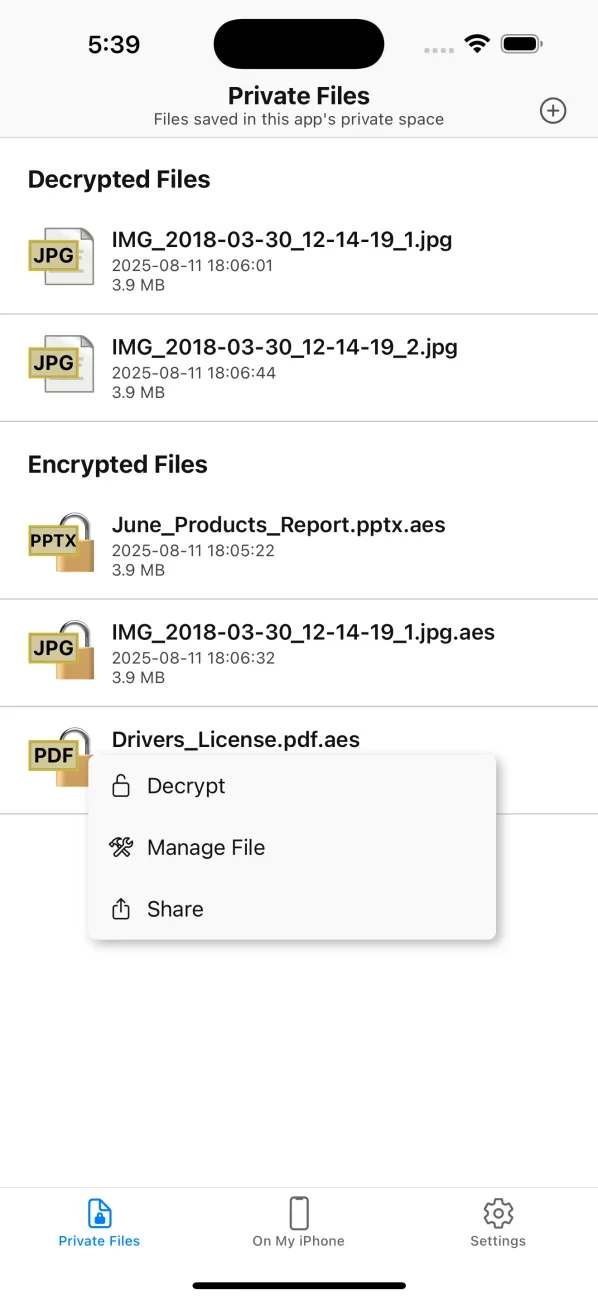
• Saves decrypted files in the app for preview or export to other apps
• Supports quick actions: rename or swipe to delete
• Performs DoD 5220.22-M secure wipe before deleting files
• Previews most major file types (PDF, JPG, MOV, PNG, TXT, and more)
• Displays decryption date and file size for each file
In-App Upgrade Features (Encryption)
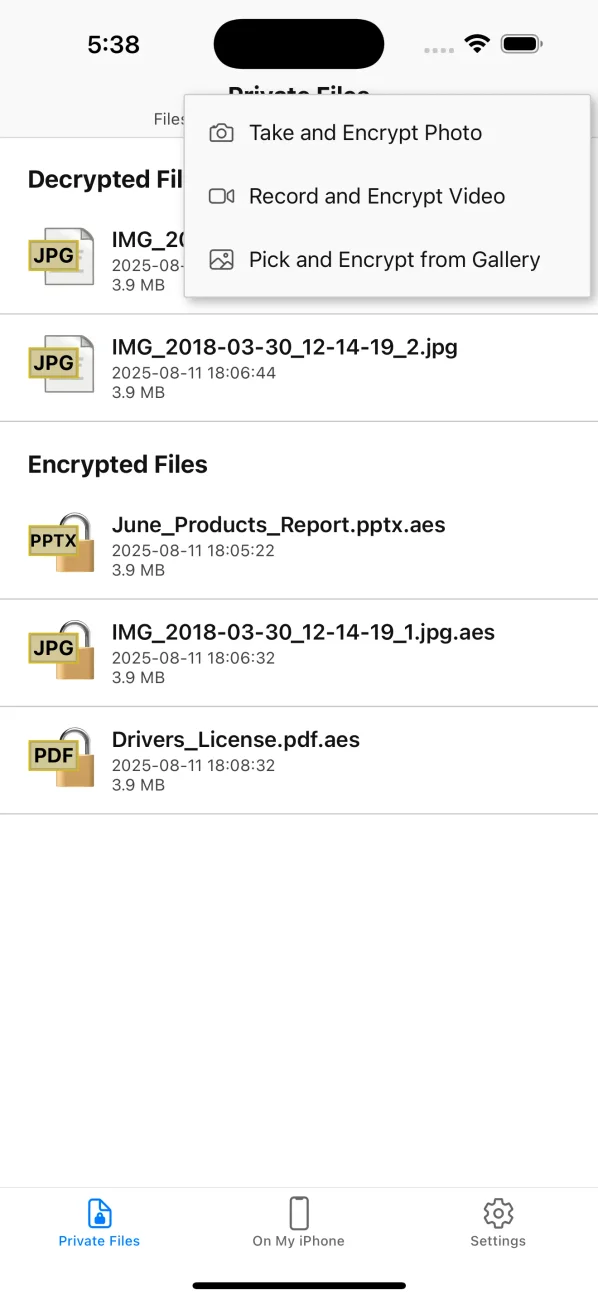
• Encrypt files directly on your iOS device and store them securely within the app
• Take a photo with the camera and immediately encrypt it for safe storage
• Adds AESCrypt as an “Open In…” option for all file types, enabling encryption from other apps (Pages, Numbers, Keynote, etc.)
• Export encrypted files and photos to your installed cloud apps (Dropbox, Drive, iCloud, etc.)
• Touch ID / Face ID support to keep in-app files protected
Notes
• This app decrypts files encrypted with AESCrypt.com or by this app only
• Encryption in this app requires the in-app upgrade
• Supports the standard AES Crypt file format across desktop and mobile. Files encrypted outside the AES Crypt ecosystem are not supported
• For support or feature requests, visit the Discussion Forum at AESCrypt.com
LEGAL
The duration and price of each subscription are displayed in the AES Crypt app under Settings → “AES Crypt (Paid Full Version)” at the time of purchase. Payment will be charged to your Apple ID account upon confirmation of purchase. Subscriptions automatically renew unless canceled at least 24 hours before the end of the current billing period. You can manage or cancel your subscription at any time in your Apple ID account settings after purchase.
Terms of Use (EULA): https://www.apple.com/legal/internet-services/itunes/dev/stdeula/
Privacy Policy: https://aescrypt.datafromthings.com/privacy.html
What’s new
Version 4.1 · Nov 17, 2025
• Fixed an issue where files sent to AES Crypt wouldn’t always appear in the app
• Added a new setting to optionally disable the encrypt/decrypt popup when sending files
• Improved purchase page legal text for Dark Mode
App privacy
What Island Time Innovations declares on the App Store about how this app handles data.
-
Data not collected
The developer does not collect any data from this app.
Privacy practices may vary, for example with the features you use or your age.
Information
- Seller
- Island Time Innovations LLC
- Category
- Productivity
- Version
- 4.1
- Updated
- Nov 17, 2025
- Released
- Jan 10, 2014
- Size
- 19.7 MB
- Requires
- iOS 15.1 or later
- Age rating
- 4+
- Price
- Free
- In-app purchases
- Yes
- Languages
- English
- Copyright
- © 2014-2025 Island Time Innovations
You might also like
-
 AxCryptFile Security Made Easy
-
AxCrypt EncryptionFile Security Made Easy
-
 Encrypt-itSafeguard your personal data
-
 Simpleum Safe Encryptionhide folder and pictures
-
 The EncryptionProductivity
-
 Cloak FilesProductivity
-
 KryptoVaultProductivity
-
 Cryptomator: Protect PrivacyOpen Source Cloud Encryption
-
 FlowCrypt: Encrypted EmailEasiest PGP Mail Encryption
-
 myTextViewer: Code & Log FileOpen Any Text, JSON, YAML, CSV