All Notes App
Sticky notes, lists & photos
Designed for iPhone, iPad
Free · In-app purchases
- Age rating12+
- CategoryProductivity
- DeveloperSebastian DErej
- LanguagesEnglish+ 7 more
- Size7.8 MB
Links to the official App Store page
Download.org hosts no file of All Notes App. The button opens its official App Store page, published by Sebastian DErej. Listing last checked on Nov 16, 2026.
Screenshots




About
All Notes turns the simplicity of a sticky note into a place for everything worth remembering.
Write a quick thought, tick off a checklist, add a photo, or sketch an idea by hand. Every note holds whatever you need, in any combination.
WHAT YOU CAN DO
• Mix notes, to-do lists and photos in a single note
• Sketch and handwrite with Apple Pencil or your finger
• Give each note its own color so the important ones stand out
• Choose the font and text color that suit how you read
• Sort notes into folders, and folders within folders
• Filter your board to find what you need at a glance
ALWAYS IN SYNC
Your notes follow you between iPhone and iPad through iCloud. No account to create, nothing to set up.
SHARE A NOTE
Send a note to someone else and work on it together — they see your edits, you see theirs. You can share straight from a Messages conversation.
ON YOUR HOME SCREEN
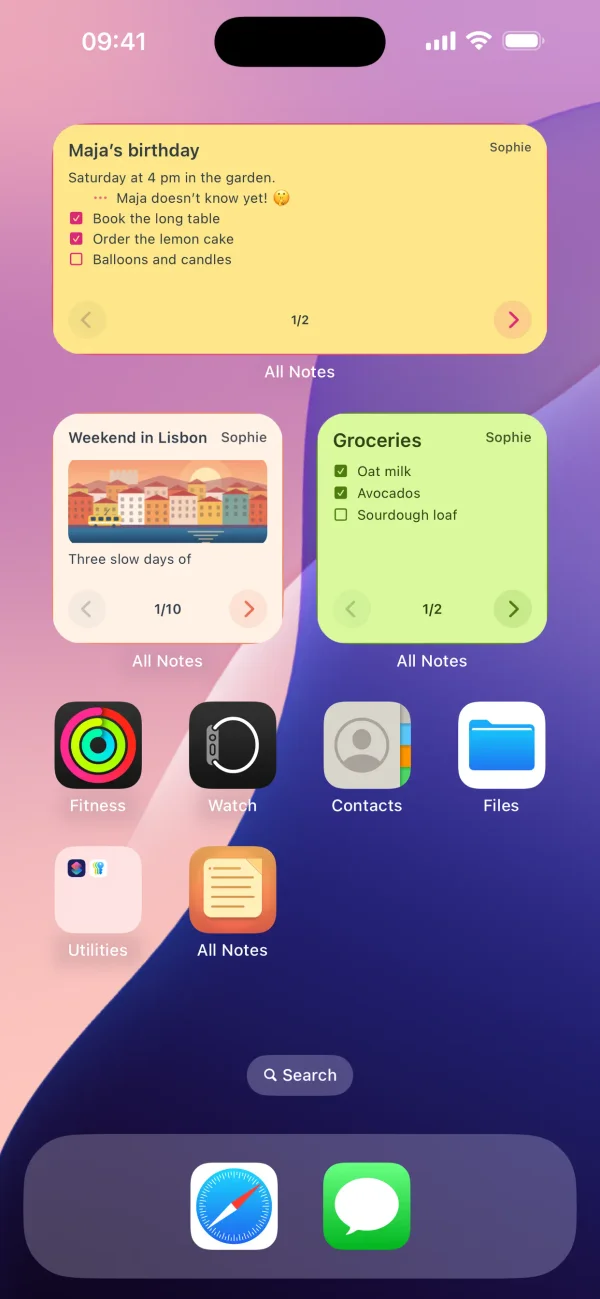
Add a widget in small, medium or large to keep a note in view — and tick off to-dos without opening the app.
All Notes is available in English, German, Spanish, Italian, Polish, Portuguese, Czech and Ukrainian.
What’s new
Version 1.4.1 · Nov 14, 2026
The toolbar in a note is easier to reach and easier to read. Every button is now big enough to hit, the ones that add something sit apart from the ones that switch a mode, and while the keyboard is up there is a button to put it away.
Opening a panel from the toolbar no longer pushes your note up the screen. The line you were writing stays where it is.
The text size shows the number it is setting and keeps to a readable range, and the fonts are listed by their own names. VoiceOver reads out every button in the row, and a note shared with you for reading shows its toolbar as unavailable instead of quietly ignoring a tap.
Sharing tidies up after itself. A note its owner deletes now goes from everyone's device, and when your access to a shared note ends, the copy on your device goes with it rather than staying behind with nothing to sync to.
App privacy
What Sebastian DErej declares on the App Store about how this app handles data.
-
Data not collected
The developer does not collect any data from this app.
Privacy practices may vary, for example with the features you use or your age.
Information
- Seller
- Sebastian DErej
- Category
- Productivity
- Version
- 1.4.1
- Updated
- Nov 14, 2026
- Released
- Apr 7, 2026
- Size
- 7.8 MB
- Requires
- iOS 17.0 or later
- Age rating
- 12+
- Price
- Free
- In-app purchases
- Yes
- Languages
- English, Czech, German, Italian, Polish, Portuguese, Spanish, Ukrainian
- Copyright
- © Sebastian Derej
You might also like
-
 Notes: Aesthetic NotesNotes, To-Dos & Image Widgets
-
 Quick Note: Sticky Notes MenuFloating Memo, Todo & Widget
-
 Sticky Notes - PostyTo-Do Lists, Notes & Widgets
-
 Color Notes - Journals, To DosPastel Color Coded Notepad
-
 Desktop Note - Notes & PhotosAlways-on-desktop sticky note
-
 Sync Sticky NotesDesktop Notes with Cloud Sync
-
 Notes: Color Notepad, NotebookNotes for Daily Tasks
-
 Notebook - Notes and ListsNotes App
-
 Notezilla - Notes & RemindersSimple & nice little app :)
-
 Plain Note: Notes WidgetSimple Notepad for Quick Memos