
OneTapMemo: Snippets & Prompts
Tap to copy your saved text
Designed for iPhone, iPad
In-app purchases
- Age rating4+
- CategoryProductivity
- DeveloperMao Otani
- LanguagesJapanese+ 1 more
- Size2.0 MB
Links to the official App Store page
Download.org hosts no file of OneTapMemo: Snippets & Prompts. The button opens its official App Store page, published by Mao Otani. Listing last checked on Nov 23, 2026.
Screenshots




About
"Typing this again?" Make it one tap.
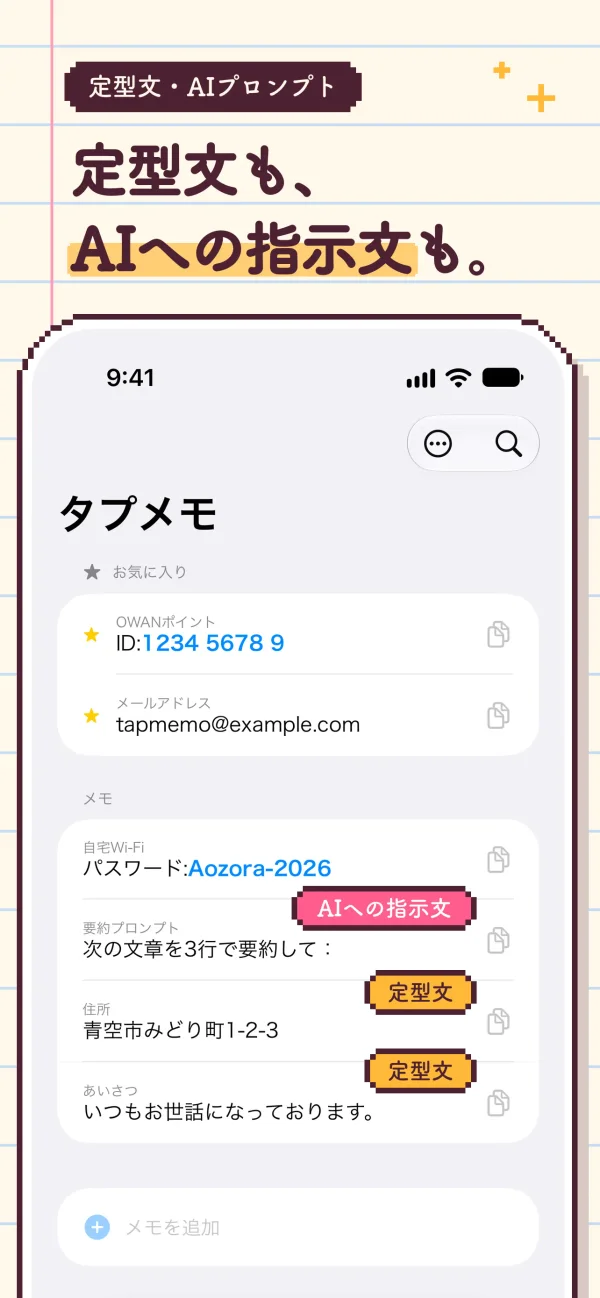
Email, address, canned replies, AI prompts — tap to copy.
OneTapMemo is a notepad made for copy and paste.
Think of the text you keep hunting down to copy, or typing out by hand. There's more of it than you'd expect.
Save it once, then just tap it in the list. A quick buzz, and it's on your clipboard.
WHO IT'S FOR
• You paste the same replies and templates into emails and chats, again and again
• You're tired of typing out your address, email, phone number, or member number
• You keep a set of AI prompts and want each one a tap away
• You have text that's too long for Text Replacement
• You just want the fastest way to copy something
FEATURES
● Tap to copy
Tap a memo and it's copied. A haptic tap and a green check tell you it worked.
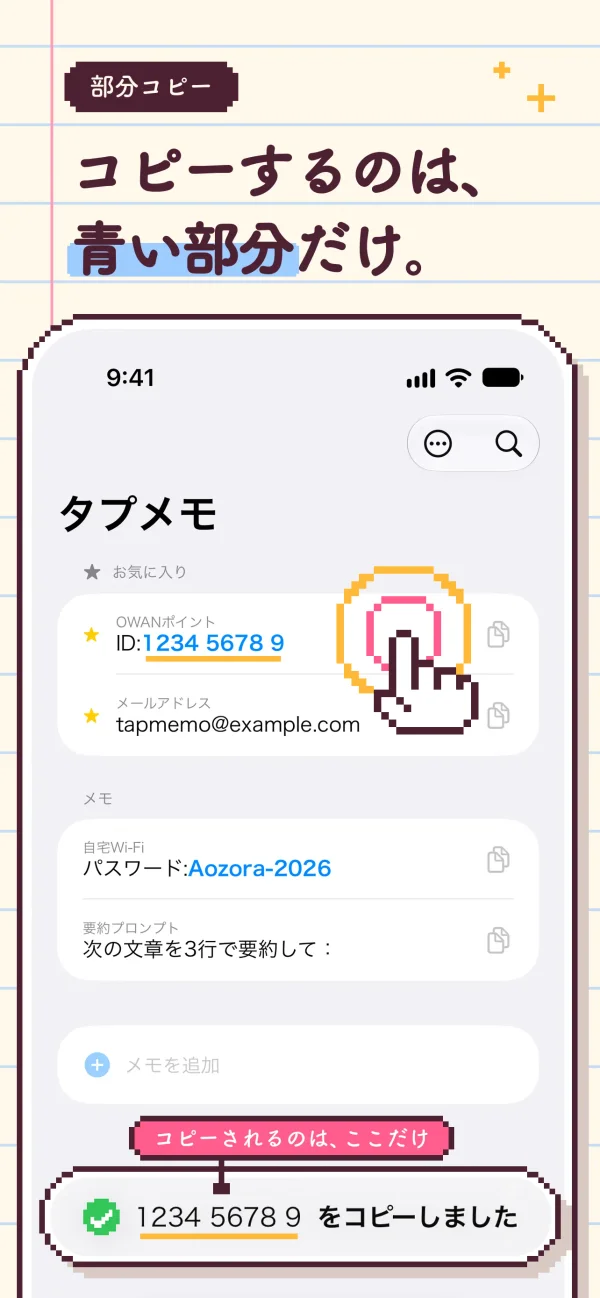
● Copy only the part you need
Write "Member no: 123456789" and copy just the number. The part shown in blue is what gets copied.
The label stays in the memo. Only the value gets pasted.
● Home Screen and Lock Screen widgets
Keep the memos you use most in a widget. Tap one and the app opens with that memo copied.
Small, medium, and large on the Home Screen, and you choose which memo goes in each slot (up to six in large).
● Favorites and "Most used"
Star a memo to pin it to the top, or let the list sort itself by how often you copy.
● Hide what you'd rather not show
Mark a memo as blind and the widget shows ***** instead, while the real text is still what gets copied.
Turn on Face ID / Touch ID protection and it's hidden in the app too, with a check before you copy or edit.
● iCloud sync
The same memos on iPhone and iPad, with nothing to set up. They follow you to a new device.
You can also export everything as JSON and import it back as a backup.
● Add from the Share menu
Select text in Safari or another app, tap Share, and choose OneTapMemo to save it on the spot.
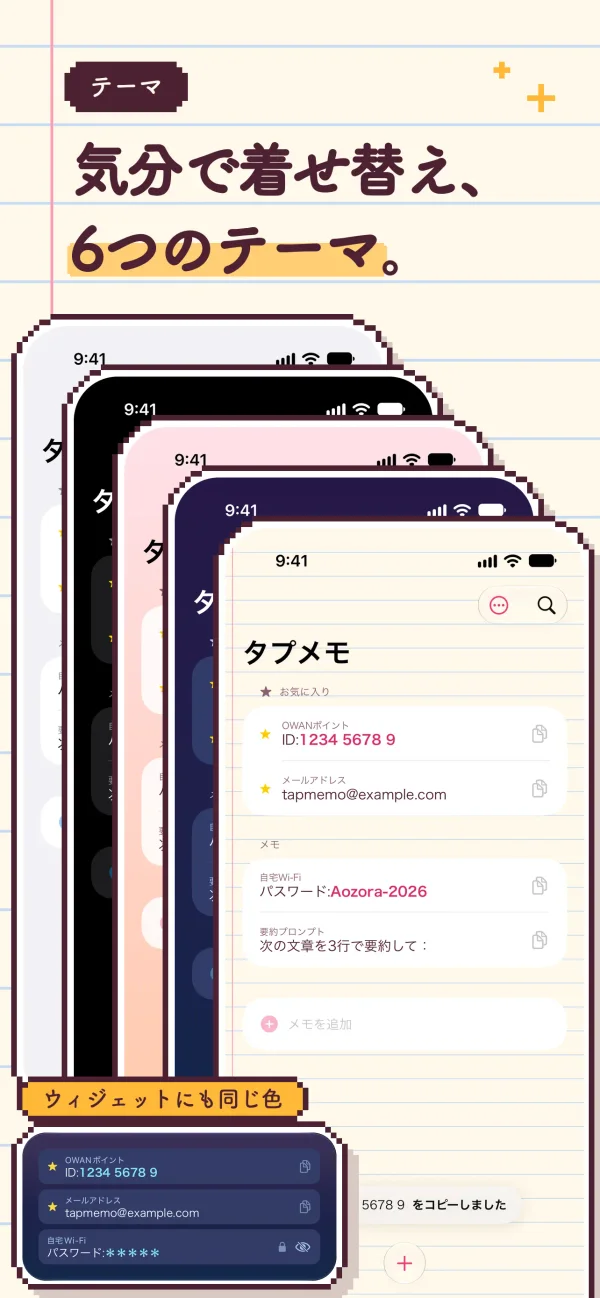
● Themes
Light and Dark, plus Sakura Sunset, City Pop, and Pixel Notebook, which matches the app icon.
Your widgets follow the theme, and there are three text sizes.
● And more
Search, drag to reorder, and Recently Deleted keeps removed memos for 30 days.
Supports iPhone Duo. Available in English and Japanese.
NO ADS, NO DATA COLLECTION
No ads, ever. No usage tracking.
Your memos stay on your device and in your own iCloud.
A NOTE ON PASSWORDS
OneTapMemo can hide memos and protect them with Face ID / Touch ID, but it does not fill in login screens (no AutoFill).
It isn't a replacement for a password manager. Think of it as a way to stop typing the same things by hand.
I built this because I wanted it myself.
If you like it, you can support development from inside the app.
What’s new
Version 1.5 · Nov 19, 2026
New
・A new theme, Pixel Notebook — the cream ruled notebook from the app icon. Your widgets follow it too.
・Copying now gets a pixel-art check mark, and the icon's double ring ripples out from the row you tapped.
・You can now rate and review the app from Settings. Requests are welcome there too.
Fixed
・Tapping a memo in the widget didn't copy it. Tapping now opens the app with that memo copied.
App privacy
What Mao Otani declares on the App Store about how this app handles data.
-
Data not collected
The developer does not collect any data from this app.
Privacy practices may vary, for example with the features you use or your age.
Information
- Seller
- Mao Otani
- Category
- Productivity
- Version
- 1.5
- Updated
- Nov 19, 2026
- Released
- Jul 24, 2026
- Size
- 2.0 MB
- Requires
- iOS 17.0 or later
- Age rating
- 4+
- In-app purchases
- Yes
- Languages
- Japanese, English
- Copyright
- © 2026 Pachiraworks
You might also like
-
 ぺたキー|コピペ&クリップボードキーボード管理Productivity
-
 定型文キーボード - PhraseBoardProductivity
-
 Roomy Calendar: Simple PlannerSimple, Clean & Easy Calendar
-
 Text Expander - Snippet KitPaste Saved Replies Anywhere
-
 Best Calendar - MagiCalEXSimple Smart Stylish Calendar
-
 CopyPaste - Paste Quickly NowCopy and paste quickly!
-
 AI文書スタイル変換 - 文章校正や面白い文章の作成Productivity
-
 QuickPaste - Clipboard ManagerCopy,Paste with Smart Keyboard
-
 宛名印刷 - はがき・封筒Productivity
-
 Migoo - Best Video AgentIdeas in, finished videos out