
Pralo: Pose & Composition Cam
Posing guides, filters & color
Designed for iPhone
$0.99
- Age rating4+
- CategoryPhoto & Video
- DeveloperYiwu Aolinai Network Technology Co., Ltd.
- LanguagesEnglish+ 46 more
- Size11.1 MB
Links to the official App Store page
Download.org hosts no file of Pralo: Pose & Composition Cam. The button opens its official App Store page, published by Yiwu Aolinai Network Technology Co., Ltd. Listing last checked on Nov 20, 2026.
Screenshots

About
“Take a picture of me.”
He took ten. Not one was worth posting.
Pralo was made for that sentence: it takes the composition a good photographer carries in their head and draws it right into the viewfinder.
【SHOOT BY TEMPLATE】
Pick a photo you love as your template — portrait, travel, photoshoot, couples, selfie, food. A silhouette of the person and a few guide frames appear in the viewfinder: where to stand, how much of the frame to fill, how high to hold the phone. Line it up and press the shutter.
Fade the silhouette as much as you like, or turn it off any time. Templates update online, and the community keeps adding new compositions. Offline, the built-in templates still work.
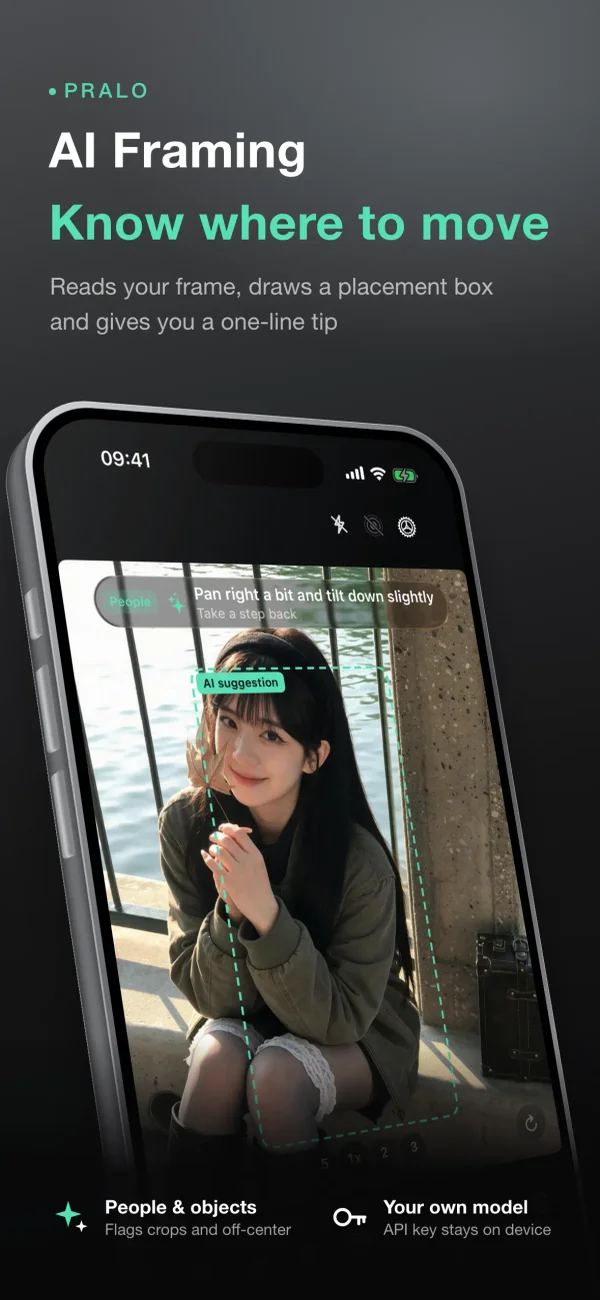
【COMPOSITION ADVICE: IT TELLS YOU WHERE TO MOVE】
Don't want a template? Let it take a look at your frame. It marks the suggested position and says it in plain words: “Take a step back.” “The subject is too far left.” Works for people and for still life.
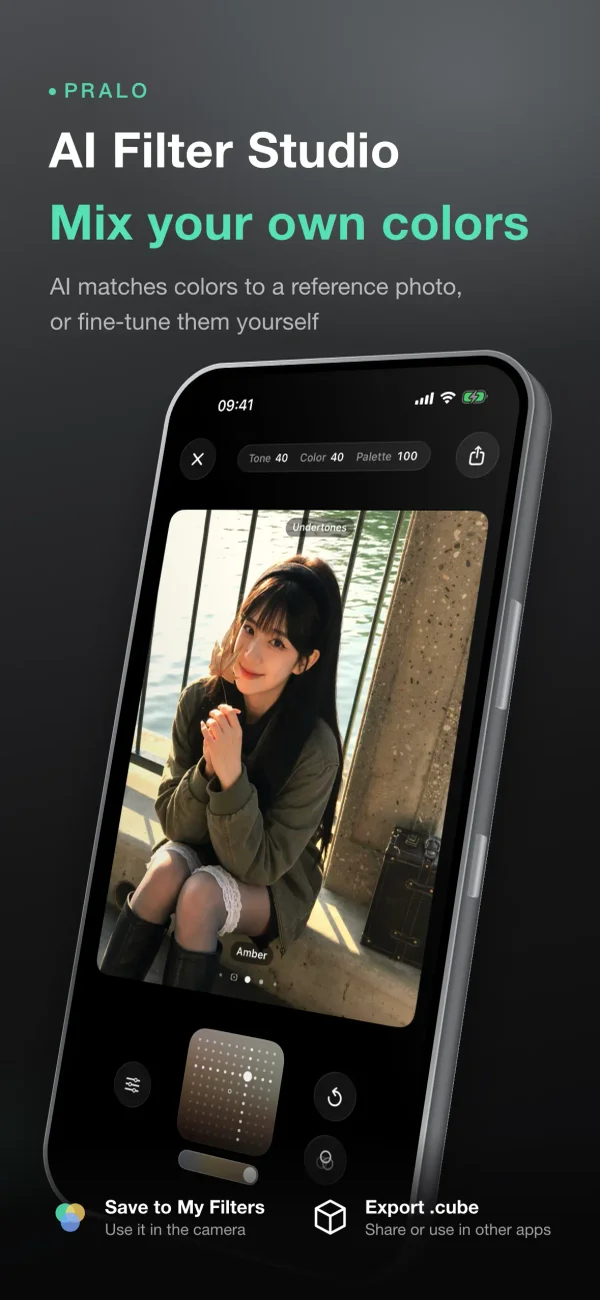
【FILTER STUDIO: MAKE THE COLOR YOURS】
Give it a reference photo you love and it matches the color for you. Or do it by hand — drag a fingertip and the tone follows.
Save the look as “My Filter” and use it straight from the camera: what you see in the viewfinder is the color of the final shot. You can also export it as a .cube file, to send to a friend or take into other software.
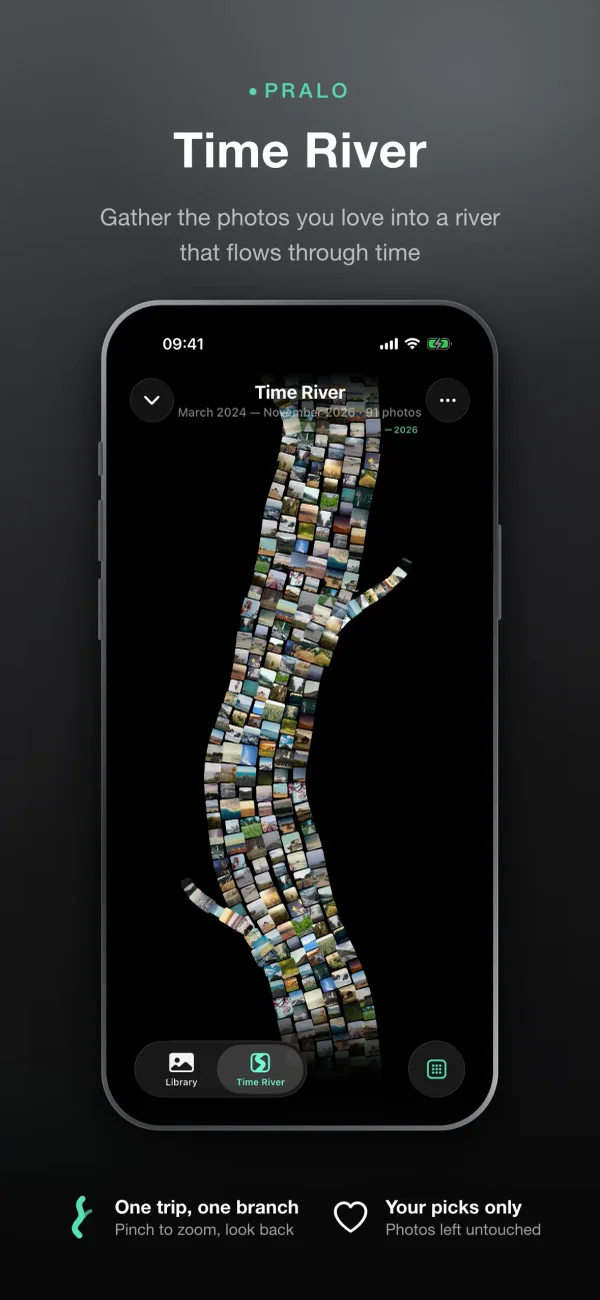
【TIME RIVER】
Add the photos you can't bear to delete, and they flow into a river ordered by the day they were taken. One trip becomes one tributary. Pinch to zoom and drift back downstream.
The river is your own list. It never touches your system Photos library.
【EVERYTHING A CAMERA SHOULD HAVE】
· Pro mode: ISO, shutter speed, white balance and focus, all in your hands
· Portrait blur, macro, Live Photos
· Grid, level, multiple aspect ratios
· 48 interface languages
【ABOUT COST】
Composition advice and reference-photo color matching run on a model service you provide yourself. How much you use and what it costs is between you and that provider. Pralo adds no markup and takes no cut. Leave it empty if you like: everything else works in full.
【ABOUT PRIVACY】
No sign-up, no account, no ads.
Your photos stay in your own library.
Your API key is stored only in this device's Keychain and is not synced to iCloud.
What’s new
Version 2.0 · Nov 14, 2026
First things first: getting the fundamentals right.
· Pro mode: manual shutter, ISO, white balance, focus and exposure compensation on a dial; switch lenses directly; burst shooting
· Portrait and macro: Portrait now uses the system Cinematic effect (iOS 26 and later, on supported devices); new Macro button
· AI Framing: connect your own AI model for live feedback on your frame, with composition and angle suggestions
· Time River: photos you add flow downstream by capture date, and busy months branch into tributaries
· AI Filter Studio: color-grade photos with your own AI model; 16 presets; match the tone of a reference photo; export as HEIC / JPEG / PNG
· Faster, smoother launch, and photos open and close right under your finger
App privacy
What Yiwu Aolinai Network Technology Co., Ltd. declares on the App Store about how this app handles data.
-
Data not linked to you
May be collected but is not linked to your identity.
- Contact info
- User content
- Identifiers
Privacy practices may vary, for example with the features you use or your age.
Information
- Seller
- Yiwu Aolinai Network Technology Co., Ltd.
- Category
- Photo & Video
- Version
- 2.0
- Updated
- Nov 14, 2026
- Released
- Sep 9, 2026
- Size
- 11.1 MB
- Requires
- iOS 16.0 or later
- Age rating
- 4+
- Price
- $0.99
- Languages
- English, Arabic, Bengali, Bulgarian, Catalan, Croatian, Czech, Danish, Dutch, Finnish, French, German + 35 more
- Copyright
- © 2026 Yiwu Aolinai Network Technology Co., Ltd.
You might also like
-
 HOOKCAM - Fishing CameraPre-Record & Voice Control
-
 UnSee - Photo PrivacyOn-Device Privacy Redaction
-
 MUVIC - Video & Vlog MakerVlog editing with AI BGM
-
 Halcyon CameraFilm soul. Pro controls.
-
 Timestamp Camera: CamTag GPSGeotag Photo, Map & Date Stamp
-
 SeloPhoto: Collage MakerPolaroid grids for Stories
-
 Vane: Video to Live PhotoLive Photos that play anywhere
-
 Picin: Photo RoamingOrganize, Collage & Memories
-
 Fliply: Photo ShuffleA playful camera roll
-
 Ocre: Photo to PaintingOil Paint & Brush Effects