
BeanDo: To Do List & Tasks
Planner, Reminders & Calendar
Designed for iPhone, iPad
Free · In-app purchases
- Age rating4+
- CategoryProductivity
- DeveloperChangLin Yang
- LanguagesEnglish+ 4 more
- Size112.8 MB
Links to the official App Store page
Download.org hosts no file of BeanDo: To Do List & Tasks. The button opens its official App Store page, published by ChangLin Yang. Listing last checked on Nov 18, 2026.
Screenshots


About
BeanDo is a personal productivity app that brings together task management, flexible reminders, habit tracking, calendar integration, and smart date recognition.
From everyday tasks to complex recurring schedules, BeanDo provides versatile tools to help you manage your personal life with ease.
Simple and Flexible Task Management
• Organize tasks with dates, times, tags, notes, priority markers, subtasks, attachments, and reminders.
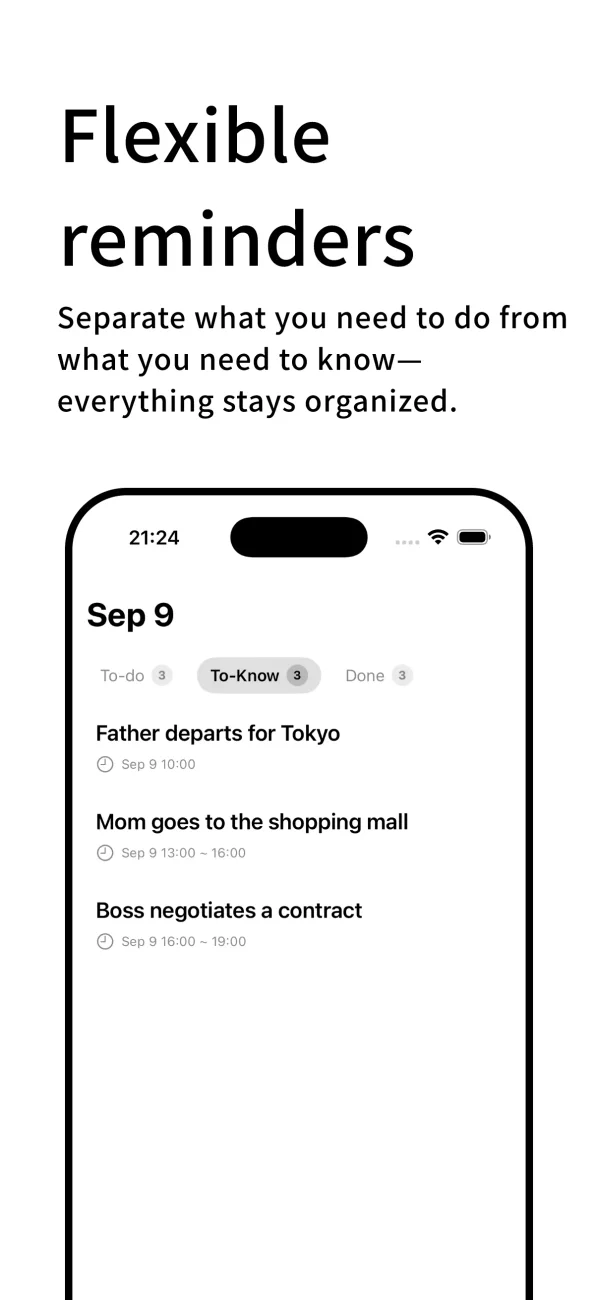
• Separate actionable tasks from information you simply need to know.
• View today's tasks, completed items, and important information in one place.
• Customize themes and reminder preferences.
Flexible Recurring Reminders
Choose from a wide range of reminder rules to fit different routines and needs.
• One-time, daily, weekly, monthly, and yearly reminders.
• Workday, public holiday, and adjusted working day reminders.
• A/B week schedules, specific dates, date ranges, and interval-based repeats.
• Multiple reminder times, snooze options, notifications, and enhanced system reminders.
Holiday and adjusted workday settings support Mainland China, Hong Kong, Japan, and South Korea, with more regions planned.
Habit Tracking
Build consistent habits and track your progress.
• Set target counts and tracking periods.
• Schedule habit reminders.
• Track consecutive check-ins.
• Review habit records and statistics.
Small Do · Quick Pickup Slips
Designed for parcel pickup and food collection, Small Do recognizes relevant information from screenshots and images, helping you organize pickup codes, identifiable brand names, and addresses into convenient slips.
• Quickly capture pickup information.
• View and present details when needed.
• Focused recognition scope: parcel pickup and food collection. Uncertain information is not arbitrarily classified.
Small Do processes information primarily on-device. Results depend on image content and recognition conditions.
Smart Date Recognition · Pro+
Enter natural language and let BeanDo recognize dates, times, and recurring rules. Tap recognized date information to apply the corresponding settings and create tasks more efficiently.
Smart Date Recognition works offline and is available with Pro+.
Built for iPhone
• Home Screen and Lock Screen widgets.
• Live Activities and Dynamic Island in supported scenarios.
• Siri and Shortcuts for supported actions.
• Optional calendar integration with your permission.
• Notifications and snooze options.
Availability depends on your iOS version and settings.
Local-First and Privacy-Focused
BeanDo's core task management features do not rely on a self-hosted server.
• Data is stored locally on your device by default.
• Use local features without enabling iCloud.
• Optionally sync supported data across devices through iCloud.
• Calendar access requires your permission.
Sync and attachment availability may depend on network connectivity, account settings, and available storage.
BeanDo Pro / Pro+
BeanDo includes core features, with optional subscriptions for additional capabilities.
• BeanDo: Essential personal task management.
• Pro: Advanced features included in the Pro subscription.
• Pro+: Pro benefits plus exclusive features such as Smart Date Recognition.
Current benefits, pricing, and free trial terms are shown in the app and on the App Store. Subscriptions renew automatically unless canceled. Manage or cancel your subscription in your Apple Account settings. If a free trial is offered, review its terms and cancel before it ends if you do not wish to continue.
Supported Languages
Simplified Chinese, Traditional Chinese, English, Japanese, and Korean.
Technical Support:
https://jishudao.github.io/BeanDo.github.io/BeanDoTechnicalSupportPage
Privacy Policy:
https://jishudao.github.io/BeanDo.github.io/BeanDoPrivacyPolicy
Terms of Service:
https://jishudao.github.io/BeanDo.github.io/BeanDoTermsOfService
Feedback: yangcongpro@gmail.com
X: @yangcong_pro
What’s new
Version 1.261111 · Nov 14, 2026
BeanDo Version 1.261111 Update
1.Updated some icons using the Lucide icon library, making the icons better reflect their functions.
2.Modified the Smart Date Recognition feature: automatic setting has been removed and replaced with manual setting by tapping the recognition button, avoiding the issue in previous versions where users trying to edit content accidentally triggered a time setting. Also optimized recognition for English, Japanese, and Korean, making it more accurate.
3.Optimized the "Selected Days" option in reminder methods for to-dos. You can now set individual reminder times for different dates (only one time can be set).
4.Optimized some known issues.
App privacy
What ChangLin Yang declares on the App Store about how this app handles data.
-
Data used to track you
May be used to track you across apps and websites owned by other companies.
- Identifiers
-
Data not linked to you
May be collected but is not linked to your identity.
- Identifiers
- Usage data
Privacy practices may vary, for example with the features you use or your age.
Information
- Seller
- ChangLin Yang
- Category
- Productivity
- Version
- 1.261111
- Updated
- Nov 14, 2026
- Released
- Feb 9, 2026
- Size
- 112.8 MB
- Requires
- iOS 17 or later
- Age rating
- 4+
- Price
- Free
- In-app purchases
- Yes
- Languages
- English, Japanese, Korean, Simplified Chinese, Traditional Chinese
- Copyright
- © 2026 杨昌霖. 保留所有权利。
You might also like
-
 Doggy CaptureCapture tasks as they happen
-
 Dunit: To Do & TaskYour Last To Do App
-
 待办鸭-待办清单 灵感&备忘Productivity
-
 HowLong: To-Do & RemindersLock Screen Tasks & Checklist
-
 Meow Planner: Pomodoro TimerStudy & Work With a Focus Cat
-
 GewuDo: To-Do & RemindersOne step at a time
-
 AI Quick Notes: Voice To-DoMemos, Tasks & Reminders
-
 Simply Things: To-Do ListQuick capture, daily focus
-
 WanList: To-Do List & PlannerAI goals, habits & reminders
-
 Firefly Todo: Calendar PlannerDrag Tasks, Log Time & Review