
BillLog: Itemized Spending
Receipt Scan, Tags & Budgets
Designed for iPhone
In-app purchases
- Age rating4+
- CategoryFinance
- Developer章铭 李
- LanguagesTraditional Chinese+ 9 more
- Size12.0 MB
Links to the official App Store page
Download.org hosts no file of BillLog: Itemized Spending. The button opens its official App Store page, published by 章铭 李. Listing last checked on Nov 13, 2026.
Screenshots





About
BillLog is a personal finance app built around itemized records, tags, and custom boards.
Instead of saving only a total, you can break a bill into individual items and record quantities, unit prices, categories, and prices after discounts—so you can see where your money actually went.
Categories answer “What kind of expense was this?” Tags connect expenses to real-life contexts. Group bills for a trip, home project, household, or subscription with tags, then use custom boards to follow spending, income, trends, and budget progress over time.
Key features:
- Receipt-assisted entry: scan a receipt or import an image from Photos to create an editable draft
- Itemized records: split one bill into multiple items with names, quantities, unit prices, and categories
- Discount allocation: distribute an order-level discount across items for more accurate totals and reports
- Tag organization: attach multiple tags to a bill and organize spending by household, trip, project, or any context you choose
- Custom boards: combine tags into focused boards for spending, income, trends, and budget progress
- Flexible insights: review your finances by date, category, and tag
- Recurring bills: manage daily, weekly, monthly, quarterly, or yearly expenses and get reminders before they are due
- Data control: sync with iCloud, import or export JSON and Excel files, and protect access with Face ID
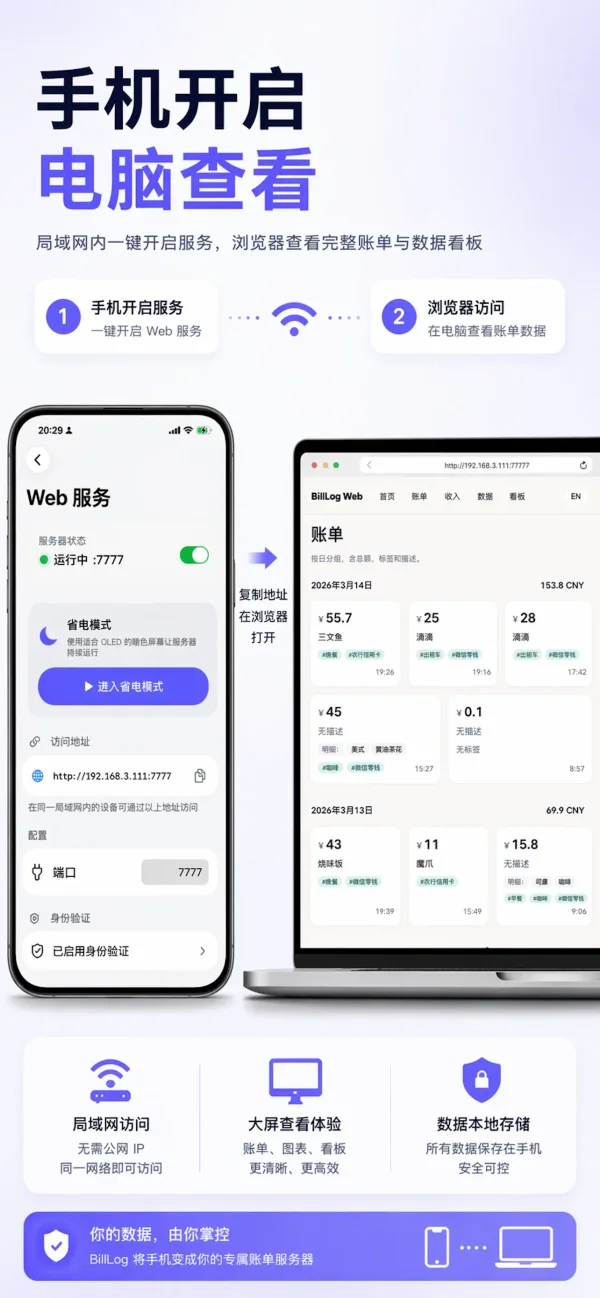
- Local web access: open the Web service to view bills, dashboards, and boards from a browser on the same network
Useful for:
- Grocery shopping: save individual items and keep categories accurate after discounts
- Travel and home projects: group expenses with tags and monitor the budget on a dedicated board
- Subscriptions and fixed expenses: track recurring charges and see what is coming up
- Household and project finances: review income and spending together in one context
From quickly saving a purchase to understanding a long-running project, BillLog turns everyday transactions into records you can actually review.
Terms of Use:
https://www.apple.com/legal/internet-services/itunes/dev/stdeula/
Privacy Policy:
https://myqonnt.github.io/BillLog/privacy-policy.html
What’s new
Version 0.6.1 · Sep 17, 2026
- Prevented duplicate captures and imports while a receipt is being recognised, avoiding overlapping tasks and conflicting results.
- Dashboard totals for 1, 7 and 30 days now refresh automatically after bills are added, edited, deleted or imported.
- Fixed an issue where Face ID could remain stuck after an authentication error.
- Improved scanning camera reliability and VoiceOver descriptions for recurring bill statuses.
App privacy
What 章铭 李 declares on the App Store about how this app handles data.
-
Data not collected
The developer does not collect any data from this app.
Privacy practices may vary, for example with the features you use or your age.
Information
- Seller
- 章铭 李
- Category
- Finance
- Version
- 0.6.1
- Updated
- Sep 17, 2026
- Released
- Mar 23, 2026
- Size
- 12.0 MB
- Requires
- iOS 18.0 or later
- Age rating
- 4+
- In-app purchases
- Yes
- Languages
- Traditional Chinese, German, Japanese, French, Ukrainian, Simplified Chinese, Italian, English, Spanish, Korean
- Copyright
- © @BillLog
You might also like
-
 TallyScan: Price TrackerGrocery receipts & unit prices
-
 YueYu: Budget & SavingsMake room for what matters
-
 Qinghe Ledger: Voice & BillsVoice Entry & Bill Import
-
 TapSpend: Money Made SimpleAI, Budgets & Multi-Currency
-
 Daybook: Expense TrackerAI Receipts, Budget & Splits
-
 Orvia: Smart Money TrackerBudget, Assets & Insights
-
 MyVault: Personal Asset VaultTrack Value, RWA & Lifecycle
-
 Asset Packet-Asset ManagerClear Card-based Asset Manager
-
 Artos Budget & Expense TrackerRead bank statements, no login
-
 Expense Tracker: TrackoraExpense Tracker & Budget