Bimmer Telemetry
Live BMW data without adapter
Designed for iPhone, iPad
In-app purchases
- Age rating4+
- CategoryUtilities
- DeveloperDumitru Davidov
- LanguagesRussian+ 32 more
- Size12.4 MB
Links to the official App Store page
Download.org hosts no file of Bimmer Telemetry. The button opens its official App Store page, published by Dumitru Davidov. Listing last checked on Nov 21, 2026.
Screenshots

About
SEE YOUR BATTERY’S CURRENT CAPACITY
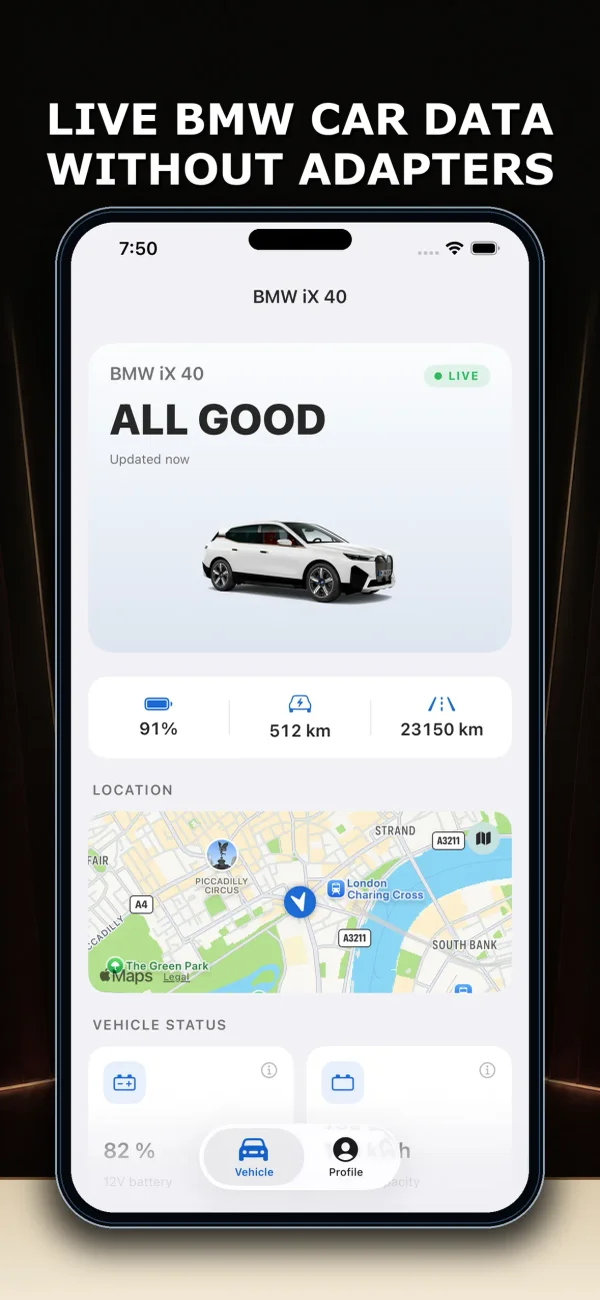
On compatible electric and plug-in hybrid BMW models, see the current usable battery capacity in kWh and live charging power – not just a percentage.
Bimmer Telemetry is made for more than EVs. Petrol, diesel, hybrid or electric: view every supported signal your vehicle provides, from tyres, doors and climate to location, actual mileage and upcoming service.
No OBD dongle, cable or extra hardware is needed. Connect remotely through your own BMW CarData account and turn official vehicle signals into a clear, elegant dashboard on iPhone, iPad and iPhone Duo.
SEE CHARGING AS IT HAPPENS
• Current charging power in kW
• AC or DC charging status
• Time to full and target charge
• Charging-port status
UNDERSTAND YOUR BATTERY
• Current usable battery capacity in kWh
• State of charge and battery health
• High-voltage and 12 V battery data
• Electric range, consumption and mileage
CHARGING HISTORY AND TYRE HEALTH
• Every charging session from the last 30 days: energy added, duration, peak power, start and end charge, and where you charged
• Smart Maintenance tyre diagnosis: wear, defects, season, dimensions and the mileage left until replacement
• Saved charging locations with their charging windows, current limits and plug type
• Vehicle details: model, series, body type, colour, build date and gross battery capacity
APPLE INTELLIGENCE AND SIRI
• A two-sentence, plain-language summary of your car’s state, generated entirely on device with Apple Intelligence – nothing leaves your iPhone (iOS 26 or later on supported devices)
• Ask Siri “Check my BMW in Bimmer Telemetry”, or add the action to Shortcuts, Spotlight and the Action button, and hear battery, range and charging state in seconds
MADE FOR EVERY SCREEN
• Arrange the dashboard tiles in your own order by dragging (iOS 27)
• A two-column dashboard on iPad and on iPhone Duo when unfolded; the layout follows the window as you fold, split or resize
• Toolbars and the tab bar tuck away while you scroll, so the data stays front and centre
MORE THAN A CHARGING SCREEN
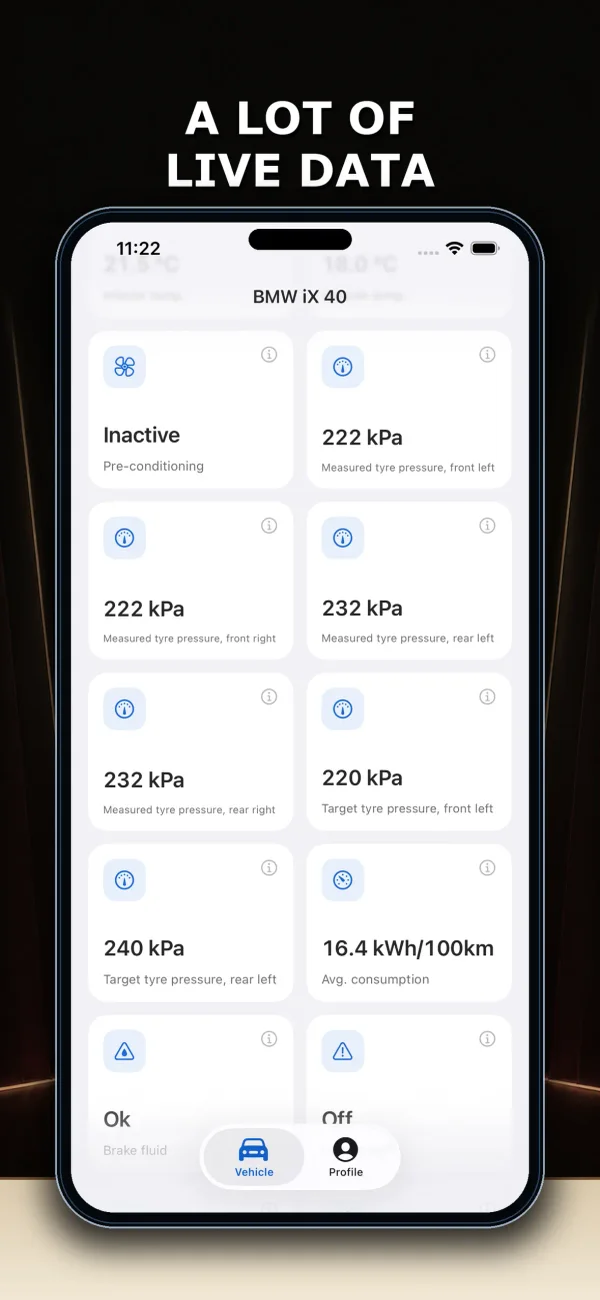
Check doors, windows, locks, trunk, hood and alarm status. View measured and target tyre pressure, tyre temperature, climate data, cabin and exterior temperature, and more. See your vehicle on a live map and open its location in Apple Maps.
EVERY VALUE EXPLAINED
Tap any data point for a description based on BMW’s Telematics Data Catalogue. No more guessing what a signal means.
PRIVATE BY DESIGN
There are no developer accounts, ads, analytics or tracking SDKs. Vehicle data travels directly between your device and BMW CarData and is never sent to our servers. Tokens stay in the iOS Keychain, cached data stays on your device, and the Apple Intelligence summary is computed on device.
TRY BEFORE YOU CONNECT
Explore a realistic BMW iX in free Demo Mode – including charging history, tyres and vehicle details – no account required. Bimmer Telemetry Pro unlocks your own vehicle with a one-month free trial, followed by a monthly subscription.
SETUP AND COMPATIBILITY
Connecting your vehicle requires your own BMW CarData account and a free Client ID. Step-by-step guidance is included. Availability varies by market, and the data BMW provides varies by model: charging history, tyre diagnosis and charging locations appear when your vehicle supports them. CarData supports compatible BMW, MINI, Rolls-Royce and Toyota Supra vehicles; electrified models provide the richest experience. Available in 14 languages.
Bimmer Telemetry is an independent app and is not affiliated with or endorsed by BMW AG or the other vehicle manufacturers mentioned.
Terms of Use (EULA): https://www.apple.com/legal/internet-services/itunes/dev/stdeula/
What’s new
Version 2.2 · Nov 17, 2026
• Everything at once: the first time you open your vehicle, the app loads all values BMW has for it — no more waiting for the car to report a change. Refresh manually anytime (BMW allows 50 requests per day).
• New “Service & messages” screen: Check Control messages, service items and ConnectedDrive contracts, where your vehicle provides them.
• More details: battery health, lock status, factory options and the last visit at each charging location.
• Fixed: charging history not loading, wrong units and battery capacity, untranslated values and an inaccurate summary.
• New in Settings: share diagnostic data with support — VIN, location and addresses are removed.
App privacy
What Dumitru Davidov declares on the App Store about how this app handles data.
-
Data not collected
The developer does not collect any data from this app.
Privacy practices may vary, for example with the features you use or your age.
Information
- Seller
- Dumitru Davidov
- Category
- Utilities
- Version
- 2.2
- Updated
- Nov 17, 2026
- Released
- Jul 8, 2026
- Size
- 12.4 MB
- Requires
- iOS 18.6 or later
- Age rating
- 4+
- In-app purchases
- Yes
- Languages
- Russian, Bulgarian, Slovenian, English, Arabic, Hungarian, Dutch, Greek, Danish, Hebrew, Spanish, Italian + 21 more
- Copyright
- © Dumitru Davidov
You might also like
-
 BimmerDash: OBD2 GaugeReal-time performance monitor
-
 SmartScanPro BimmerOBD2 Code Scanner
-
 BimmerObd - Link Code ReaderRead fault codes & live data
-
 VibeScan - OBD2 Gauges ScannerLive ECU Data & DTC Scanner
-
 DPF Monitor for BMWDiesel DPF Tracking Tool
-
 TireWise: Pressure & TreadTire pressure & tread log
-
 Tune-Up ConnectECU logger and drag timer
-
 OpenBimmerLive gauges, logs, fault codes
-
 WETOX-V2L/V2H PowerShareVehicle to Everything
-
 TokenWise - AI Quota TrackerUsage limits, resets & widgets