
- Age rating4+
- CategoryProductivity
- DeveloperBlydan Construction
- Size9.3 MB
Links to the official App Store page
Download.org hosts no file of Blydan Daily. The button opens its official App Store page, published by Blydan Construction. Listing last checked on Nov 23, 2026.
Screenshots
About
Blydan Daily turns the notes you take on site into a finished daily field report, so you never have to sit down and write one at the end of the day.
DROP NOTES ALL DAY
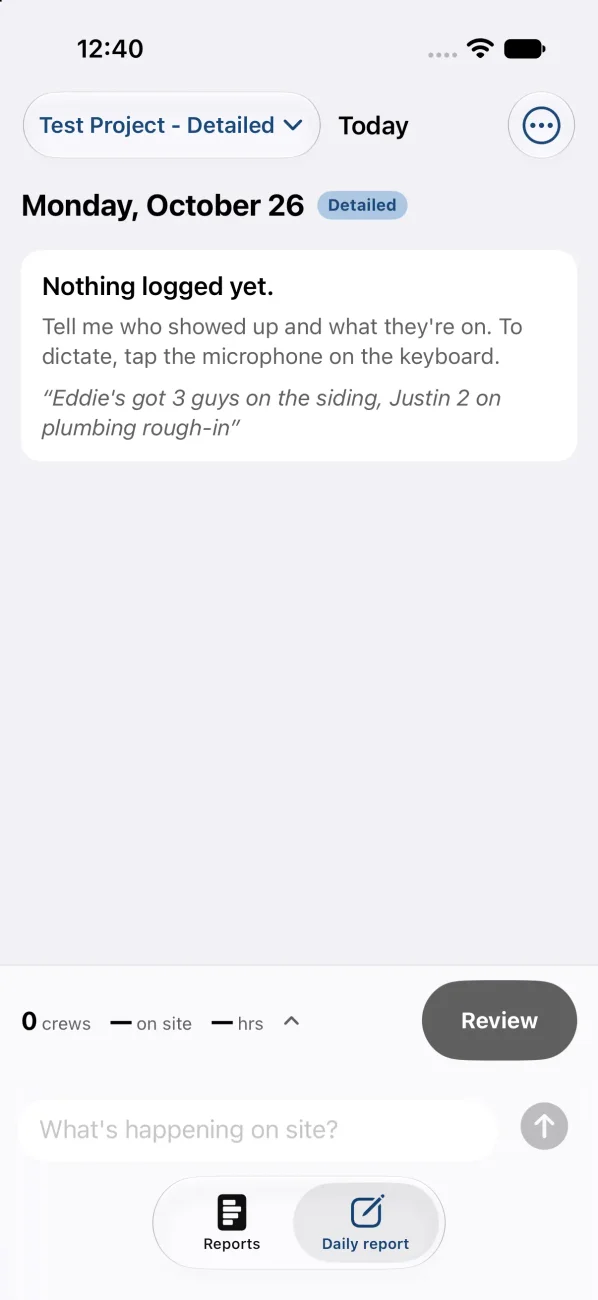
Type or dictate whenever something happens: who showed up, what got poured, which delivery came late. You don’t need to start or set up a report. The app knows what day it is and which project you’re on. A note typed at 12:40 a.m. after a night pour still counts toward the day the work happened.
YOUR REPORT WRITES ITSELF
As you add notes, an AI assistant builds them into your daily report. It fills in crews, equipment, materials, weather, safety, open items and look-ahead. It can also look up today’s weather, yesterday’s crew roster and past reports. You can edit any field yourself at any time.
YOU APPROVE EVERY REPORT
The assistant drafts, but it never files. Before anything is submitted you see the exact report that will be saved, and nothing gets filed until you tap Submit.
WORKS WITHOUT SIGNAL
Take notes and file reports from a basement, a tunnel or a remote site. Your notes are saved on the phone the moment you write them. Reports filed offline send themselves when you reconnect, and they’re never filed twice.
YOUR NOTES ARE SAFE
Every note is saved as you go. If the app crashes, gets closed or the battery dies, your day’s notes are still there.
PRIVATE DICTATION
Voice dictation happens entirely on your iPhone. Your recordings never go to an outside transcription service.
TRACK PROGRESS ON LARGE JOBS
For jobs with subprojects, each one starts with yesterday’s percent complete, so you only change the numbers that moved. If a number goes down, the app points it out on the review screen.
STAY ON SCHEDULE
Weekday reminders at 6:30 a.m. (“Begin collecting notes”) and 3:30 p.m. (“Finish report”). Once you file, the rest of the day’s reminders turn off. Home Screen and Lock Screen widgets show today’s progress at a glance, and a Live Activity tracks your report while it’s being filed.
BUILT FOR THE FIELD
Easy to use one-handed on iPhone
Notes and your report side by side on a larger iPad
Full light and dark mode support, readable outdoors and at night
Sign in once with your company Microsoft account
What’s new
Version 1.8 · Nov 20, 2026
5 days a week to keep your streak! Streaks continue through weekends, holidays, and days off.
App privacy
What Blydan Construction declares on the App Store about how this app handles data.
-
Data linked to you
May be collected and linked to your identity.
- Location
- Contact info
- User content
- Identifiers
- Diagnostics
-
Data not linked to you
May be collected but is not linked to your identity.
- Diagnostics
Privacy practices may vary, for example with the features you use or your age.
Information
- Seller
- Blydan Construction Co. LLC
- Category
- Productivity
- Version
- 1.8
- Updated
- Nov 20, 2026
- Released
- Nov 5, 2026
- Size
- 9.3 MB
- Requires
- iOS 17.0 or later
- Age rating
- 4+
- Price
- Free
- Copyright
- © 2026 Blydan Construction Co LLC
You might also like
-
 Smart AI Note Taker: MemoWaveAI Summary, Ask AI Transcriber
-
 BIM 360 Field for iPhonesProductivity
-
 Vibe CanvasWrite and Draw, Together
-
 Videoscope iProductivity
-
 Claude Duet by AnthropicYour proactive work agent
-
 Pocket - AI Personal AssistantYour AI Personal Assistant
-
 Device HelpYour Device, Simplified
-
 BluebeamField app for PDF workflows
-
 RoomScan Pro LiDAR floor plansThe easy way to measure rooms
-
 Google AI Edge EloquentUnlimited, no cost dictation