Category Tabs for Google Keep
Best organize your Keep notes
Designed for iPhone, iPad, Mac, iPod touch
$0.99
- Age rating4+
- CategoryProductivity
- DeveloperCarlos Jeurissen
- LanguagesEnglish
- Size4.5 MB
Links to the official App Store page
Download.org hosts no file of Category Tabs for Google Keep. The button opens its official App Store page, published by Carlos Jeurissen. Listing last checked on Nov 12, 2026.
Screenshots
About
Tired of wasting time looking look through and re-sorting all of your notes on Google Keep?
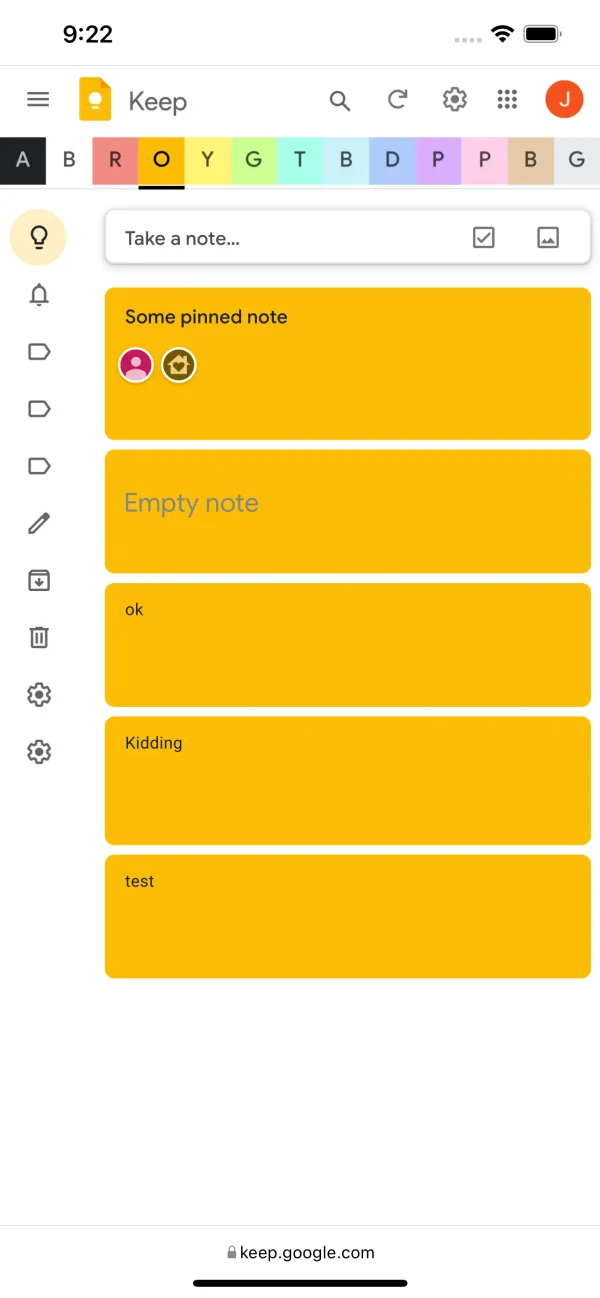
With Category Tabs for Google Keep™, you can now sort your new and existing notes by color. When you want to view the notes you have sorted by color, simply click on the note color you wish to view. If you would like to view your you entire collection of notes/checklists, there is an “All” option next to the color options (this option is set by default).
Category Tabs for Google Keep™ seamlessly integrates into the page and the options to look at your notes/checklists in list view or gird view is still available. The ability to post a quick note/list/picture is still available as well and is still placed in the same spot as it usually is. This application supports all the colors offered by Google Keep.
You can access the settings by opening the menu in google keep, and hit “Customize Categories”
What’s new
Version 20.17.0 · Oct 31, 2026
Fixed layout issues. Improved accessibility.
Learn more: https://apps.jeurissen.co/category-tabs-for-google-keep/whatsnew
App privacy
What Carlos Jeurissen declares on the App Store about how this app handles data.
-
Data not collected
The developer does not collect any data from this app.
Privacy practices may vary, for example with the features you use or your age.
Information
- Seller
- Carlos Jeurissen
- Category
- Productivity
- Version
- 20.17.0
- Updated
- Oct 31, 2026
- Released
- Dec 10, 2020
- Size
- 4.5 MB
- Requires
- iOS 15.0 or later
- Age rating
- 4+
- Price
- $0.99
- Languages
- English
- Copyright
- © 2021-2026 Jeurissen Apps
You might also like
-
 FaceDial PRO Photo DialerEasy Photo Dialer for FaceTime
-
 NotesHub: Notes, Kanban BoardsYour second brain in Markdown
-
 palililiA quieter to-do list
-
 Goaltender | Habit TrackerPlan Your Day. Build Goals.
-
 Reminder: Daily Tasks & AlarmTo-do list & task manager
-
 Core: AI Writing StudioReads your work. Real sources.
-
 MDflow - Mobile MarkdownSpace for humans and AI agents
-
 Daymark PlannerNavigate your day
-
 SMSReader - PDF/EPUB ReaderRead books & docs fast, easily
-
 Makingmyself AppTrue stories for your goals