Chord Progression Lab
Music theory chord progression
Designed for iPhone, iPad
Free · In-app purchases
- Age rating4+
- CategoryMusic
- DeveloperDavid Mickey
- LanguagesEnglish
- Size2.5 MB
Links to the official App Store page
Download.org hosts no file of Chord Progression Lab. The button opens its official App Store page, published by David Mickey. Listing last checked on Nov 25, 2026.
Screenshots

About
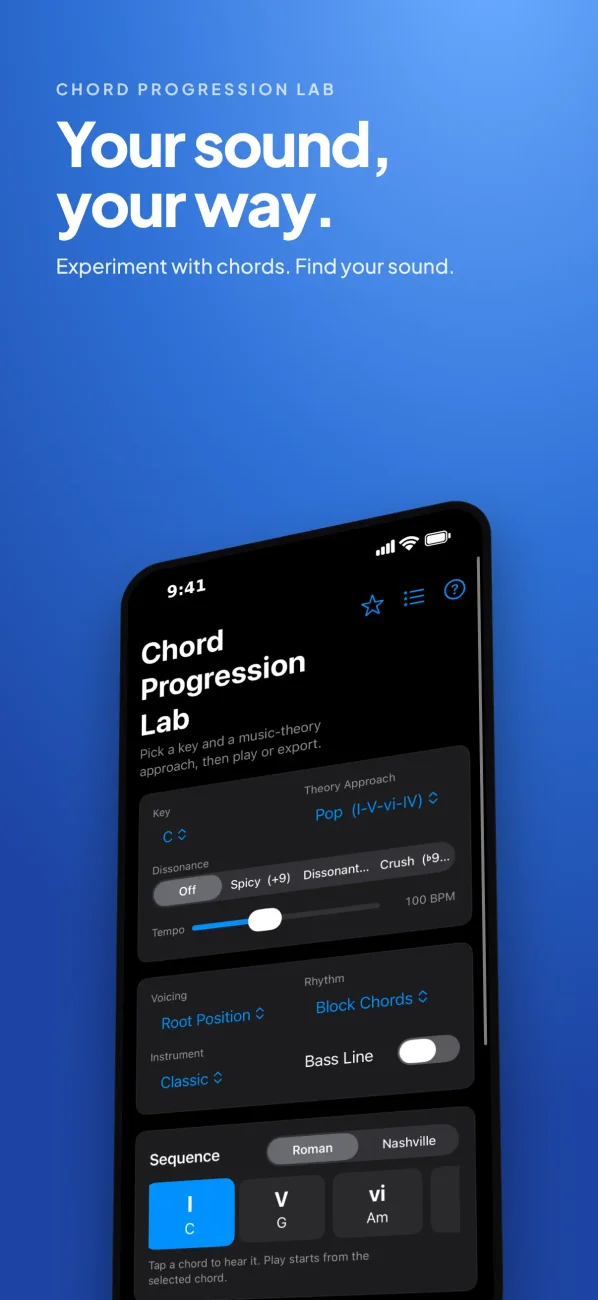
Chord Progression Lab is a music-theory sketchpad. Pick a key and a style, and the app builds a playable chord progression right away. You can hear it, see it on a piano keyboard, and export it as a MIDI file.
It works for songwriters hunting for an idea, students learning how chords fit together, and anyone curious how a flamenco progression differs from a doo-wop one.
EXPLORE 24 MUSICAL STYLES
- Pop, Doo-Wop, Pachelbel, 12-Bar Blues, Jazz ii-V-I, Circle of Fifths, Andalusian, Epic Minor
- Rock and Punk power-chord patterns
- Asia: Indian Raga, Arabic Maqam, East Asian Pentatonic, Japanese Hirajoshi, Gamelan
- Europe: Klezmer, Flamenco, Celtic, Slavic Minor, Balkan 7/8
- Americas, Africa and Pacific: Highlife, Bossa Nova, Reggae, Hawaiian Slack Key
- Avant-Garde: atonal quartal chords and clusters
SEE AND HEAR EVERY CHORD
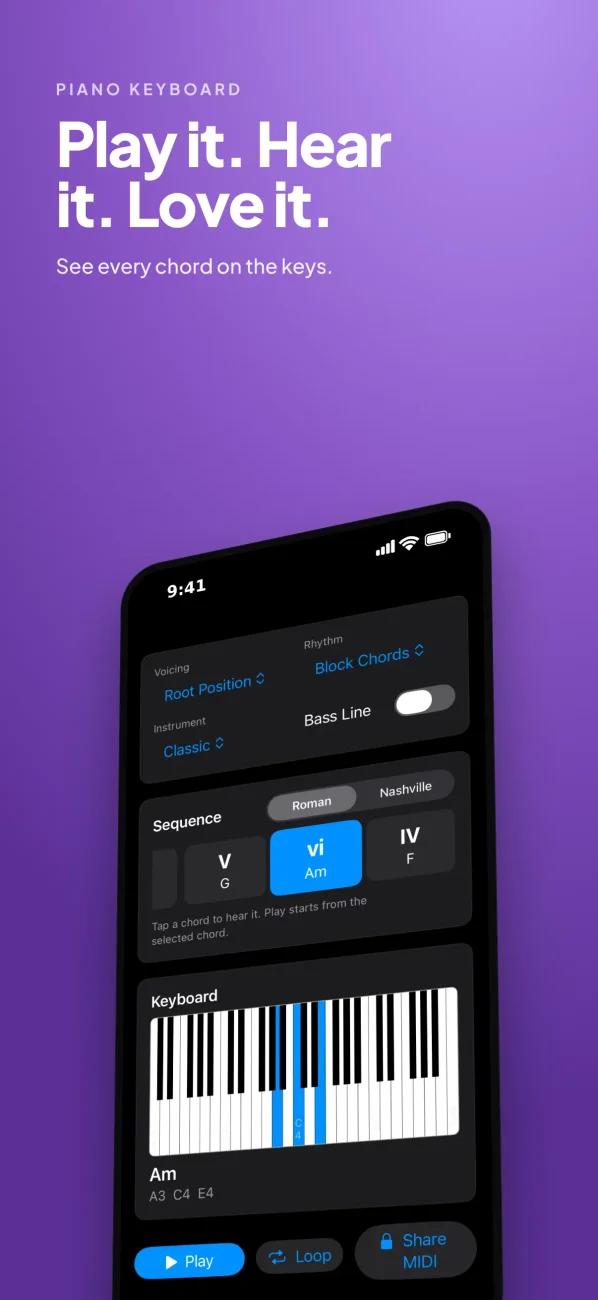
- Tap any chord to hear it, or press Play to run the whole progression
- The on-screen piano highlights each chord's notes as it sounds
- Roman numerals or Nashville numbers show each chord's role in the key
- Loop playback to practice or write over a progression
SHAPE THE SOUND
- All 12 keys
- Tempo from 40 to 200 BPM, with a suggested tempo for each style
- Dissonance control, from clean triads to a flat 9 and sharp 11 "Crush" setting
- Voicings: root position, inversions, open spread, and smooth voice leading
- Rhythms: block chords, arpeggio, strum, and off-beat chops
- Six built-in instruments: Classic, Piano, Electric Piano, Organ, Pad and Pluck
- Optional bass line
SAVE AND SHARE
- Save your favorite progressions and reload them any time
- Export a standard MIDI file to GarageBand, Logic, Ableton, FL Studio or any DAW
PRIVATE AND OFFLINE
Everything runs on your device with a built-in synthesizer. No account, no internet connection, no recording, no tracking.
FREE TO TRY, UNLOCK ONCE
Download free with 6 styles (Pop, Doo-Wop, Pachelbel, 12-Bar Blues, Rock, Circle of Fifths) and the Off and Spicy dissonance levels. A single one-time purchase, "Unlock Everything," adds all 24 styles, the Dissonant and Crush levels, and MIDI export. There is no subscription, and it is yours forever.
What’s new
Version 1.1 · Nov 25, 2026
What's New in Chord Progression Lab
Chord Progression Lab now lets you explore, shape, and save your progressions.
• Tap any chord to hear it and see it on the keyboard. The sequence scrolls to follow along.
• Play from anywhere. Select a chord and press Play to start there. Tap a chord during playback to jump to it.
• Loop your progression to keep it going.
• Chord names on the keyboard. See the chord and its notes spelled out under the keyboard.
• Voicings. Choose root position, inversions, open spread, or smooth voice leading.
• Rhythm patterns. Choose block chords, arpeggio, strum, or off-beat chops. Add an optional bass line.
• Six instrument sounds: Classic, Piano, Electric Piano, Organ, Pad, and Pluck.
• Roman or Nashville numbers. Switch how chords are labeled.
• Save your favorites. Name a progression and bring it back anytime, with all its settings.
• MIDI export updated. Shared files now include your rhythm, bass line, and instrument.
• Accessibility improvements. Better VoiceOver support and Reduce Motion support.
App privacy
What David Mickey declares on the App Store about how this app handles data.
-
Data not collected
The developer does not collect any data from this app.
Privacy practices may vary, for example with the features you use or your age.
Information
- Seller
- David Mickey
- Category
- Music
- Version
- 1.1
- Updated
- Nov 25, 2026
- Released
- Jun 22, 2026
- Size
- 2.5 MB
- Requires
- iOS 26.5 or later
- Age rating
- 4+
- Price
- Free
- In-app purchases
- Yes
- Languages
- English
- Copyright
- © 2026 Mickey
You might also like
-
 Worship Chords:Piano TheoryLearn Church Chords & Scales
-
 Jazz Standards ChecklistJazz Repertoire Checklist App
-
 Flipspark: Studio Prompt CardsInspiration for Music Makers
-
 Tunes - Jazz RepertoirePractice tracker for standards
-
 Mediant: Chords & Harmonizeby Songdeed
-
 Onset – Singing TeleprompterSetlist & chords for your band
-
 RiffAlly Jam: Guitar PracticeSolo with scales & live chords
-
 Harmony Lab:Chord ProgressionsExplore chords and harmony
-
 Jazz Improv Practice & ScalesRandom key, tempo & mood cards
-
 43 Electro Swing: Jazz BandChaos-driven Song Generator