
- Age rating4+
- CategoryPhoto & Video
- DeveloperSPLYZA Inc.
- LanguagesEnglish+ 11 more
- Size49.3 MB
Links to the official App Store page
Download.org hosts no file of Clipstro - auto strobe motion. The button opens its official App Store page, published by SPLYZA Inc. Listing last checked on Nov 20, 2026.
Screenshots
About
#1 iPad Photo & Video App in Japan and Spain, Austria, Denmark, Czech Republic!
Added Apple Watch support for all phases of the recording and conversion processes.
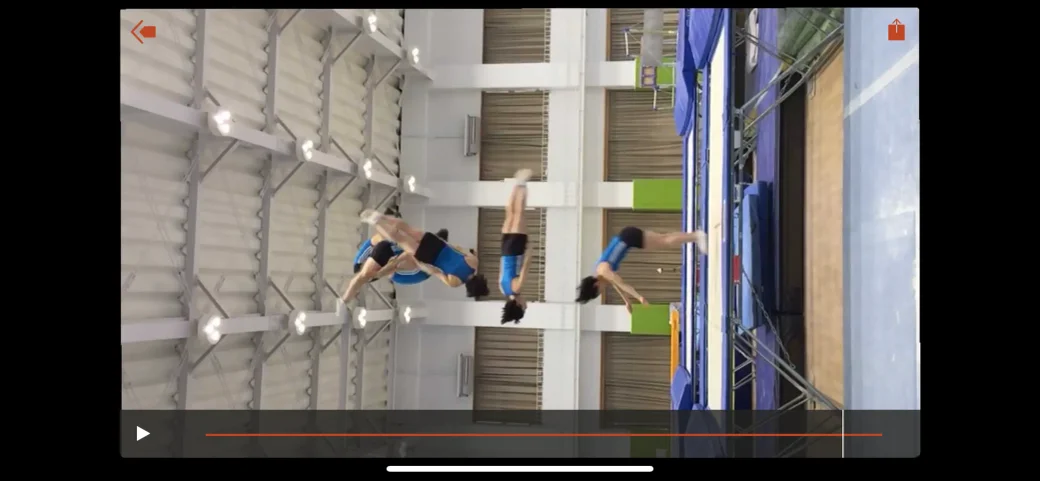
With Clipstro, you can record 5 seconds of video and it will automatically convert it into an actionshot video.
Clipstro allows you to create a video, similar to motion sequence images, hassle-free. Yon don't even need a tripod.
Enjoy using the app for sports, checking your posture, or videos of cars, bikes, etc.
The video you created can be posted on Facebook, or you can save it to the photo library in order to upload it on video-sharing apps such as Instagram, Vine, LINE, RIDERS.
TIPS FOR GETTING THE BEST RESULTS:
1) Keep the camera as still as possible. In cases where the camera needs to follow an action, move the camera slowly and no more than 45 degrees.
2) The background should be distinctive. Water, snow, or sky backgrounds will likely not produce desired results. Also, avoid dark places.
3) Because actions performed in place will overlap, objects and actions being recorded should move across the video frame.
IN-APP PURCHASES:
The following options are available without In-app Purchase
Interval (smaller values mean closer strobe intervals): 2, 4
Strobes (number of strobes to keep): All, 5
Objects: 1, Many
Addition values available through In-app Purchase (Interval and Strobes options sold separately)
Interval: 3, 6, 8
Strobes: 3, 7, 10
THE RESOLUTION OF THE VIDEO AFTER CONVERTED:
Clipstro supports devices running iOS 7 or later, but the resolution for the video may vary depending on the memory capacity of the device.
Devices with less than 512 MB of RAM ... 640X360
e.g.: iPhone4/4s, iPad2, iPad mini 1st, iPod touch 5th
Devices with more than 1GB of RAM ... 1280X720
e.g.: iPhone5/5c/5s, iPad 3rd/4th/Air, iPad mini Retina
CONVERTING TIME:
Clipstro supports devices running iOS 7 or later, but a newer and faster device requires less time to convert.
iPhone 4s, 70 seconds
iPhone 5, 58 seconds
iPhone 5s, 33 seconds
iPhone6, 27 seconds
iPhone6Plus, 27 seconds
iPad 2, 65 seconds
iPad 3rd, 115 seconds
iPad Air, 27 seconds
iPad mini, 58 seconds
iPod touch 5th, 70 seconds
SUPPORT:
For any questions, suggestions or problems, please contact at: clipstro.support@splyza.com or Facebook/Twitter@clipstro.
FOLLOW US:
Facebook/Twitter/Vine/Instagram: @clipstro
What’s new
Version 3.1.13 · Nov 14, 2026
Bug fixes.
App privacy
What SPLYZA Inc. declares on the App Store about how this app handles data.
-
Data not collected
The developer does not collect any data from this app.
Privacy practices may vary, for example with the features you use or your age.
Information
- Seller
- SPLYZA, K.K.
- Category
- Photo & Video
- Version
- 3.1.13
- Updated
- Nov 14, 2026
- Released
- Jul 29, 2014
- Size
- 49.3 MB
- Requires
- iOS 15.0 or later
- Age rating
- 4+
- Price
- $3.99
- Languages
- English, Dutch, French, German, Italian, Japanese, Korean, Portuguese, Russian, Simplified Chinese, Spanish, Traditional Chinese
- Copyright
- © SPLYZA Inc.
You might also like
-
 MotionVideoCameraAfterimage Effect for videos
-
 Strobe - Action Sequence PhotoVideo to Action Photo Collage
-
 BinaryFreeze AIAI Freeze Frame Kinogram
-
 TrailStackStrobe Photo from Any Video
-
 Action Sequence ShotCapture the Dynamic Motion
-
 SnaPPurinPhoto Sequences from Video
-
 ko Frame ExtractorCreate photos from videos
-
 レンズ何持ってく?Photo & Video
-
 Framera: Video to PhotoPixel-Perfect Frame Grabber