Compress PDF - PDF Compressor
Reduce Size, Batch, Offline
Designed for iPhone, iPad, iPod touch
In-app purchases
- Age rating4+
- CategoryProductivity
- DeveloperMuhammad Awais Younas
- LanguagesEnglish
- Size32.7 MB
Links to the official App Store page
Download.org hosts no file of Compress PDF - PDF Compressor. The button opens its official App Store page, published by Muhammad Awais Younas. Listing last checked on Nov 10, 2026.
Screenshots
About
Compress PDF — Shrink File Size, 100% On Your Device
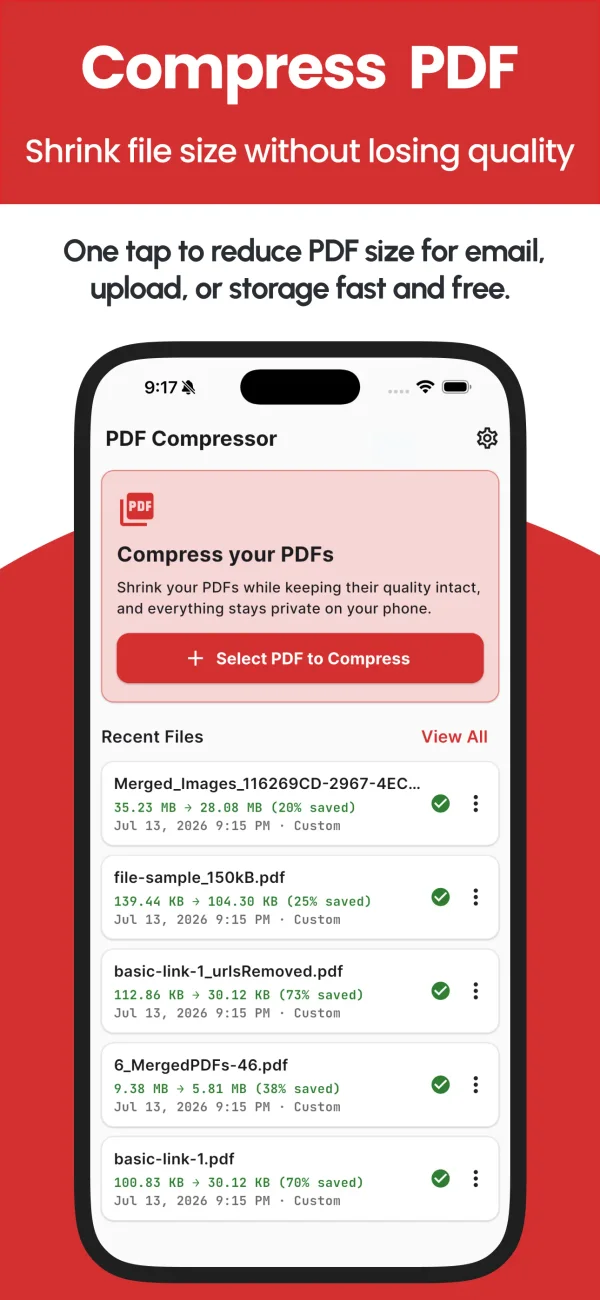
Is a PDF too large to email, upload, or submit? Compress PDF reduces file size
in seconds, right on your iPhone or iPad — without ever sending your document
to a server.
COMMON PROBLEMS THIS SOLVES
- An application portal rejects your file for exceeding its size limit
- A form, registration, or submission system caps uploads at a few MB
- Your email provider blocks large attachments
- A scanned document or photo-heavy PDF is taking up way too much storage
- You just want a faster, lighter file to share
If any of that sounds familiar, Compress PDF fixes it in a few taps.
100% OFFLINE — NOTHING IS EVER UPLOADED
Unlike most PDF compressor apps, which quietly send your files to a server to
process them, Compress PDF works entirely on-device. Your contracts, IDs,
scans, and personal documents never leave your phone. No account, no sign-up,
no cloud dependency — just fast, private compression, even with no internet
connection.
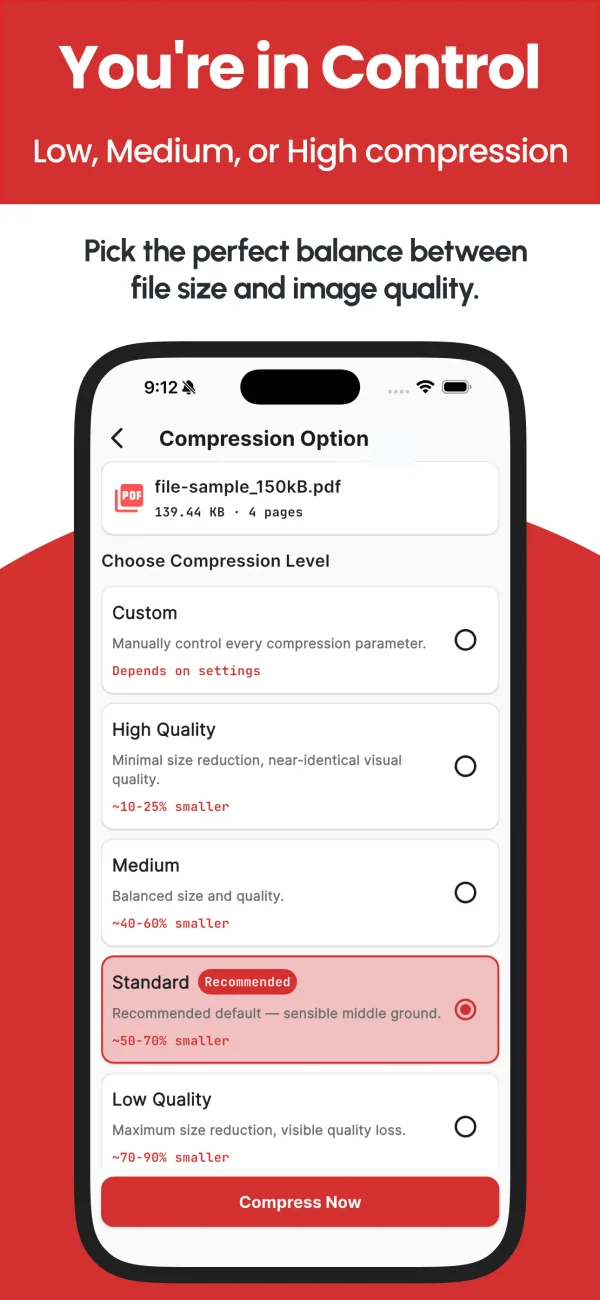
5 COMPRESSION LEVELS — PICK ONE, OR TAKE FULL CONTROL
- High Quality — light compression, virtually no visible quality loss
- Medium — balanced size reduction
- Standard (Recommended) — a smart default so you don't have to think about it
- Low Quality — maximum size reduction when you need the smallest file possible
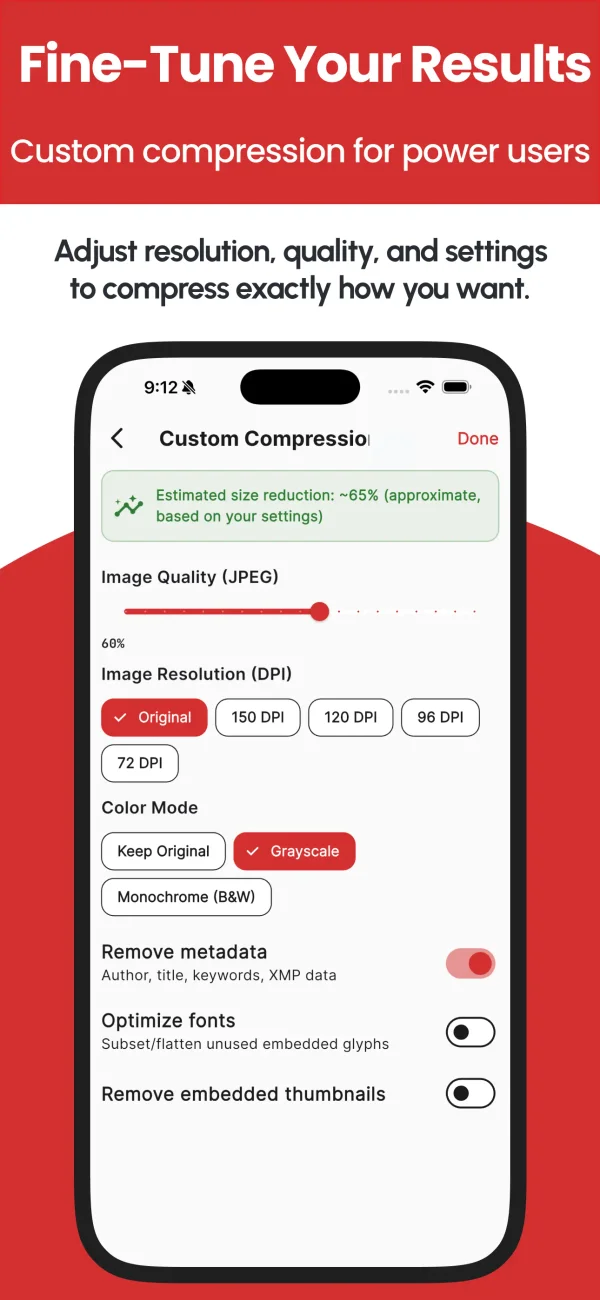
- Custom — full manual control over JPEG quality, image resolution/DPI, color
mode (grayscale or black & white), metadata removal, thumbnail removal, and
font optimization — with a live estimated size preview as you adjust
Most competing apps give you a single "compress" button and hope for the
best. Compress PDF gives you a real dial when you need one, so you can hit an
exact size target for a strict upload portal instead of guessing.
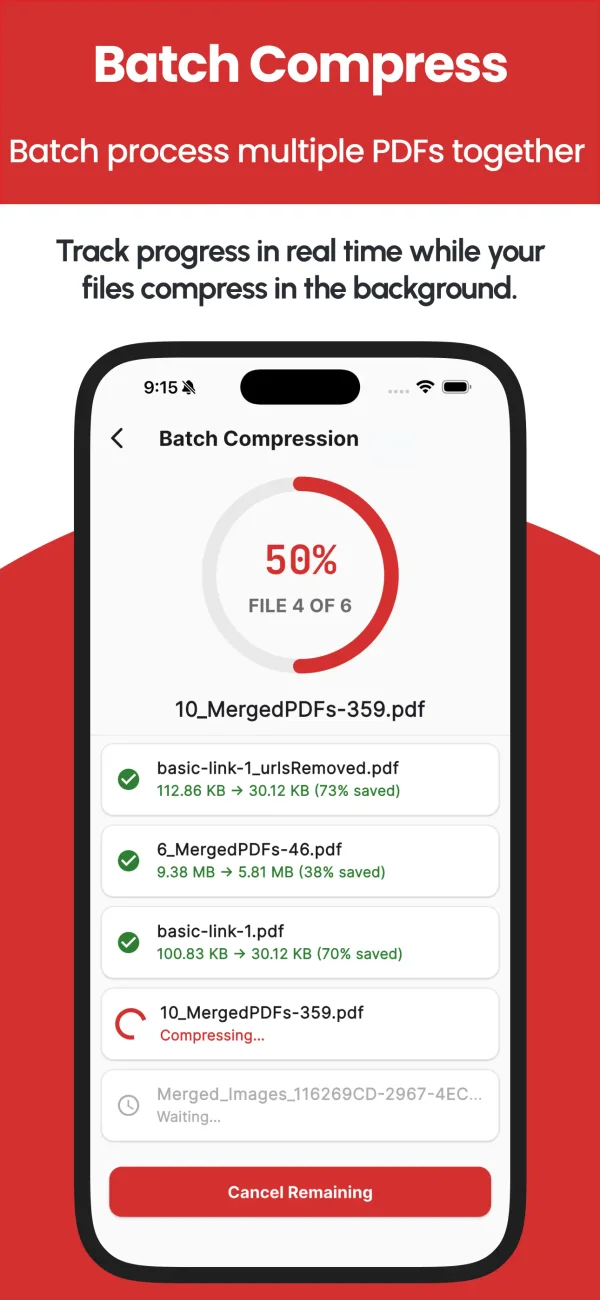
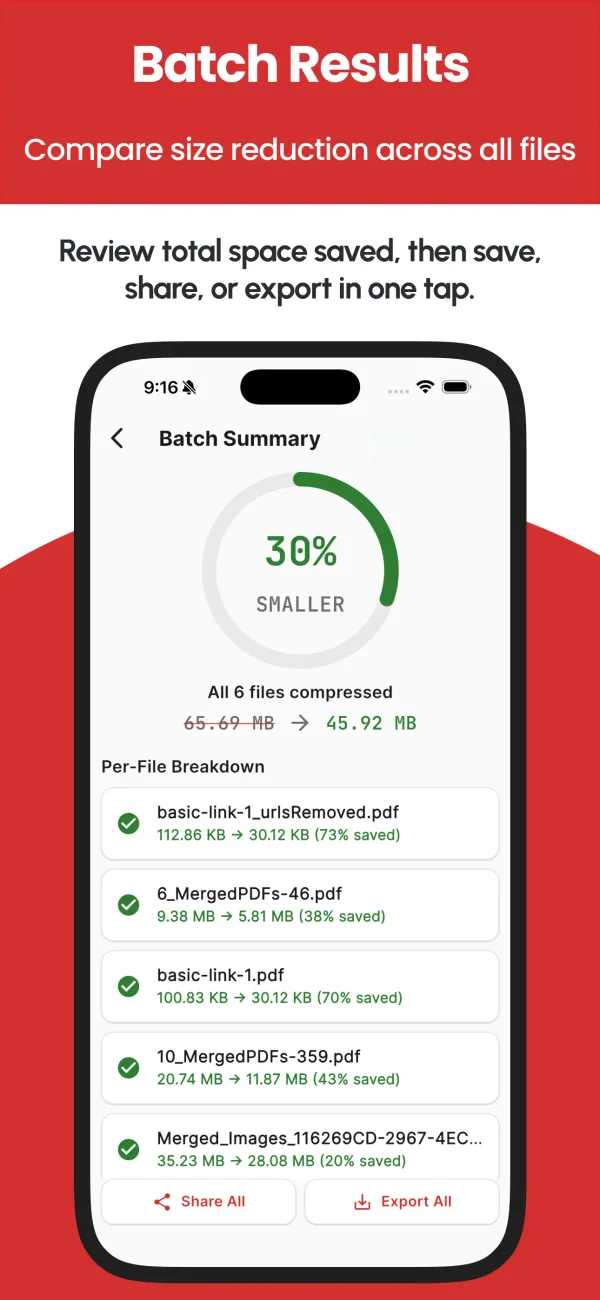
BATCH COMPRESS MULTIPLE PDFs AT ONCE
Select several files and compress them together in a single batch job. A
dedicated progress screen shows the true status of every file — waiting,
compressing, done, failed, or skipped — instead of one vague spinner. When
it's finished, Share All or Export All bundles every result into a single zip
so you're not tapping through separate share sheets one file at a time.
HANDLES PASSWORD-PROTECTED PDFs
Locked PDF? The app detects it and asks for the password instead of silently
failing partway through.
A COMPLETE PDF WORKFLOW, NOT JUST A COMPRESSOR
- Built-in viewer to preview any PDF before or after compressing — vertical or
book-style scrolling, pinch-to-zoom, rotate, jump-to-page, print, and share
- Export or Save to any location you choose — not locked into app-only storage
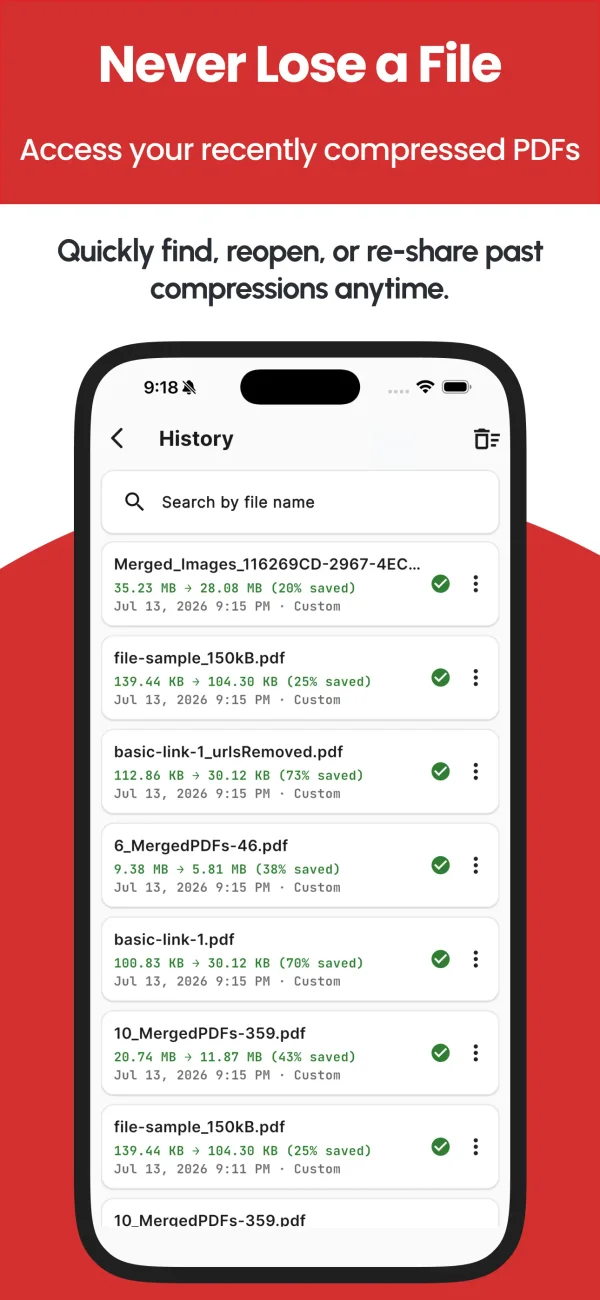
- History tracks every compression with before/after size and % saved,
searchable by name, with quick re-share, re-export, or delete
BUILT FOR EVERYONE
Available in 20 languages with full right-to-left support for Arabic and
Urdu. Light, dark, and system themes, each fully designed. Set your default
compression level once so returning visits don't require re-picking settings.
WHO IT'S FOR
- Students and professionals submitting documents with a strict size cap
- Anyone emailing large scans, reports, or contracts
- People freeing up storage without sacrificing document quality
- Power users who want manual control over DPI, quality, and color — not
just a black-box "compress" button
Compress PDF is free to use, with ads. Pro is an auto-renewable subscription
(in-app purchase) that removes all ads and lifts the batch-size limit for
unlimited files per batch — support ongoing development and get early access
to new features.
Download Compress PDF and shrink your files in seconds — privately, offline,
and exactly the way you want.
Terms of use: https://codifyappsprivacy.blogspot.com/p/terms-of-use.html
What’s new
Version 1.2 · Aug 28, 2026
Minor bug fixes and performance improvements.
App privacy
What Muhammad Awais Younas declares on the App Store about how this app handles data.
-
Data not linked to you
May be collected but is not linked to your identity.
- Identifiers
Privacy practices may vary, for example with the features you use or your age.
Information
- Seller
- Muhammad Awais Younas
- Category
- Productivity
- Version
- 1.2
- Updated
- Aug 28, 2026
- Released
- Jul 17, 2026
- Size
- 32.7 MB
- Requires
- iOS 15.0 or later
- Age rating
- 4+
- In-app purchases
- Yes
- Languages
- English
- Copyright
- © Muhammad Awais Younas
You might also like
-
 Shrink PDF: Compress PDF FilesProductivity
-
 Compress PDF: Smaller FilesShrink a PDF to email it
-
 PDFai: PDF Chat & AI SummaryReader & PDF to Word Converter
-
 PDF Compressor: Shrink filesReduce PDF Size for Email
-
 PDF Fixer: Merge & CompressSplit, reorder & organize PDFs
-
 PDF Compressor - size compressCompress pdf size reduce size
-
 SlideCrop: Slide Scanner & PDFScan & Crop Lecture Slides
-
 Pdf Compressor - Compress FileReduce PDF Size & Keep Quality
-
 Image Converter: JPG PNG RAWConvert Photo to PDF & HEIC
-
 PDF Compressor - Shrink FilesCompress PDF to Target Size