Crew Control Schedule
Track Time, Estimate & Invoice
Designed for iPhone, iPad, iPod touch
Free
- Age rating4+
- CategoryBusiness
- DeveloperThe Aspire Software Company
- LanguagesEnglish
- Size3.3 MB
Links to the official App Store page
Download.org hosts no file of Crew Control Schedule. The button opens its official App Store page, published by The Aspire Software Company. Listing last checked on Nov 18, 2026.
Screenshots



About
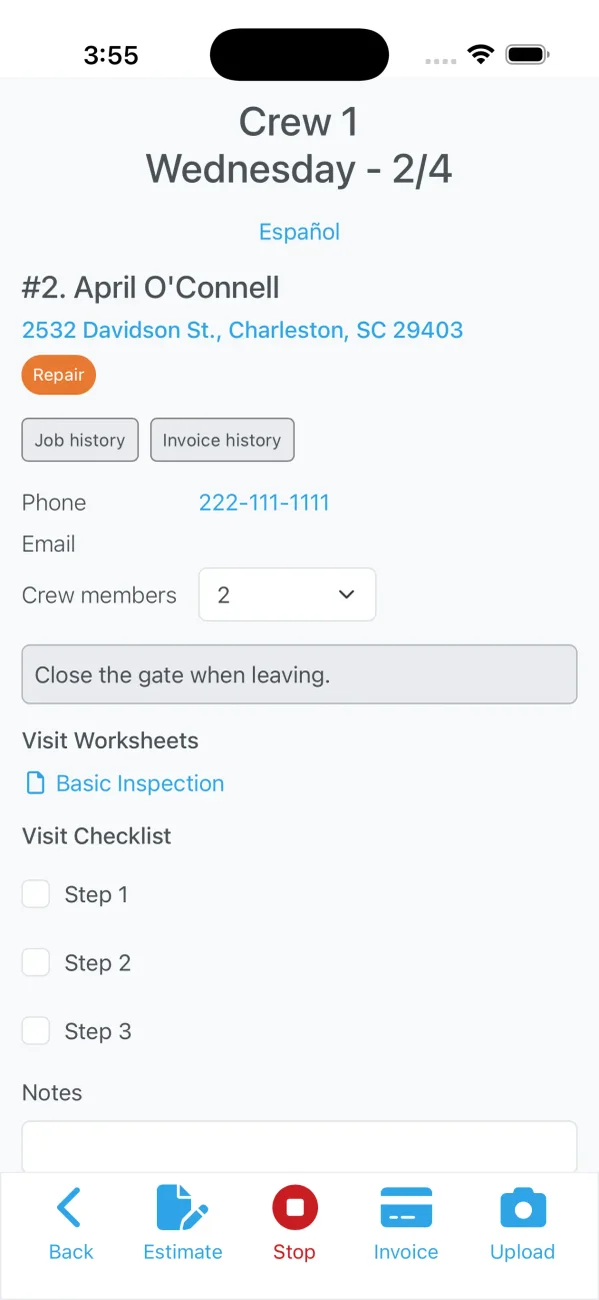
Crew Schedule is the mobile app for field technicians and crew leaders. It works with Crew Control to keep your team connected, informed, and efficient in real time.
- Key Features for Crew Leaders and Technicians:
- Real-Time Job Access: View customer information, property details, notes, and service history synced from Crew Control.
- Send On-The-Way Texts: Notify customers when a crew is on the way to improve communication and build trust.
- Capture Quality Work: Take and upload timestamped photos, complete checklists, and record detailed job notes right from the field.
- Accurate Time Tracking: Clock in and out of jobs with real-time updates to Crew Control’s schedule.
- Instant Invoicing and Payments: Create invoices and accept credit card payments on-site without delay.
- Stay in Sync: Automatic updates keep the office up to date with field progress and job status.
Crew Schedule helps your crews stay productive, your communication clear, and your customers happy with the support of Crew Control.
What’s new
Version 2.1 · Feb 24, 2026
Updated app store listing.
App privacy
What The Aspire Software Company declares on the App Store about how this app handles data.
-
Data linked to you
May be collected and linked to your identity.
- Location
- Contact info
- Usage data
- Diagnostics
Privacy practices may vary, for example with the features you use or your age.
Information
- Seller
- Aspire LLC Apps
- Category
- Business
- Version
- 2.1
- Updated
- Feb 24, 2026
- Released
- Feb 6, 2026
- Size
- 3.3 MB
- Requires
- iOS 15.0 or later
- Age rating
- 4+
- Price
- Free
- Languages
- English
- Copyright
- © Aspire Software