CrossPaste: Clipboard Manager
Universal Sync Across Devices
Designed for iPhone, iPad
Free · In-app purchases
- Age rating4+
- CategoryUtilities
- DeveloperShenzhen Bianyi Weilai Technology Co., Ltd.
- LanguagesEnglish+ 8 more
- Size332.9 MB
Links to the official App Store page
Download.org hosts no file of CrossPaste: Clipboard Manager. The button opens its official App Store page, published by Shenzhen Bianyi Weilai Technology Co., Ltd. Listing last checked on Nov 18, 2026.
Screenshots



About
CrossPaste — Universal Clipboard Across Devices
Copy anything and paste it on any device, seamlessly.
COPY ONCE, PASTE ANYWHERE
Copy on your iPhone and it instantly appears on your Mac, Windows, or Linux machine. No extra steps — your clipboard syncs in real time across all your devices.
RICH CONTENT SUPPORT
More than just text — CrossPaste syncs text, images, files, links, HTML, RTF, and colors, preserving the original format perfectly.
PRIVACY FIRST
• End-to-End Encrypted — Asymmetric encryption keeps your data fully secure
• LAN Only — Data never touches any third-party server
• Local Storage — Your data stays on your devices
CROSS-PLATFORM, SEAMLESSLY CONNECTED
Works with macOS, Windows, and Linux desktops alongside iOS. One consistent interface across every device you use — no learning curve.
POWERFUL FEATURES
• Pasteboard Keyboard — Access clipboard history from any app
• Smart Cleanup — Automatic storage management, zero maintenance
• Widgets — Home screen widgets for one-tap pasting
• Shortcuts — Siri Shortcuts support for voice-powered workflows
• Large File Transfer — Move big files between devices with ease
• Import & Export — Back up and migrate your clipboard data
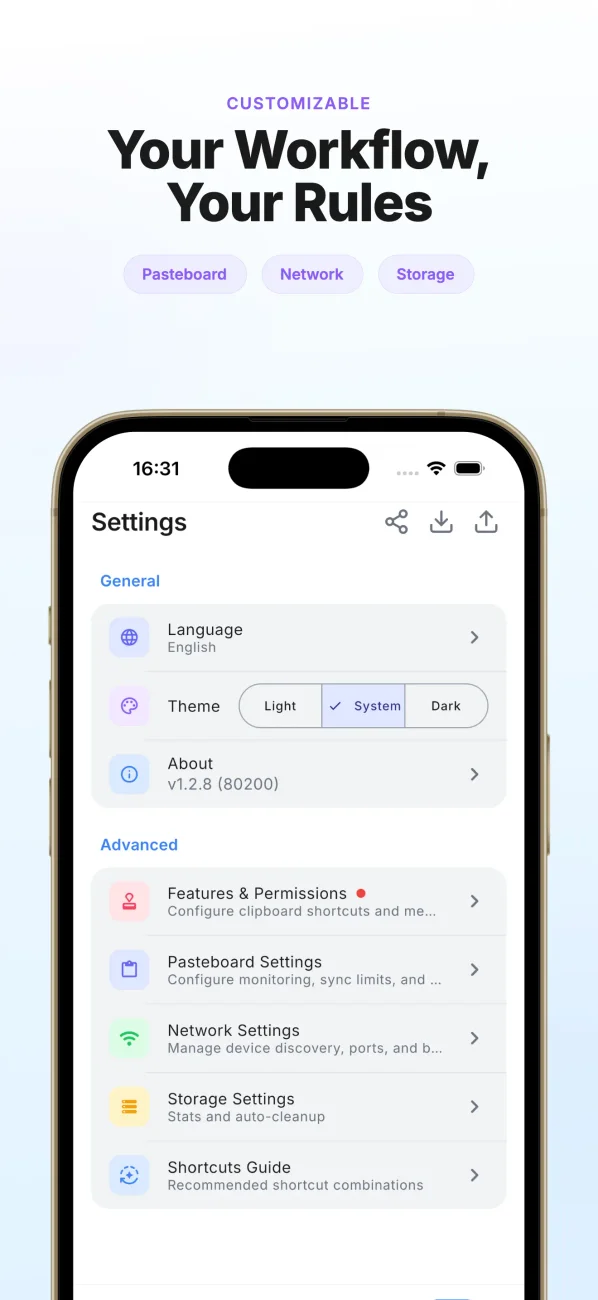
FULLY CUSTOMIZABLE
Fine-tune pasteboard monitoring, sync settings, network discovery, and storage management to match your personal workflow.
---
CrossPaste Pro unlocks all premium features including unlimited device connections, unrestricted sync, end-to-end encryption, tag management, and more.
Subscription Terms:
• Payment will be charged to your iTunes account
• Subscription automatically renews unless canceled at least 24 hours before the end of the current period
• Renewal will be charged within 24 hours prior to the end of the current period
• You can manage and cancel subscriptions in your account settings after purchase
Privacy Policy: https://crosspaste.com/en/mobile-privacy-policy
Terms of Use: https://crosspaste.com/en/mobile-terms-of-use
What’s new
Version 2.3.0 · Nov 10, 2026
A brand-new native iOS look that feels right at home on your iPhone.
• The clipboard, devices, pairing and subscription screens are rebuilt in native iOS style, with smoother scrolling and transitions
• A fresh welcome tour with clean line illustrations that look great in light and dark mode
• Messages, dialogs and the pairing code now use native iOS styles
• The button for importing from Photos moved to the top, where it is easier to find
• Subscribers can now upgrade straight to Lifetime
• Wording in many languages was reviewed by native speakers and reads more naturally
• Devices now appear and connect even if you join Wi‑Fi after opening the app
• Large files you received still open after you update the app
• Fixed a crash when browsing items whose received files were deleted, a subscription price that sometimes showed blank, and other issues
App privacy
What Shenzhen Bianyi Weilai Technology Co., Ltd. declares on the App Store about how this app handles data.
-
Data used to track you
May be used to track you across apps and websites owned by other companies.
- Location
- Identifiers
- Usage data
-
Data linked to you
May be collected and linked to your identity.
- Location
- Identifiers
- Usage data
-
Data not linked to you
May be collected but is not linked to your identity.
- Diagnostics
Privacy practices may vary, for example with the features you use or your age.
Information
- Seller
- Shenzhen Bianyi Weilai Technology Co., Ltd.
- Category
- Utilities
- Version
- 2.3.0
- Updated
- Nov 10, 2026
- Released
- Jun 15, 2026
- Size
- 332.9 MB
- Requires
- iOS 16.0 or later
- Age rating
- 4+
- Price
- Free
- In-app purchases
- Yes
- Languages
- English, French, German, Japanese, Korean, Persian, Simplified Chinese, Spanish, Traditional Chinese
- Copyright
- © Compile Future Technology Co., Ltd.
You might also like
-
 Octoclip: Universal ClipboardClipboard history & sync
-
 WinSend: iPhone to Windows PCPhoto, File & Clipboard Sync
-
 ClipsyncSync your clipboard
-
 Clipp.netCross-platform clipboard sync.
-
 OmniClip - Universal ClipboardCopy text across all devices
-
 Clipboard: OnePasteCopy Paste Keyboard
-
 Clipboard Manager - PastePalCopy Paste Keyboard History
-
 Sill – Mac StreamingRemote Mac window management
-
 Device Kit: Phone TemperatureCPU Monitor & Battery Status
-
 仓输入法Utilities