- Age rating4+
- CategoryPhoto & Video
- DeveloperCyanView
- LanguagesEnglish
- Size72.2 MB
Links to the official App Store page
Download.org hosts no file of CyanCamera App. The button opens its official App Store page, published by CyanView. Listing last checked on Nov 15, 2026.
Screenshots

About
CyanCamera
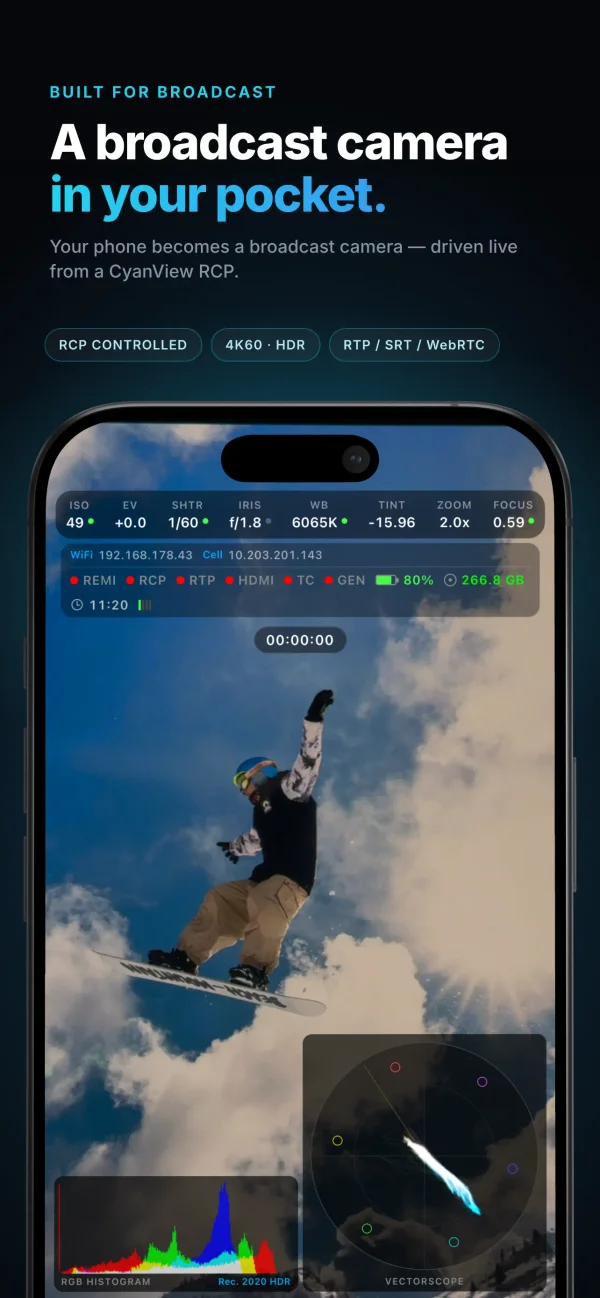
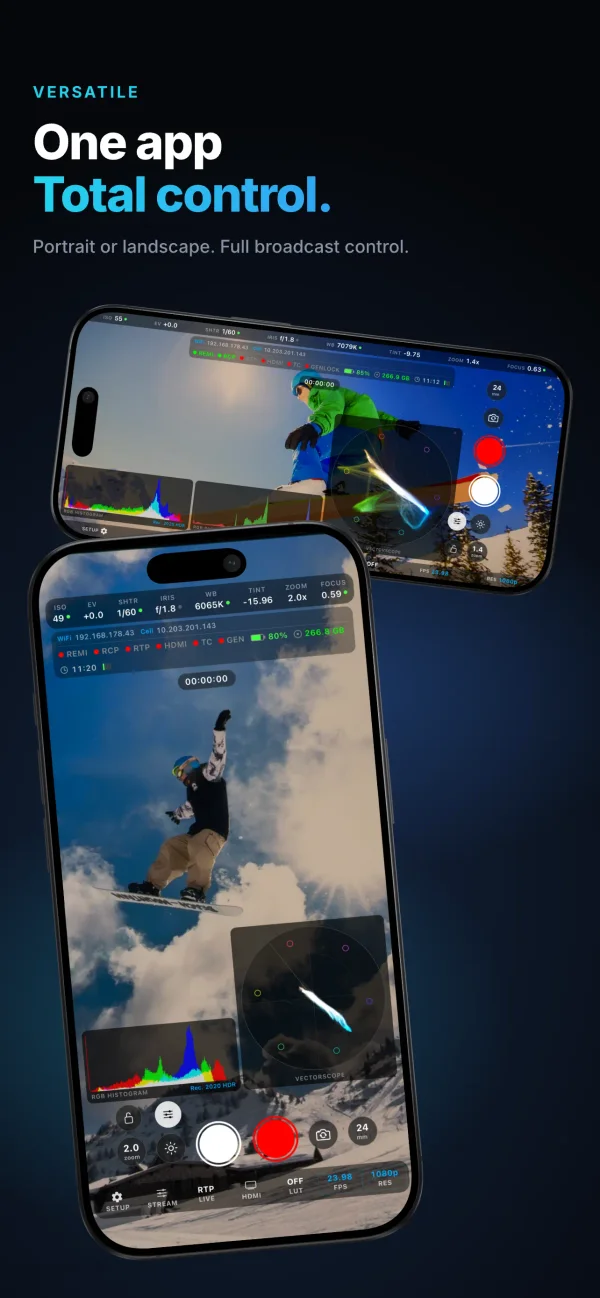
Your phone becomes a numbered camera on your CyanView gateway, shaded live from the same RCP your team already uses on every other camera in the show. Same panel, same workflow, same look as the 210+ camera models CyanView controls.
Remote control from the RCP
ISO, shutter, iris, exposure compensation, white balance (temperature, tint or 5600K preset), focus, auto focus and zoom respond to the RCP over REMI, with precise fine clicks and configurable knob steps. Custom buttons switch lenses, toggle the look, flip the camera, start recording, switch RTP and SRT, nudge the bit rate, toggle HDMI, lock, zen mode and stabilization. Red, green and call tally light a border around the picture. The RCP sees battery, thermal state, HDMI, codec and free space.
REMI Cloud connects the phone to an RCP over the internet, with auto, regional (Asia, Australia, Brazil, EU, US) or manual server selection and a latency probe.
Iris priority on iPhone 18 Pro variable aperture lenses (iOS 27). Auto exposure can be fenced inside an operator-set ISO and shutter window, like a limited AGC. Manual values survive restarts and fall back to auto when the RCP is lost, by policy.
External control
VISCA over IP. Blackmagic zoom and focus demand over USB MIDI. A REST settings API with export, import, reset and status, so a gateway or script configures the phone.
Capture
HEVC 8 or 10-bit, ProRes 422 Proxy to HQ, Apple ProRes RAW on supported iPhones. Rec.709, P3 D65, Rec.2020 HLG, Apple Log and Apple Log 2, with Log and HLG at 10 bits end to end. Bit rate automatic or fixed up to 240 Mbps, to the photo library, an SSD or any Files folder, with custom file names.
Presets from 23.98 to 60 fps in 1080p and 4K, plus 120 and 240 fps. The sensor clock is pinned to the exact fractional cadence. Still photos, stabilization modes, lens-locked or physical-only zoom, 180 degree flip, microphone policies, frame guides, shutter angle display and a thermal monitor that sheds load before iOS throttles.
Genlock and timecode
With the Blackmagic Camera ProDock, genlock and LTC on BNC lock the phone to house sync, so the feed cuts frame-accurately. Recordings carry a timecode track with offset trim. Timecode can also come from MIDI timecode over the network or NTP. Genlock needs iPhone 17 Pro or later.
HDMI output
Rec.709, HLG or Apple Log 2 at up to 10 bits through a USB-C adapter, with audio monitoring and anamorphic de-squeeze. Preview and Output modes bake the look on the GPU. Broadcast mode (iOS 27) sends the sensor feed straight to the link at exact cadence with SMPTE ancillary metadata for the lowest latency.
Live color shading
A GPU port of the CyanView multimatrix: lift, gamma, gain, saturation, hue, local contrast, a 16-vector multimatrix and gate/select, all live from the panel and baked into a 3D LUT scoped per consumer: preview, HDMI, recording or stream.
LiveLab LUT stream
Load any .cube as your base look. CyanView LiveLab pushes LUTs live over the network and grabs frames for grading. Look and Apple Log to Rec.709 conversions ship in the app.
Scopes
Native GPU RGB parade, histogram and vectorscope with a configurable refresh rate, plus an audio meter.
Streaming
RTP for ultra low latency on the local network, a few frames glass to glass, with a lossless path and a control channel into FXVP. SRT for the public internet in caller or listener mode with encryption, AAC audio and NTP timecode SEI for Makito MultiSync. H.264 or H.265, bit rate changes live from the phone or the RCP.
Requirements
Remote control and shading need a CyanView RCP. Everything else runs standalone. Genlock and LTC need a ProDock. Apple Log 2 needs iOS 26. Broadcast HDMI and iris need iOS 27.
What’s new
Version 1.0.4 · Nov 7, 2026
Takes gallery
• A new Takes screen in Settings shows your recorded takes.
• Play and export a take with a LUT. Each take shows a LUT preview.
• RAW takes also record an H.264 proxy for fast review.
Zebra stripes
• Zebra stripes show on the preview.
• Set the levels and the colors in the widget settings.
White balance
• A new slider panel sets the temperature and the tint.
Streaming
• SRT is more stable, with paced sends and a limit on the encoder data rate.
• The stream screen explains the SRT latency setting.
Recording
• A disabled codec, color space or chroma option tells you why it is off.
• Bit depth is hidden for ProRes and RAW.
Bug fixes and performance improvements.
App privacy
What CyanView declares on the App Store about how this app handles data.
-
Data not collected
The developer does not collect any data from this app.
Privacy practices may vary, for example with the features you use or your age.
Information
- Seller
- Cyanview
- Category
- Photo & Video
- Version
- 1.0.4
- Updated
- Nov 7, 2026
- Released
- Sep 8, 2026
- Size
- 72.2 MB
- Requires
- iOS 26.0 or later
- Age rating
- 4+
- Price
- Free
- Languages
- English
- Copyright
- © 2026 CyanView SA
You might also like
-
 LDX ScannerFull insight about your LDX100
-
 Calibra Color CameraTrue color in any light
-
 RED control proAdvanced RED camera control
-
 CreativeGradingRevolutionary Camera Shading
-
 Rubin: RAW & Open Gate CamProRes, Apple Log & Live LUTs
-
 GhostFix: Image RepairRemove Glare & Lens Flares
-
 Zixi On Air ProOn Air Pro
-
 VHS Cam 3000: Retro VideoRetro VHS Camcorder & Filters
-
 CamPlot CalculatorsDoF, exposure, media & sensor
-
 VAZOYO - AI Photo FeedbackImprove your photo with AI