
- Age rating4+
- CategoryPhoto & Video
- DeveloperCow Cow Technologies LLC
- LanguagesFrench+ 10 more
- Size13.3 MB
Links to the official App Store page
Download.org hosts no file of Dronie: Hyperlapse & Timelapse. The button opens its official App Store page, published by Cow Cow Technologies LLC. Listing last checked on Nov 23, 2026.
Screenshots

About
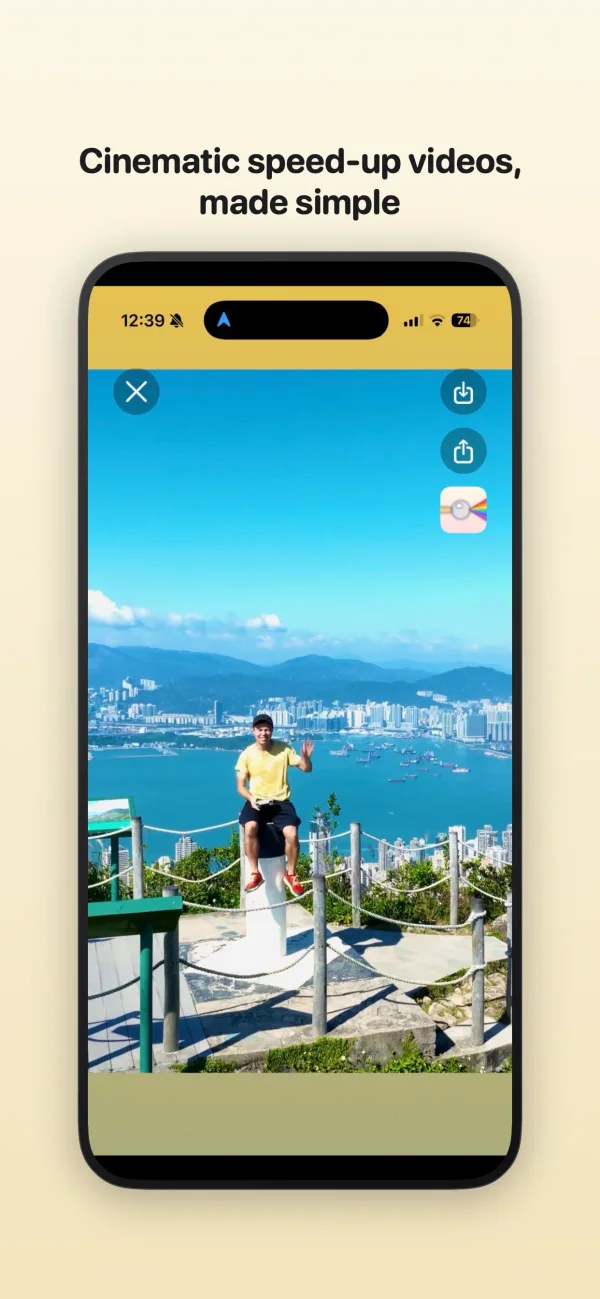
Dronie is a free app that turns a long video into a short, punchy clip. It's a drone-style hyperlapse you can make in seconds.
Pick a video from your library, or share one in from Photos, Files or another app. Drag two dividers to mark a beginning, a middle, and an end. Choose how long you want the final clip to be. Dronie keeps the beginning and end at normal speed and sweeps through the middle as a smooth time-lapse to hit your target duration. That's the whole app.
Great for:
• Hiking, biking, and driving footage. Keep the dramatic start and finish, and glide through the journey.
• Cooking and craft videos. Full speed for the setup and the reveal, then hyperlapse the work.
• Drone reveal shots. Full speed for the takeoff and the reveal, with a time-lapse of the flight in between.
• Walk-throughs of a place or event, for drone-style flyover energy without a drone.
• Anything that's a good clip but too long to share as is.
Features:
• Built for speed. Pick a video, drag two dividers, tap export, and your clip is done in a few taps.
• Three-segment composition with two draggable dividers.
• Trim junk off the start or end first, and the segments work on what's left.
• Target output duration. Set the length you want and Dronie does the speed math. Or switch to Speed in Settings and pick how fast the middle plays.
• Audio plays all the way through, with the sped-up middle kept at natural pitch so voices don't go squeaky. Or mute it with one tap.
• Hand off the finished clip to Photos, Messages, or any other app.
• No account, no login, no upload. Everything happens on your device.
Free to download. No subscription, no account.
What’s new
Version 1.2.32 · Nov 12, 2026
Minor bug fixes and accessibility improvements.
App privacy
What Cow Cow Technologies LLC declares on the App Store about how this app handles data.
-
Data not linked to you
May be collected but is not linked to your identity.
- Identifiers
- Usage data
- Diagnostics
Privacy practices may vary, for example with the features you use or your age.
Information
- Seller
- Cow Cow Technologies LLC
- Category
- Photo & Video
- Version
- 1.2.32
- Updated
- Nov 12, 2026
- Released
- May 30, 2026
- Size
- 13.3 MB
- Requires
- iOS 17.0 or later
- Age rating
- 4+
- Languages
- French, German, English, Simplified Chinese, Traditional Chinese, Korean, Spanish, Italian, Japanese, Portuguese, Russian
- Copyright
- © 2026 Cow Cow Tech.
You might also like
-
 LapseArc: 8K Stable Timelapse8K Time Lapse Camera, RAW Edit
-
 Video Speed: Slow & FastSee the new length instantly
-
 Add Text to Photo & VideoFree captions.No subscription.
-
 Timelapse maker: Speed ChangerVideo Speed Editor & Lapse it
-
 Interval Pro: Timelapse CameraHyperlapse, manual control, 4K
-
 ElasticClip – Video SpeedAdjust video timing easily
-
 Verva: Green Screen & Slow MoChroma Key & Beat Video Editor
-
 Timestamp Camera: Photo, VideoGPS Photo Location Map Camera
-
 Kassette: VHS & Retro CameraTape, Fisheye & 90s Effects
-
 NanoFlick: Guided Video MakerTemplate + Camera = Done Fast