
EK Crew Rest
Inflight Crew break planner
Designed for iPhone, iPad
In-app purchases
- Age rating4+
- CategoryProductivity
- DeveloperAyman Maklad
- LanguagesEnglish
- Size4.8 MB
Links to the official App Store page
Download.org hosts no file of EK Crew Rest. The button opens its official App Store page, published by Ayman Maklad. Listing last checked on Nov 8, 2026.
Screenshots
About
EK Crew Rest helps long-haul cabin and flight crew plan onboard break windows quickly and accurately — no spreadsheets, no mental arithmetic.
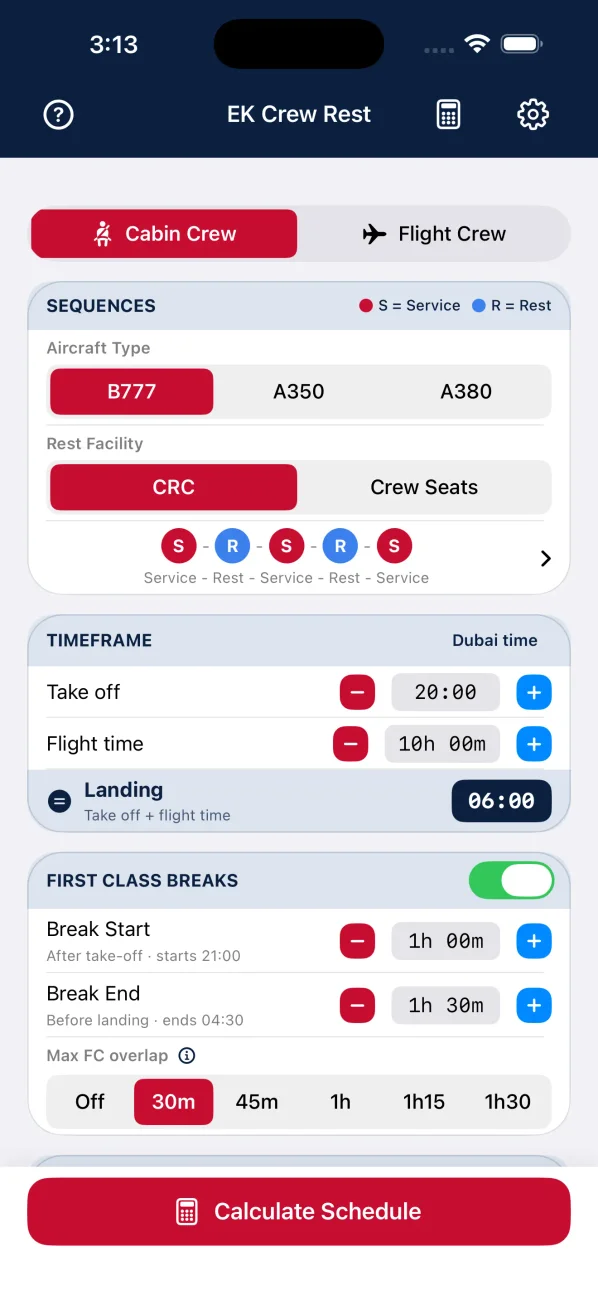
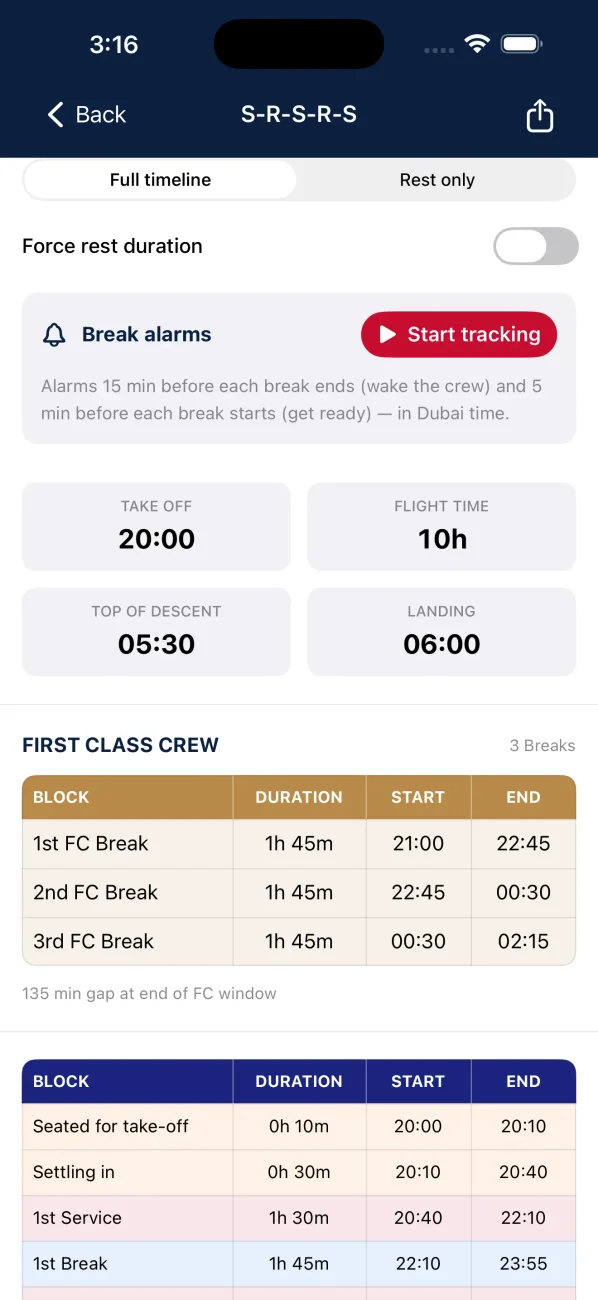
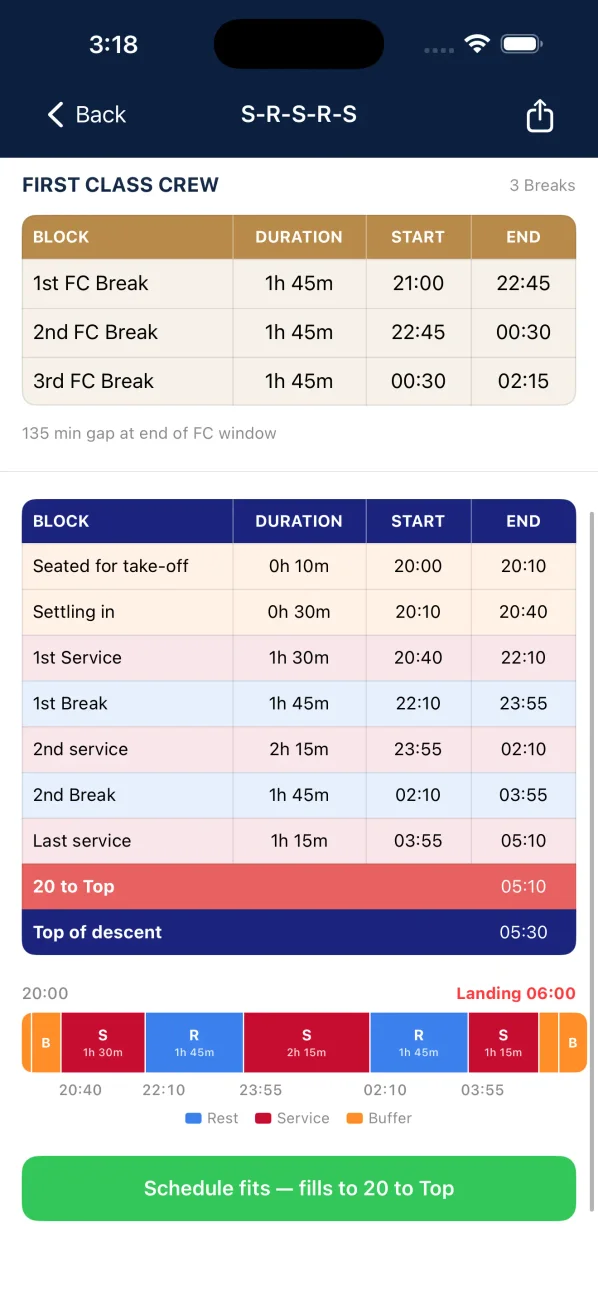
Enter your break start time and top of descent, choose your rest-service sequencing pattern, and the app automatically calculates how long each rest block should be so every crew member gets equal, fair rest within the available window.
CABIN CREW FEATURES
· 10 rest-service sequences covering 2, 3 and 4 rest slots, filtered by aircraft (B777 / A350 / A380) and rest facility (CRC, LD-CRC, MD-CRC, crew seats)
· Auto-calculated, equal rest blocks based on the available flight time — all times on the 5-minute grid
· Middle + last service support; optional separate Business / Economy service timings with all cabins resting the same duration
· First Class breaks on 2-rest sequences — window set relative to take-off and landing, with controllable FC break overlap so everyone keeps the longest possible rest
· Force a target rest duration and see the schedule update live
· Buffer settings and round-to-5-minute handover times
FLIGHT CREW FEATURES
· Dedicated flight crew break calculator — 2, 3 or 4 breaks
· Break start (after takeoff) and break end (before landing) buffers
· Equal rest blocks distributed across the available window
BREAK ALARMS
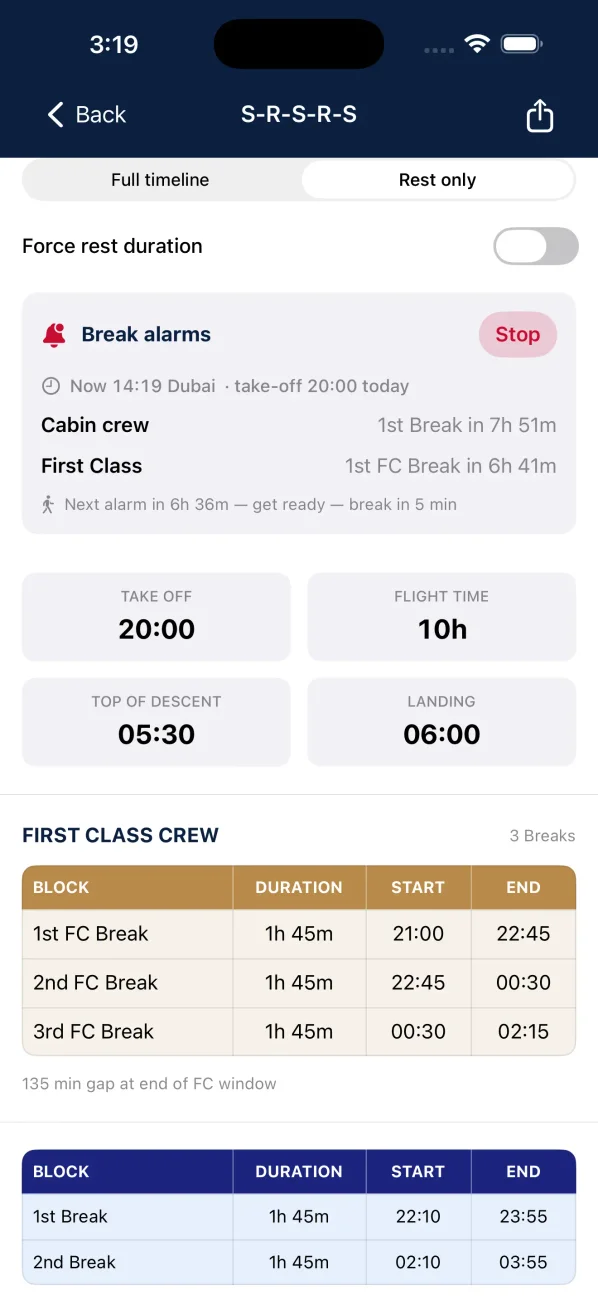
· Start tracking a schedule and get an alarm 15 minutes before each break ends (time to wake the crew) and 5 minutes before each break starts (get ready) — with sound, even while the app is open
· Live progress for every crew group: which break is running and how long is left
· Works in the clock you choose — UTC or Dubai time — whatever zone the device is showing
TOOLS
· Time Calculator: an HH:MM calculator that adds, subtracts, multiplies and divides times on the 24-hour clock and respects the day run
· Share a full-colour digital card, or print A4 (1 page, or 2 copies with a cut line)
· Redesigned iPad dashboard; compact, fast iPhone layout
GENERAL
· No account required. No data collected. No network requests.
SEQUENCES SUPPORTED
SRR · SRRS · SRSRS · SRRR · SRRRS · SRRRR · SRRRRS · SRRSRRS · SRSRRS · SRRSRS
PRICING
10 free calculations included. Full access available as a one-time purchase — no subscription.
What’s new
Version 4 · Aug 28, 2026
Break alarms
Start tracking a calculated schedule and the app rings 15 minutes before each break ends (time to wake the crew) and 5 minutes before each break starts (get ready for your break) — with sound, as banners even while the app is open. A live card shows which break each group is on and how long is left.
Your clock, not the phone's
Choose UTC or Dubai time in Settings. Alarms and the Time Calculator's NOW key follow your choice, whatever zone the device switches to mid-flight.
Time Calculator
A new HH:MM calculator (tap the calculator icon): digits fill straight into hours:minutes, + − × ÷ work on times, results wrap on the 24-hour clock and show the day run.
First Class, the clear way
The FC window is now set as "Break Start (after take-off)" and "Break End (before landing)" so it follows your flight automatically. Max FC overlap lets FC breaks overlap each other so every cabin keeps the longest possible equal rest; Off never overlaps.
Redesigned input screens
A new iPad dashboard (Timeframe, Sequence, Service durations, First Class) and a more compact iPhone form. Sequences are spelled out in words (Service - Rest - Rest - Service), explanations moved into ⓘ tooltips, all times land on the 5-minute grid, and the Business/Economy split now keeps every cabin on the same rest duration.
Also
· Navy navigation bar with a new share menu and cleaner results tables
· Print — 1 page / 2 copies now reliably opens the share sheet
· Fixed a case where a tap on − / + could step twice
· Removed the saved-schedules list and the reference guide to keep the app focused
App privacy
What Ayman Maklad declares on the App Store about how this app handles data.
-
Data not collected
The developer does not collect any data from this app.
Privacy practices may vary, for example with the features you use or your age.
Information
- Seller
- Ayman Maklad
- Category
- Productivity
- Version
- 4
- Updated
- Aug 28, 2026
- Released
- Apr 14, 2026
- Size
- 4.8 MB
- Requires
- iOS 17.6 or later
- Age rating
- 4+
- In-app purchases
- Yes
- Languages
- English
- Copyright
- © 2026 Gulflens Studio
You might also like
-
 Duty-RestPilot & Cabin Crew Rest Tool
-
 CrewRest PilotSmart Rest Planning for Pilots
-
 FlyLuciaBetter Flying Starts Here
-
 HUD SONiC: Pilot LogbookADS-B Flight Log & Pilot Jobs
-
 Flight-Time IIFlight, Rest & Duty Times Calc
-
 SOAMSProductivity
-
 ASPIRE LUXProductivity
-
 Reclock: Jet Lag PlannerSleep, Light & Time Zone Plan
-
 Time : Calculator++PProductivity