
Encrypted Memories
Private photos on Proton Drive
Designed for iPhone, iPad, Mac
Free · In-app purchases
- Age rating4+
- CategoryPhoto & Video
- DeveloperThomas Langstadlinger
- LanguagesEnglish+ 1 more
- Size46.4 MB
Links to the official App Store page
Download.org hosts no file of Encrypted Memories. The button opens its official App Store page, published by Thomas Langstadlinger. Listing last checked on Nov 12, 2026.
Screenshots


About
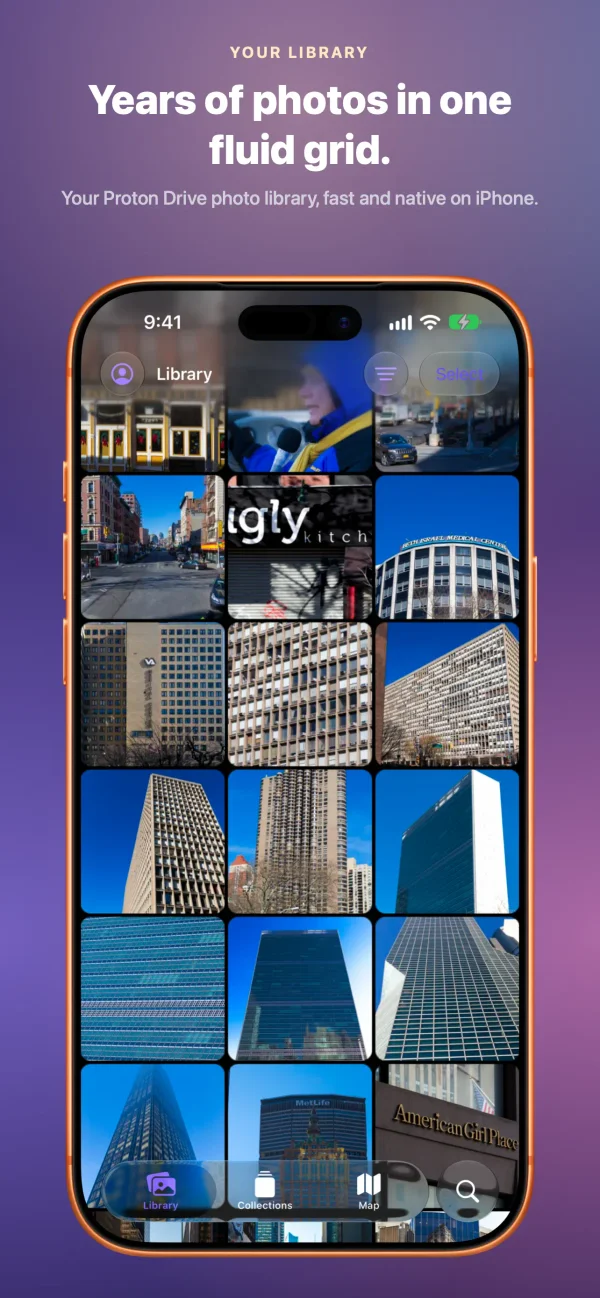
All your Proton Drive photos in a fast, native photo app for iPhone and iPad.
Scroll through years of memories, open any photo in full resolution, and find pictures by what's in them. Your library stays in Proton Drive, end-to-end encrypted.
WHAT YOU GET
• A fluid grid for your whole photo library. Built on Metal, so scrolling and pinch-zooming stay smooth.
• Photos, Live Photos and videos in a clean, native viewer.
• Albums and favorites, organized the way you expect.
• Your photos on a map, right where they were taken.
• Smart Search: find photos by what's in them. It runs on your device and is optional.
• Backup of your iPhone or iPad Photos library to Proton Drive.
• Media caching for faster access.
PRIVATE BY DESIGN
• Smart Search runs on your device. Your photos and search queries are not sent to a search service.
• Sign-in uses Proton's web flow, so Encrypted Memories does not collect your Proton password.
FREE AND OPEN SOURCE
Every feature is free. No subscription, no locked features. Optional tips help cover the cost of publishing on the App Store and do not unlock anything.
GOOD TO KNOW
• An existing Proton account is required. The app does not create Proton accounts.
• Requires iOS 26 or iPadOS 26 and a device that supports Metal 3.
• Uses the official open-source Proton Drive SDK.
• Encrypted Memories is an independent app and is not affiliated with or endorsed by Proton AG.
What’s new
Version 1.1.0 · Oct 13, 2026
1.1.0 – The Privacy Release
Your photos, your rules.
- New: Duplicates. Find identical photos and merge them.
- Private from the start: location is removed when you share, your photos are blurred when you switch apps (iPhone and iPad), and backup waits for Wi-Fi unless you allow cellular data.
- You can turn off Map and Places in the privacy settings.
- More reliable backup, including Live Photos and edited photos.
- See at a glance which photos aren't backed up, and why.
- Bug fixes and performance improvements.
App privacy
What Thomas Langstadlinger declares on the App Store about how this app handles data.
-
Data not linked to you
May be collected but is not linked to your identity.
- Diagnostics
Privacy practices may vary, for example with the features you use or your age.
Information
- Seller
- Thomas Langstadlinger
- Category
- Photo & Video
- Version
- 1.1.0
- Updated
- Oct 13, 2026
- Released
- Aug 31, 2026
- Size
- 46.4 MB
- Requires
- iOS 26.0 or later
- Age rating
- 4+
- Price
- Free
- In-app purchases
- Yes
- Languages
- English, German
- Copyright
- © 2026 Thomas Langstadlinger
You might also like
-
 PawCam: Pet Photo CameraAI picks the best pet shot
-
 ACamViewfinderFocus, Lens & Diopter Tools
-
 Timestamp Camera: CamTag GPSGeotag Photo, Map & Date Stamp
-
 Video Converter: CompressorShrink Size, Extract Audio MP3
-
 Nitra - HDR EditorHDR Photos · RAW · Live Photo
-
 Fliply: Photo ShuffleA playful camera roll
-
 PickPix - Photo CleanupSwipe to clean & recall photos
-
 Mute Video & Extract AudioVideo to audio converter
-
 MapCam - Map Film CameraFilm camera that stamps maps
-
 WinkU - Dual Phone CameraRemote Selfies & Live Preview