
EverCue: Subscription Control
Skip deliveries you don't need
Designed for iPhone, iPod touch
Free · In-app purchases
- Age rating4+
- CategoryProductivity
- DeveloperLYN ANN MORTIMER
- LanguagesEnglish
- Size37.2 MB
Links to the official App Store page
Download.org hosts no file of EverCue: Subscription Control. The button opens its official App Store page, published by LYN ANN MORTIMER. Listing last checked on Nov 18, 2026.
Screenshots

About
EverCue answers the one question every subscriber has when a shipment email arrives: do I actually need this box yet?
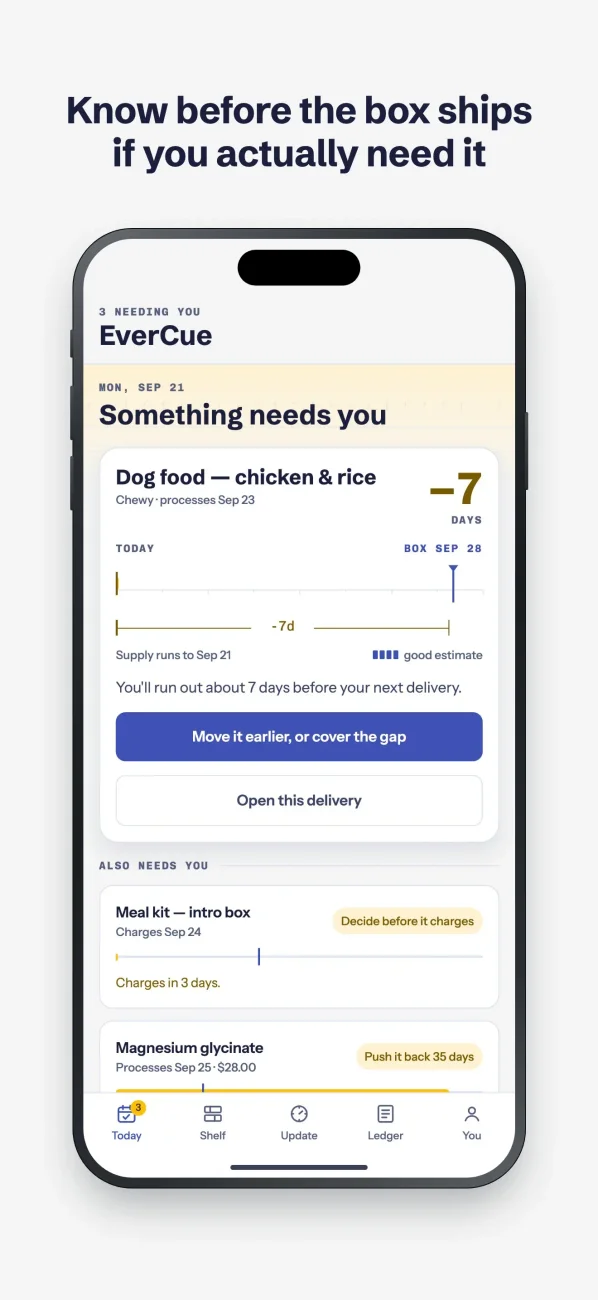
Most delivery schedules don't know how fast you really use things. Supplements, coffee, pet food, razors and laundry supplies keep arriving on a fixed timer, and the extras pile up in a cupboard. EverCue measures what you have left against when the next delivery lands, and tells you the answer in days.
THE OVERLAP
For each delivery, EverCue works out the day your supply runs out and the day the next box arrives. If the box would land early, it says so, with the exact number of days to push it back. If you are cutting it close, it says that too. Every number is plain arithmetic on your own readings, and the working is shown on screen.
THE CUE LINE
A simple timeline for each delivery: your remaining supply, the arrival date and the gap between them, updated live as you record how much is left.
THE LEVEL DIAL
Recording a reading takes one tap. The dial opens on EverCue's own estimate, so confirming it is usually all you need, and every reading sharpens the usage rate. The app tells you how confident that rate is, from "assumed" to "good".
DECISION REMINDERS
A local reminder before each shipment processes, while there is still time to skip, pause or push it at the retailer. EverCue never changes an order for you; it tells you what to do and you do it where you subscribe.
TODAY, SHELF AND LEDGER
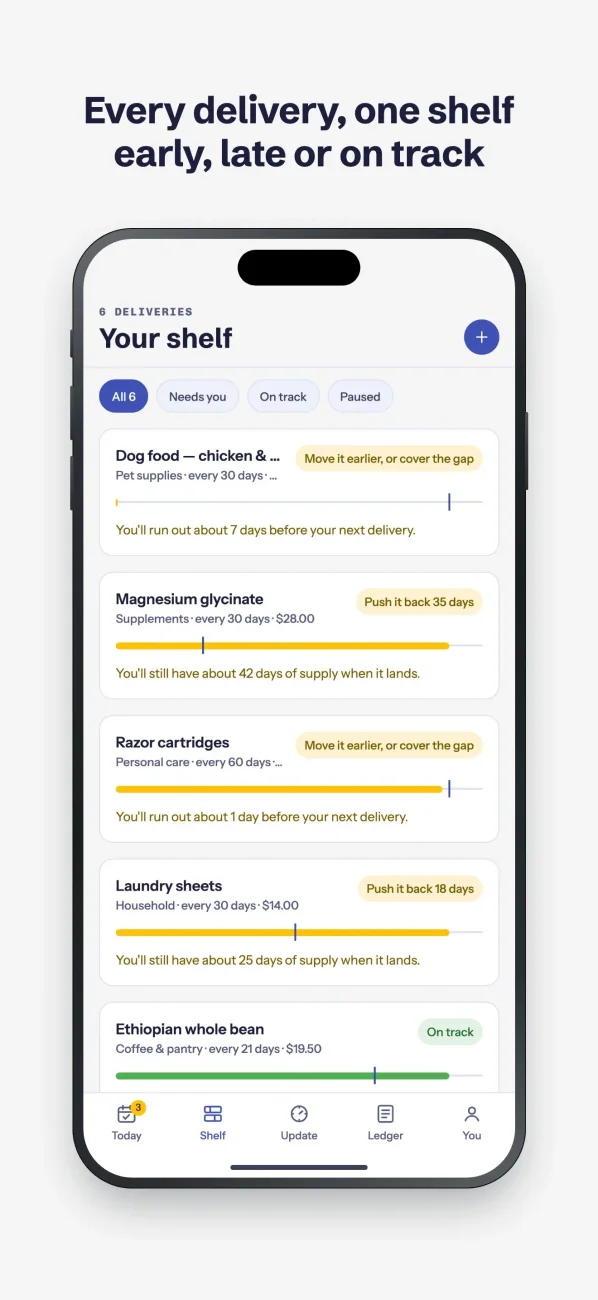
Today lists what needs a decision first. Shelf shows every delivery at a glance. Ledger keeps a factual record of what you skipped and what you deferred, as separate totals, and your monthly commitment across every plan. Quiet Days counts the days nothing needed your attention.
FREE AND EVERCUE PRO
Free: the full loop for up to 3 deliveries, including the Overlap, the Cue Line, the Level Dial, readings, the depletion chart, decision reminders, export and Quiet Days.
EverCue Pro adds unlimited deliveries, Cadence Fit (the delivery interval that matches how fast you really use something), the Pile-up (how over-stocked your whole shelf is, in days and money), your full ledger history, per-delivery reminder timing and a weekly digest.
EverCue Pro is an auto-renewing subscription, monthly or yearly, with a 7-day free trial for new subscribers. Payment is charged to your Apple Account at confirmation of purchase. The subscription renews automatically at the same price unless it is cancelled at least 24 hours before the end of the current period. Manage or cancel anytime in your App Store account settings.
EverCue does not connect to any retailer or bank account. Your deliveries are stored in your own account and can be exported at any time.
Privacy Policy: https://adcxcjvsnh.accountnotify.app/privacy
Terms of Use (EULA): https://adcxcjvsnh.accountnotify.app/terms
What’s new
Version 1.0.2 · Nov 9, 2026
A clearer first-run setup, a new app icon, and if deleting your account doesn't go through, EverCue now tells you so you can try again.
App privacy
What LYN ANN MORTIMER declares on the App Store about how this app handles data.
-
Data not collected
The developer does not collect any data from this app.
Privacy practices may vary, for example with the features you use or your age.
Information
- Seller
- LYN ANN MORTIMER
- Category
- Productivity
- Version
- 1.0.2
- Updated
- Nov 9, 2026
- Released
- Oct 7, 2026
- Size
- 37.2 MB
- Requires
- iOS 15.1 or later
- Age rating
- 4+
- Price
- Free
- In-app purchases
- Yes
- Languages
- English
- Copyright
- © 2026 Lyn Mortimer
You might also like
-
 MindMemo AIMeeting notes that get done
-
 Amity: Screen Time ControlMindful app and website limits
-
 LIST BADGERAI lists, tidy and tucked in
-
 Time Box v2Time-block & review your day
-
 ScrapCraftTurn offcuts into projects
-
 Co-Parent ConnectionCustody Calendar and Expenses
-
 Password Manager (2FAS Pass)Private, Secure, Local-first.
-
 Cloaked: Protect your privacyUnlimited secure identities
-
 Focus Keeper - Pomodoro TimerADHD Organizer & Productivity
-
 Fireflies: AI Note TakerTranscribe & Speech to Text