
- Age rating4+
- CategoryPhoto & Video
- Developerhomedatasheet.com, Inc.
- LanguagesEnglish
- Size1.9 MB
Links to the official App Store page
Download.org hosts no file of Exif Wizard-Pro. The button opens its official App Store page, published by homedatasheet.com, Inc. Listing last checked on Nov 12, 2026.
Screenshots



About
Exif Wizard-Pro is an Exif reader for photographers who are serious about their digital images.
- Work in native screen resolution, portrait & landscape, on your iPad.
- Move through an album using left or right finger "swipe" gestures on the preview or zoomed-out full-size images
- Ability to e-mail photos from within the app which retain their Exif data
- Upload images via FTP (passive mode, which virtually every recent server supports) and select your upload directory via a graphical user interface. Send one image at a time, or let Exif Wizard-Pro upload an entire album for you with the touch of a button.
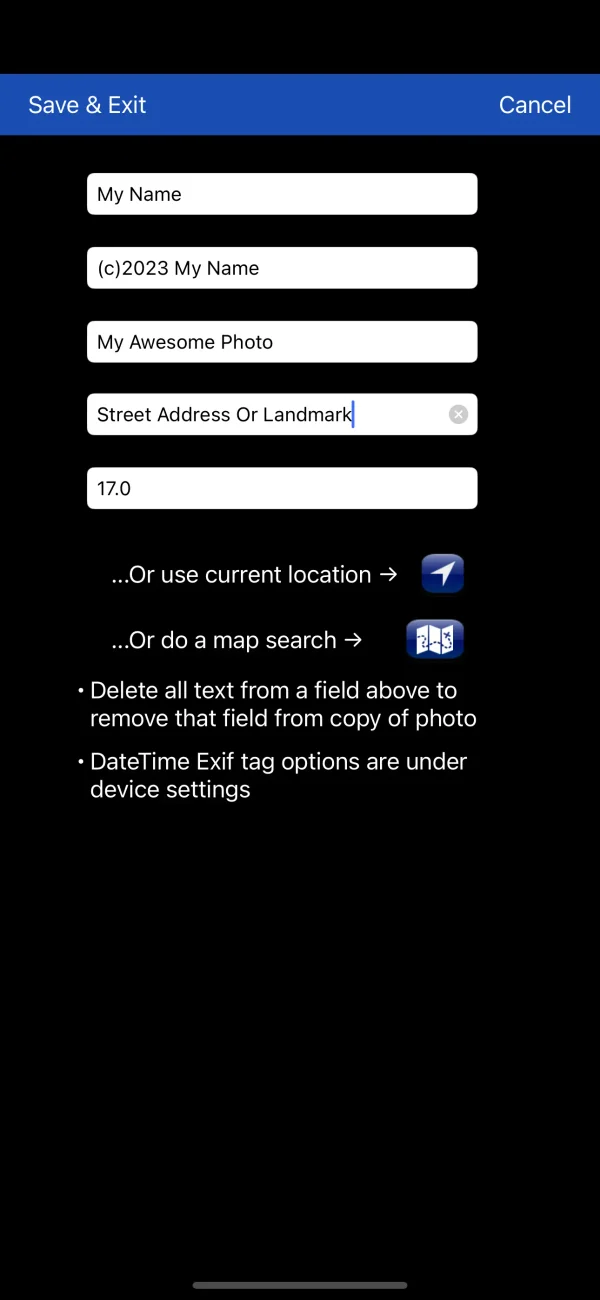
- Create a copy of an existing photo with the option to add, modify, or delete some Exif tags (Artist, Copyright, ImageDescription, Software, and GPS Location). Copies are placed at the end of your Recents album (Camera Roll). (JPEG images only)
***iCloud Photo Library Users - In the event a photo you believe is in your iCloud Photo Library fails to load, please open Apple's built-in "Photos" app to verify its presence, then try Exif Wizard-Pro again. Note that it may take several seconds or more to download a photo.
***If you edit a photo in Apple's built-in Photos app, it may become inaccessible to Exif Wizard-Pro. Reverting to original should restore access.
FTP security: Exif Wizard-Pro sends FTP data (including your password) unencrypted and, if you choose to store your password, saves it on your mobile device unencrypted. Therefore, you should NOT enter your main server password into Exif Wizard-Pro. If you have not done so already, set up an FTP account with limited access permissions. Consult your sources of technical support for further information.
Expectations Management: The process of importing photos from your desktop, laptop, or stand-alone digital camera to your mobile device is controlled by Apple. Some image editing programs, social media sites, and image upload/storage services remove Exif data from photos. Thank you for your understanding.
Notes:
- Web photos can be stored in your Recents album (Camera Roll) with Exif information by touching and holding the photo, and then touching "Add to Photos" on the action sheet which will appear.
- If you experience slow loading of photos for a selected album, go to the "Settings" app (from your home screen) and, in Exif Wizard-Pro's settings, scroll down and turn ON the "Fast Load" switch.
*** If Exif Wizard-Pro is not displaying GPS/mapping information for photos you have taken with your iOS device, it may be because you did not enable geotagging when you first used the built-in Camera app. To grant permission now, from your home screen, touch Settings -> Privacy -> Location Services. Make sure the "Location Services" switch at the top of the screen is ON, then scroll down and turn on the switch next to "Camera." Keep in mind that if you enable geotagging, people you transmit your photos to may be able to determine the locations where those photos were taken using any number of mobile and desktop Exif applications.
What’s new
Version 14.0 · Sep 19, 2026
Updated UI. Most important change is the ability to move through an album by swiping zoomed-out, full-size images left or right rather than double or triple tapping them.
App privacy
What homedatasheet.com, Inc. declares on the App Store about how this app handles data.
-
Data not linked to you
May be collected but is not linked to your identity.
- Diagnostics
Privacy practices may vary, for example with the features you use or your age.
Information
- Seller
- homedatasheet.com, Inc.
- Category
- Photo & Video
- Version
- 14.0
- Updated
- Sep 19, 2026
- Released
- Mar 21, 2011
- Size
- 1.9 MB
- Requires
- iOS 17.0 or later
- Age rating
- 4+
- Price
- $1.99
- Languages
- English
- Copyright
- © 2010-2026
You might also like
-
 EXIF Viewer by FluntroView, Remove, Edit Metadata
-
 Photo Metadata EXIF ViewerSee GPS, camera & date info
-
 EXIF Viewer LITE by FluntroPhoto GPS location,Camera info
-
 EXIF Metadata Editor & IPTCViewer Remover Batch Photo
-
 Photo Investigator: GPS & EXIFMetadata Viewer & Editor
-
 Exif MetadataView, edit, remove metadata
-
 MetaphoCheck and Edit EXIF Metadata
-
 HashPhotosOrganize, Edit, Enjoy
-
 Luminar: Photo Editor&EnhancerAI Image Editing & Retouch
-
 Tactacam REVEALPhoto & Video