
Facecam: Screen Recorder
Record Your Screen & Face
Designed for iPhone, iPad
Free · In-app purchases
- Age rating17+
- CategoryPhoto & Video
- DeveloperScreenSense Studios LLC
- Size15.6 MB
Links to the official App Store page
Download.org hosts no file of Facecam: Screen Recorder. The button opens its official App Store page, published by ScreenSense Studios LLC. Listing last checked on Nov 26, 2026.
Screenshots


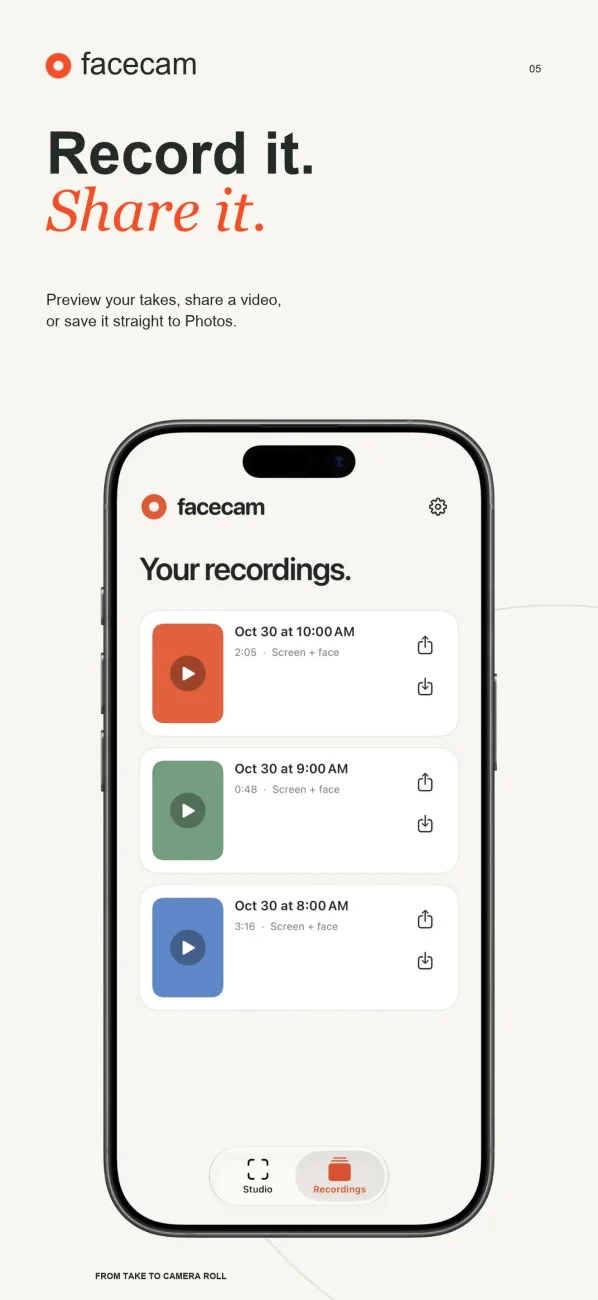
About
Record your screen and face at the same time. Facecam puts a live floating camera over the apps you show, so you can explain, demonstrate and react as you record.
Make a quick how-to, walk someone through an app, capture gameplay with your reactions, or record a lesson with a personal touch. Your screen and camera become one video, ready to save or share.
YOUR FACE, RIGHT THERE
Keep your camera visible while you use other apps. Drag the floating window to move it, pinch to resize it, or swipe it to the edge when you need more room.
CHOOSE YOUR LOOK
Keep your surroundings with Natural, or use Cutout to replace your background with a solid color or a photo. Background removal happens on your device. Mirror your camera without flipping text in your background image.
WATCH LIVE ON YOUR DESKTOP
Share your screen and floating camera with up to three desktop browsers on the same Wi-Fi while you record. Open the address shown in Studio and enter your session code. No desktop app or account is needed. Enable sound in the browser to hear your microphone commentary. The original recording stays on your device, even if a viewer disconnects.
ADD YOUR VOICE
Enable the microphone in the iOS recording picker to talk through what you are showing. Choose whether to include app audio in your saved recording in Settings. Live viewing carries microphone audio; app audio stays in the recording. Some apps and protected content may restrict screen or audio capture.
FROM RECORDING TO SHARING
Find your videos in Recordings, preview them, share them, or save them to Photos. Turn on automatic saving to add new recordings to your photo library as they finish.
A QUICKER NEXT TAKE
After your first successful recording, enable Quick to open your floating camera and the screen recording picker with fewer steps. You stay in control of screen and microphone permissions.
YOUR RECORDINGS STAY WITH YOU
No account required. Camera processing and recording happen on your device. Local live viewing is optional and uses your Wi-Fi network. You choose when to share a video or save a copy to Photos.
Requires a compatible iPhone or iPad running iOS or iPadOS 27 or later. Floating camera availability depends on device and system support. Local live viewing requires a trusted Wi-Fi network that allows devices to connect to each other.
Privacy Policy: https://facecam-web.vercel.app/privacy/
Terms & Agreements: https://facecam-web.vercel.app/terms/
End User License Agreement (EULA): https://facecam-web.vercel.app/eula/
What’s new
Version 1.0.2 · Nov 25, 2026
New Media and Web recording modes:
• Add your face and voice to photos and videos from Photos. Play, pause or scrub videos while recording.
• Record website demos as you browse, scroll and follow links.
• Move and resize your face, choose Cutout, Circle or Rectangle, and set a recording countdown in Media and Web.
• For new Media video recordings, hide or restore your face in selected segments while keeping your voice, or share the separate media and camera layers.
Name your recordings and search by name or date. Share a copy rotated left or right, at half or double speed, or without sound. Export audio as an M4A file.
App privacy
What ScreenSense Studios LLC declares on the App Store about how this app handles data.
-
Data linked to you
May be collected and linked to your identity.
- Purchases
- Identifiers
- Usage data
Privacy practices may vary, for example with the features you use or your age.
Information
- Seller
- ScreenSense Studios LLC
- Category
- Photo & Video
- Version
- 1.0.2
- Updated
- Nov 25, 2026
- Released
- Nov 6, 2026
- Size
- 15.6 MB
- Requires
- iOS 27.0 or later
- Age rating
- 17+
- Price
- Free
- In-app purchases
- Yes
- Copyright
- © 2026 ScreenSense Studios LLC
You might also like
-
 FaceCam: Face + ScreenRecord your screen and face
-
 Screen Recorder - VidorecRecord, edit & add captions
-
 Sidekick: Dual Camera RecorderRecord Front & back video Vlog
-
 Face Cam: Camera RecorderRecording screen reactions
-
 FaceCam - Camera RecorderRecording Screen Reactions
-
 Boom Loop Video Maker InfinityReverse, playback & looper app
-
 HD Face Cam Screen RecorderRecord Reactions & Gameplay
-
 Dual Camera:- Front & Back CamReaction Video & Teleprompter
-
 PNG TuberPNG Tuber streaming overlay
-
 ZencastrRecord, edit, clip & publish