
FileFly | Share & Upload Files
Upload. Link. Share.
Designed for iPhone, iPod touch
Free · In-app purchases
- Age rating4+
- CategoryProductivity
- DeveloperKello Solutions SIA
- LanguagesEnglish+ 9 more
- Size48.2 MB
Links to the official App Store page
Download.org hosts no file of FileFly | Share & Upload Files. The button opens its official App Store page, published by Kello Solutions SIA. Listing last checked on Nov 20, 2026.
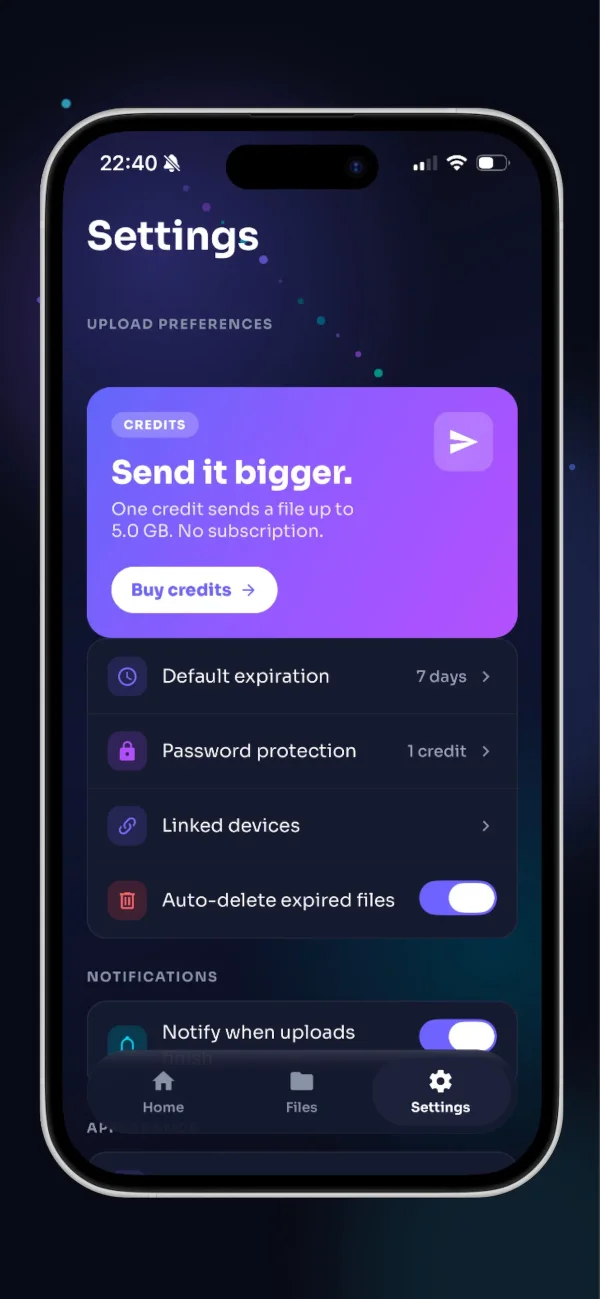
Screenshots






About
FileFly: Share & Upload Files
Upload. Get a link. Share.
FileFly makes sharing files simple.
Choose a file from your iPhone, upload it, and instantly get a shareable link. Send the link through Messages, email, social apps, or anywhere else you want.
No complicated setup. No user profile. Just your file and a link.
KEY FEATURES
- Upload Files
Upload documents, photos, videos, audio files, archives, and more directly from your device.
- Instant Share Links
Every upload gets its own unique link that you can copy and share anywhere.
- Share Anywhere
Send your file through Messages, Mail, or your favorite apps using the standard iOS sharing options.
- Password Protection
Protect supported file links with a password for an additional layer of control.
- Set Expiration
Choose how long your file remains available. Let links automatically expire after the period you select.
- Share Multiple Files
Upload multiple files and share them together through a single link where supported.
- QR Codes
Create a QR code for your file link and let someone scan it to access the download.
- Download Information
Keep track of available download information for your shared files.
- Manage Your Links
View your uploaded files, copy links, share them again, or delete files when you no longer need them.
- No Profile Required
FileFly doesn't require a user profile or complicated registration to use its core file-sharing features.
Whether you're sending a presentation, sharing photos, transferring a video, or delivering documents, FileFly gives you a simple way to turn your files into shareable links.
FileFly — upload it, link it, send it.
Your file will be securely uploaded and temporarily stored on our servers so it can be shared through your link. Files may be automatically deleted after expiration.
Privacy Policy: https://sites.google.com/view/fileflyshareuploadfiles/privacy-policy
Terms of Service: https://sites.google.com/view/fileflyshareuploadfiles/terms-of-service
In-App Purchases
File uploads require Credits. Credits are available through optional In-App Purchases.
How it works:
1-Purchase a Credit package in the app.
2-Credits are added to your available balance.
3-Use Credits when uploading and sharing files.
4-Your remaining balance is shown in the app.
5-When your Credits run out, you can purchase another package.
"Purchases are processed through the Apple App Store and are subject to Apple's applicable terms and policies."
What’s new
Version 1.2 · Sep 15, 2026
New languages added.
App privacy
What Kello Solutions SIA declares on the App Store about how this app handles data.
-
Data not collected
The developer does not collect any data from this app.
Privacy practices may vary, for example with the features you use or your age.
Information
- Seller
- Kello Solutions SIA
- Category
- Productivity
- Version
- 1.2
- Updated
- Sep 15, 2026
- Released
- Sep 14, 2026
- Size
- 48.2 MB
- Requires
- iOS 15.1 or later
- Age rating
- 4+
- Price
- Free
- In-app purchases
- Yes
- Languages
- English, Dutch, French, German, Italian, Japanese, Korean, Portuguese, Spanish, Turkish
- Copyright
- © Kello Solutions
You might also like
-
 Pixly – Storage CleanerFree Storage & Clean Contacts
-
 FileFly Network File TransferCross platform file sharing
-
 Scanner: Scan PDF & DocumentScan, Sign & Manage PDFs
-
 Sign,Stamp,Convert | ConfiDocSign, Stamp, PDF, Convert File
-
 Truthly | iKnowStay Ahead of Misinformation
-
 Nutri-UPF ScoreScan, Choose Healthier Foods!
-
 OzProductivity
-
 TRANSFERIT - Send Large FilesShare big files, sign PDFs
-
 Terra BackupProductivity
-
 Remind: Tasks & NotificationsDaily Reminders & To-Do List