
- Age rating4+
- CategoryMusic
- DeveloperImage Line Software
- LanguagesEnglish
- Size416.0 MB
Links to the official App Store page
Download.org hosts no file of FL Studio Mobile. The button opens its official App Store page, published by Image Line Software. Listing last checked on Nov 24, 2026.
Screenshots
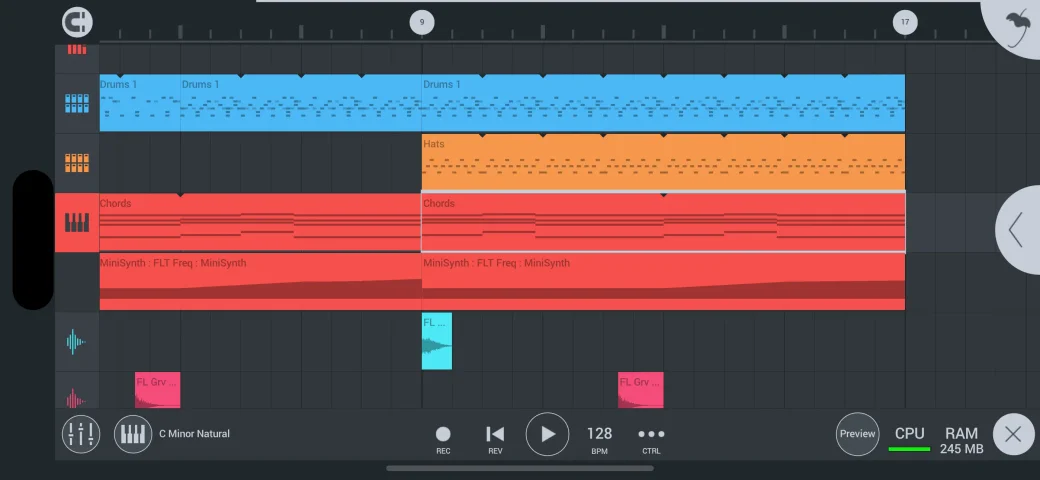


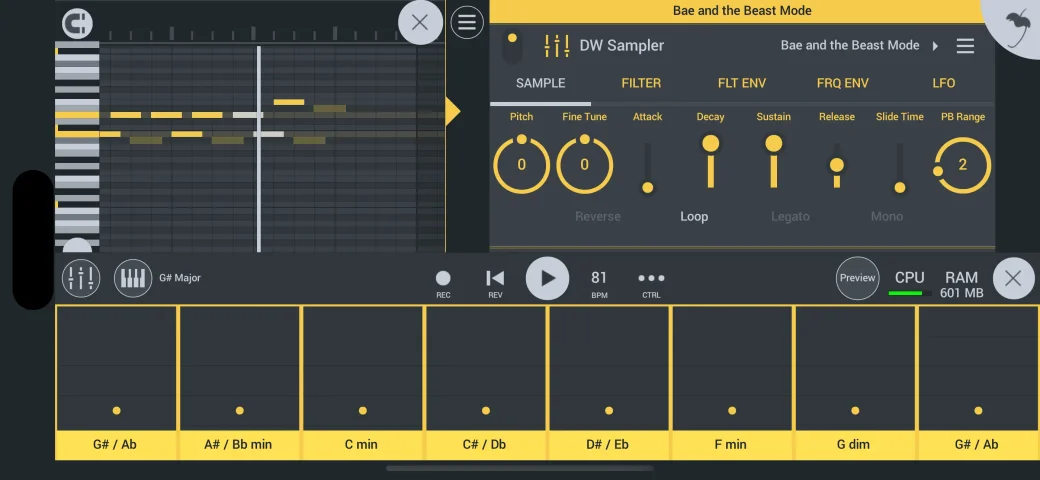
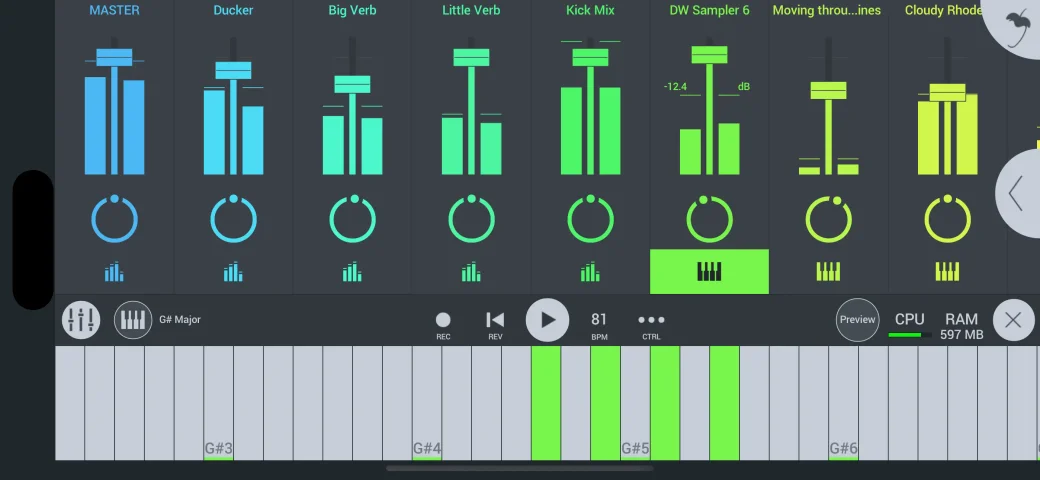

About
Create and save complete multi-track music projects on your iPad, iPhone or Mac. Record, sequence, edit, mix and render complete songs.
FEATURE HIGHLIGHTS
* Audio recording, track-length stem/wav import
* Browse sample and presets with preview
* Effects modules (see Included Content)
* Full-screen MacBook and iMac Trackpad and Mouse support.
* High quality synthesizers, sampler, drum kits & sliced-loop beats
* Instrument modules (see Included Content)
* Load projects in the FL STUDIO** FREE Plugin version of this App
* MIDI controller support (class compliant). Automation support.
* MIDI file import and Export (Single-track or Multi-track)
* Mixer: Per-track mute, solo, effect bus, pan and volume adjustment
* Piano roll. Edit notes or capture recorded performances.
* Save and load WAV, MP3, AAC*, FLAC, MIDI
* Share your songs via Wi-Fi or Cloud to other Mobile 3 installations
* Step sequencer
* User interface configurable with all screen resolutions and sizes.
* Virtual piano-keyboard & Drumpads
* IAA App support (In/Out), Audiobus support (In/Out)
* Audio recording (external and internal sources)
* Share your songs via Sync to other Mobile 3 devices / installations
* Load your projects in the FL STUDIO* FREE 'Plugin' Version of this App#
IN APP PURCHASES & INCLUDED CONTENT
FL Studio Mobile includes in-app purchases for the DirectWave sample player. You can install your own samples and don’t need to buy content.
All Instrument modules are included: Drum Sampler, DirectWave Sample Player, GMS (Groove Machine Synth), Transistor Bass, MiniSynth & SuperSaw.
All Effect modules are included: Analyzer (visual), Auto Ducker, Auto-Pitch (pitch correction), Chorus, Compressor, Limiter, Distortion, Parametric Equalizer, Graphic Equalizer, Flanger, Reverb, Tuner (Guitar/Vocal/Inst), High-Pass/Low-Pass/Band-Pass/Formant (Vox) Filters, Delays, Phaser and Stereoizer.
Included Drum Samples: Cymbals, Hats, Kicks, Snares, Toms, Percussion, Risers, SFX
Included DirectWave Instruments: Guitars, Keyboards, Orchestral, Synth, Bass, Synth Keyboards, Synth Leads, Synth Pads, Sliced, Drums, Drum Kits and Effects.
Included MiniSynth Presets: Bass, Keys, Leads, Pads, SFX, Synths
Included SuperSaw Presets: Arps, Bass, Bells, SFX, Leads, Pads, Sequences, Synths
WANT TO TRY BEFORE YOU BUY?
Install FL STUDIO 20 for macOS / Windows and you can use the FL Studio Mobile Plugin. This is identical to the App, as a plugin inside FL Studio. Get it here: http://www.image-line.com/downloads/flstudiodownload.html
MANUAL / TRAINING / VIDEOS
http://support.image-line.com/redirect/flstudiomobile_help
http://support.image-line.com/redirect/flstudiomobile_videos
SUPPORT
Please help us to help you! In the App, tap 'Help > Users & Support Forums' to register FL Studio Mobile to your Image-Line account and gain access to the forum. You can then report bugs, make feature requests and access free downloadable content: http://support.image-line.com/redirect/flmobile_forum
What’s new
Version 5.0.5 · Nov 9, 2026
FL Studio Mobile 5 is here. 10 years of FL Studio Mobile, and one of our biggest updates yet.
FL CLOUD SOUNDS
- Thousands of free sounds, right inside the app. No account needed.
- Unlock over two million sounds with an FL Cloud plan. Start your free trial in the app.
- Previews stream instantly without using storage. Sounds you add download in full quality.
PORTRAIT MODE
- It’s finally here. One of your most requested features.
- The app rotates with your device, or lock it in settings.
NEW LOOK
- Refreshed playlist, editors, Channel Rack and transport bar
- UI scaling now updates live, no restart needed
- Zoom out to fit a whole project on screen
- New reduced animations mode
WORKFLOW
- Drag and drop files from other apps
- Better mouse and keyboard support, with new shortcuts and hover hints
- Smart Solo: soloing a channel now solos its sends too
- Burn Notes to Track: turn note effects into editable notes
- Unsolo all, paste preview in the Piano Roll and Playlist, and more
Plus new demo songs to explore and lots of fixes. Happy music making!
App privacy
What Image Line Software declares on the App Store about how this app handles data.
-
Data not collected
The developer does not collect any data from this app.
Privacy practices may vary, for example with the features you use or your age.
Information
- Seller
- image-line
- Category
- Music
- Version
- 5.0.5
- Updated
- Nov 9, 2026
- Released
- Jun 21, 2011
- Size
- 416.0 MB
- Requires
- iOS 16.3 or later
- Age rating
- 4+
- Price
- $7.49
- In-app purchases
- Yes
- Languages
- English
- Copyright
- © Image Line Software NV
You might also like
-
 Cubasis LE 3Mobile Music Creation System
-
 Splice: Make music nowStart making your own songs
-
 Auxy StudioMusic & Beat Maker
-
 AudioKit Synth One SynthesizerFeature-packed Pro Synthesizer
-
 n-Track Studio DAW: Make MusicMusic Recording & Beat Maker
-
 Koala Sampler • Beat MakerYour Pocket Beat Machine
-
 Ableton NoteA place to start musical ideas
-
 MedlyMusic Making for Everyone
-
 Soundtrap: Music Making StudioEasy beat & song maker
-
 BeatStars - Instrumental BeatsStream 8 Million+ Beats