
Flair AI: Carousel Posts Maker
Turn your voice into slides
Designed for iPhone
Free · In-app purchases
- Age rating12+
- CategoryPhoto & Video
- DeveloperDenys Tsyhanok
- LanguagesEnglish+ 1 more
- Size91.1 MB
Links to the official App Store page
Download.org hosts no file of Flair AI: Carousel Posts Maker. The button opens its official App Store page, published by Denys Tsyhanok. Listing last checked on Nov 25, 2026.
Screenshots






About
Say the idea. Get the carousel.
Tap and talk for 20 seconds. Flair writes the slides in your voice and designs them, ready to post. No script, no shoot, no edit.
HOW IT WORKS
- Talk, type, or paste. A lesson, a mistake, a hot take, or a post you already wrote.
- Flair writes a hook, the points, and a slide that closes it, in your tone and for the place you post.
- Pick a look, fix a word or a photograph, and export.
WRITES LIKE YOU
Answer six questions once: what you write about, who reads it, how formal you are, how long you go on. Every carousel after that sounds like you, not like a template.
Speak English or Ukrainian. Flair hears which one and writes in it.
Already have the words? Turn on "Keep my words" and Flair lays out your own text without rewriting it.
EIGHT LOOKS
Pulse, Diary, Focus, Notes, Muse, Marker, Poster and Editorial. Pick one and the whole carousel follows it, at 4:5, 9:16 or 1:1.
AN EDITOR FOR THE LAST 10 PERCENT
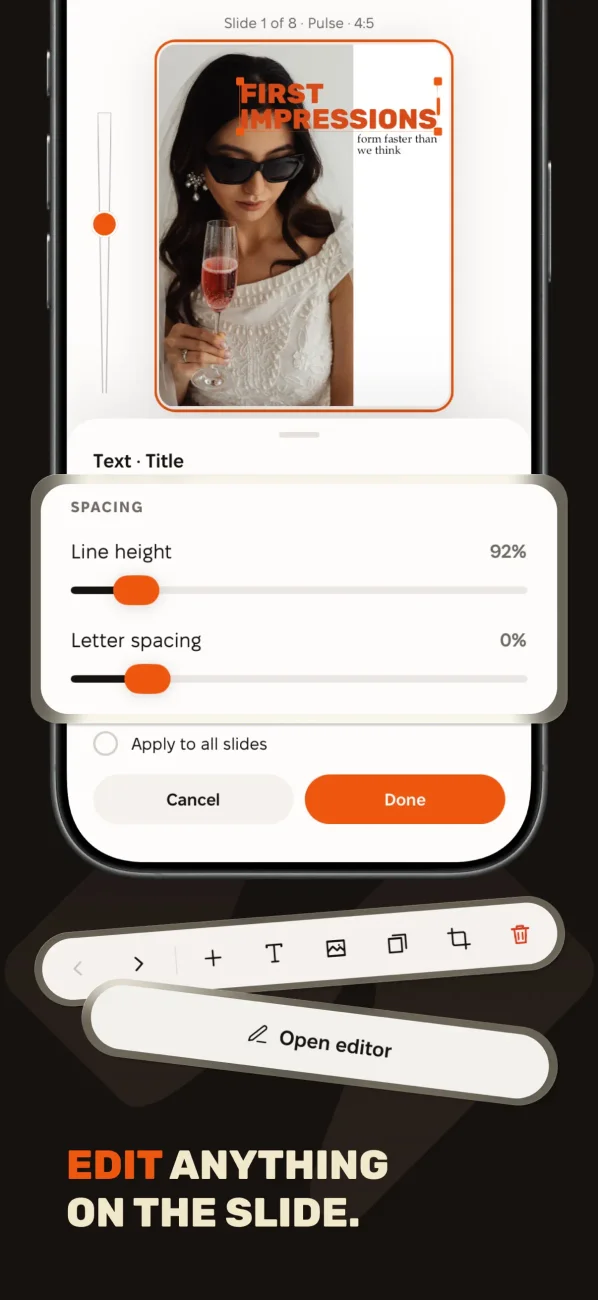
Move and resize text with your fingers. Change fonts, colours and backgrounds, add your photographs, split a slide into a collage, duplicate or delete slides. Every change saves itself.
READY TO POST
Save the slides to Photos, or share a LinkedIn carousel as a PDF.
MADE FOR
- Creators who post every week and run out of time, not ideas.
- Founders, coaches and experts building a name on LinkedIn.
- Social media managers who need one more carousel by tonight.
- Anyone who finds it easier to say a thing than to write it.
Your best ideas come on a walk, in the car, between meetings. Say one out loud and it's a post before you forget it.
FLAIR PRO
Your first 7 carousels are free. Flair Pro gives unlimited carousels, monthly or yearly.
Flair Pro is an auto-renewable subscription, monthly or yearly. Payment is charged to your Apple ID at confirmation of purchase. It renews automatically unless cancelled at least 24 hours before the end of the current period, and can be managed in your Apple ID settings. The monthly plan's first month is charged at an introductory price, then renews at the standard monthly price.
Terms of Use: https://tryflair.io/terms
Privacy Policy: https://tryflair.io/privacy
Apple's standard EULA: https://www.apple.com/legal/internet-services/itunes/dev/stdeula/
What’s new
Version 1.2.0 · Nov 24, 2026
A calmer editor, built around your slides.
• All the tools now live in one toolbar under your slides, and the slides are bigger.
• Tap + to add a slide: write one with AI from a short note, start from a photo, or begin empty.
• Cutout lifts you (or anything else) off the background of a photo.
• Moving and resizing photos and text is smoother, and photos resize from their corners.
App privacy
What Denys Tsyhanok declares on the App Store about how this app handles data.
-
Data linked to you
May be collected and linked to your identity.
- Purchases
- Contact info
- User content
- Identifiers
- Usage data
- Diagnostics
Privacy practices may vary, for example with the features you use or your age.
Information
- Seller
- Denys Tsyhanok
- Category
- Photo & Video
- Version
- 1.2.0
- Updated
- Nov 24, 2026
- Released
- Nov 8, 2026
- Size
- 91.1 MB
- Requires
- iOS 16.4 or later
- Age rating
- 12+
- Price
- Free
- In-app purchases
- Yes
- Languages
- English, Ukrainian
- Copyright
- © 2026 Denys Tsyhanok
You might also like
-
 Velume MattePhoto Frames & White Borders
-
 Caruvo: AI Content & ReelsCarousels & Reels in minutes
-
 Artreal: AI Art Mockup StudioWall Art Preview for Etsy
-
 333: Carousel & Zine MakerPhoto Dump, Postcard & Collage
-
 Luna Shoots: Shoot PlannerPhotographer CRM & galleries
-
 Posti AI: Draft Carousel PostLinkedIn Hooks & Slideshows
-
 Submagic aiSubmagic ai video generator
-
 SubApp - Captions For VideoFor Social Media
-
 Mood BoardInterior Design, Home Decor ++
-
 AI background & Remove ObjectsAI Photo Eraser & Change - BG