
- 対象年齢12+
- カテゴリ写真/ビデオ
- 開発元Denys Tsyhanok
- 言語英語ほか1言語
- サイズ91.1 MB
App Storeの公式ページにリンクしています
Download.orgはFlair AI: Carousel Posts Makerのファイルを一切ホストしていません。ボタンを押すと、Denys Tsyhanokが公開しているApp Storeのアプリページが開きます。ページの最終確認:2026/11/25。
スクリーンショット






概要
開発元はこのテキストをお使いの言語で提供していません。
Say the idea. Get the carousel.
Tap and talk for 20 seconds. Flair writes the slides in your voice and designs them, ready to post. No script, no shoot, no edit.
HOW IT WORKS
- Talk, type, or paste. A lesson, a mistake, a hot take, or a post you already wrote.
- Flair writes a hook, the points, and a slide that closes it, in your tone and for the place you post.
- Pick a look, fix a word or a photograph, and export.
WRITES LIKE YOU
Answer six questions once: what you write about, who reads it, how formal you are, how long you go on. Every carousel after that sounds like you, not like a template.
Speak English or Ukrainian. Flair hears which one and writes in it.
Already have the words? Turn on "Keep my words" and Flair lays out your own text without rewriting it.
EIGHT LOOKS
Pulse, Diary, Focus, Notes, Muse, Marker, Poster and Editorial. Pick one and the whole carousel follows it, at 4:5, 9:16 or 1:1.
AN EDITOR FOR THE LAST 10 PERCENT
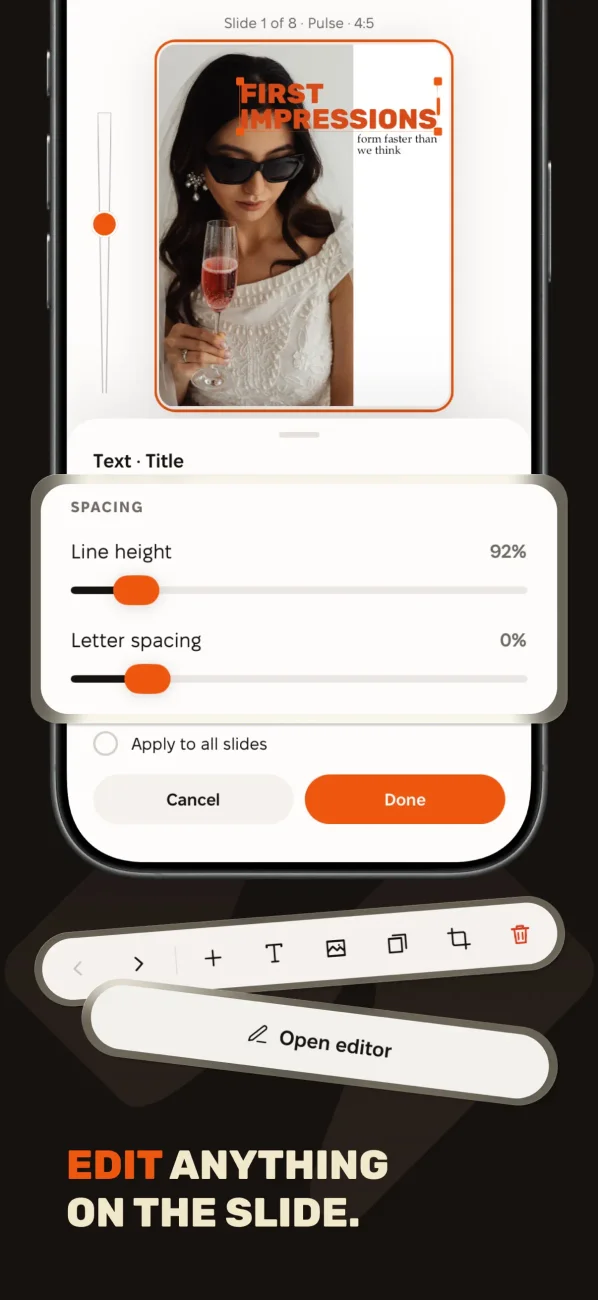
Move and resize text with your fingers. Change fonts, colours and backgrounds, add your photographs, split a slide into a collage, duplicate or delete slides. Every change saves itself.
READY TO POST
Save the slides to Photos, or share a LinkedIn carousel as a PDF.
MADE FOR
- Creators who post every week and run out of time, not ideas.
- Founders, coaches and experts building a name on LinkedIn.
- Social media managers who need one more carousel by tonight.
- Anyone who finds it easier to say a thing than to write it.
Your best ideas come on a walk, in the car, between meetings. Say one out loud and it's a post before you forget it.
FLAIR PRO
Your first 7 carousels are free. Flair Pro gives unlimited carousels, monthly or yearly.
Flair Pro is an auto-renewable subscription, monthly or yearly. Payment is charged to your Apple ID at confirmation of purchase. It renews automatically unless cancelled at least 24 hours before the end of the current period, and can be managed in your Apple ID settings. The monthly plan's first month is charged at an introductory price, then renews at the standard monthly price.
Terms of Use: https://tryflair.io/terms
Privacy Policy: https://tryflair.io/privacy
Apple's standard EULA: https://www.apple.com/legal/internet-services/itunes/dev/stdeula/
新機能
バージョン 1.2.0 · 2026/11/24
A calmer editor, built around your slides.
• All the tools now live in one toolbar under your slides, and the slides are bigger.
• Tap + to add a slide: write one with AI from a short note, start from a photo, or begin empty.
• Cutout lifts you (or anything else) off the background of a photo.
• Moving and resizing photos and text is smoother, and photos resize from their corners.
アプリのプライバシー
このアプリのデータの取り扱いについて、Denys TsyhanokがApp Storeで申告している内容です。
-
ユーザーに関連付けられたデータ
収集され、ユーザーの識別情報に関連付けられる場合があります。
- 購入
- 連絡先情報
- ユーザーコンテンツ
- ID
- 使用状況データ
- 診断
プライバシーの取り扱いは、ご利用の機能やお客様の年齢などに応じて異なる場合があります。
情報
- 販売元
- Denys Tsyhanok
- カテゴリ
- 写真/ビデオ
- バージョン
- 1.2.0
- 更新日
- 2026/11/24
- リリース
- 2026/11/8
- サイズ
- 91.1 MB
- 必要条件
- iOS 16.4以降
- 対象年齢
- 12+
- 価格
- 無料
- アプリ内課金
- あり
- 言語
- 英語, ウクライナ語
- 著作権
- © 2026 Denys Tsyhanok
こちらもおすすめ
-
 Velume Matte写真の余白加工と美しい白枠フレーム
-
 Caruvo: AI Content & Reels写真/ビデオ
-
 Artreal: AIルームビジュアライザー作品を12秒でフォトリアル空間へ
-
 333: カルーセル・ZINE作成フォトダンプ・ポストカード・コラージュ
-
 Luna Shoots: 撮影スケジュール管理フォトグラファー向け顧客管理・納品ギャラリー
-
 Posti AI: カルーセル投稿作成LinkedInでバイラルなコンテンツを量産
-
 Submagic ai写真/ビデオ
-
 SubApp - Captions For Video写真/ビデオ
-
 Mood Board写真/ビデオ
-
 Erase Backgrounderaser, remove & change object