
Floating Clock - Teleprompter
Top Window timer, text, script
Designed for iPhone, iPad, iPod touch
Free · In-app purchases
- Age rating4+
- CategoryProductivity
- Developer书敏 贾
- LanguagesEnglish+ 32 more
- Size29.9 MB
Links to the official App Store page
Download.org hosts no file of Floating Clock - Teleprompter. The button opens its official App Store page, published by 书敏 贾. Listing last checked on Nov 22, 2026.
Screenshots


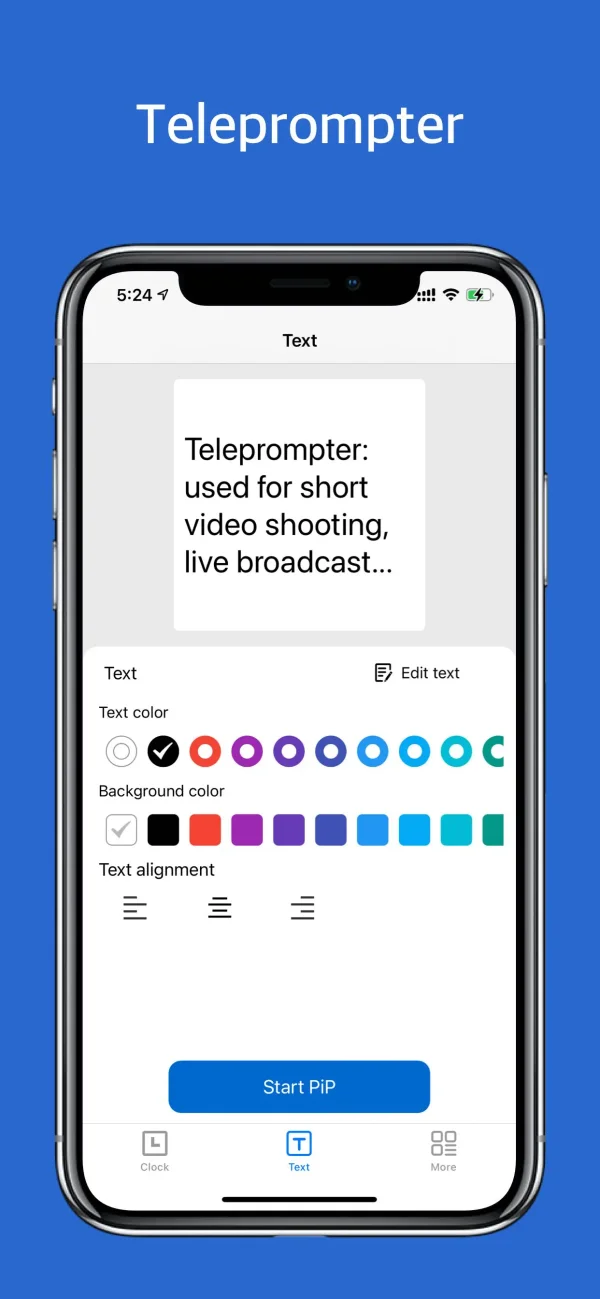

About
Floating Clock, a small window floating on the desktop, displays a digital clock, displays any text information, and helps you record short videos.
- Display time in seconds on dynamic island and lock screen.
- Desktop digital clock, providing millisecond display.
- Support 12 hours, 24 hours switch.
- Floating teleprompter, small text and script windows for easy video recording.
Contact us: cuiling_shi@163.com
What’s new
Version 1.9 · May 10, 2026
Optimized the teleprompter video recording experience.
App privacy
What 书敏 贾 declares on the App Store about how this app handles data.
-
Data used to track you
May be used to track you across apps and websites owned by other companies.
- Identifiers
-
Data not linked to you
May be collected but is not linked to your identity.
- Identifiers
Privacy practices may vary, for example with the features you use or your age.
Information
- Seller
- 书敏 贾
- Category
- Productivity
- Version
- 1.9
- Updated
- May 10, 2026
- Released
- Jun 22, 2021
- Size
- 29.9 MB
- Requires
- iOS 15.0 or later
- Age rating
- 4+
- Price
- Free
- In-app purchases
- Yes
- Languages
- English, Arabic, Catalan, Croatian, Czech, Danish, Dutch, Finnish, French, German, Greek, Hebrew + 21 more
- Copyright
- © Floating Screen
You might also like
-
 Split Screen - Floating AppsPiP Splitware Dual Window View
-
 Cronometro FlutuantePara você usar com outros apps
-
 Floating Clockms Timer, Net Speed & Alerts
-
 FloatTextFloating prompt for video
-
 Split View Multitasking ScreenDual web browser
-
 OnTake Teleprompter & CaptionsScript Reader & Auto Subtitles
-
 Floaty - PiP & Floating ViewerSplit Screen - Dual Window
-
 Teleprompter - CaptionsRead, video record & caption
-
 Split Screen ViewDuet Display - Multi Space
-
 Auto Tapper Assistant AppAutomatic Clicker, Auto Tapper