
FocusBlocks - Pomodoro Timer
Pomodoro focus
Designed for iPhone, iPad
In-app purchases
- Age rating4+
- CategoryProductivity
- DeveloperYusuke Takeuchi
- LanguagesEnglish+ 15 more
- Size6.7 MB
Links to the official App Store page
Download.org hosts no file of FocusBlocks - Pomodoro Timer. The button opens its official App Store page, published by Yusuke Takeuchi. Listing last checked on Nov 8, 2026.
Screenshots



About
What will you focus on today?
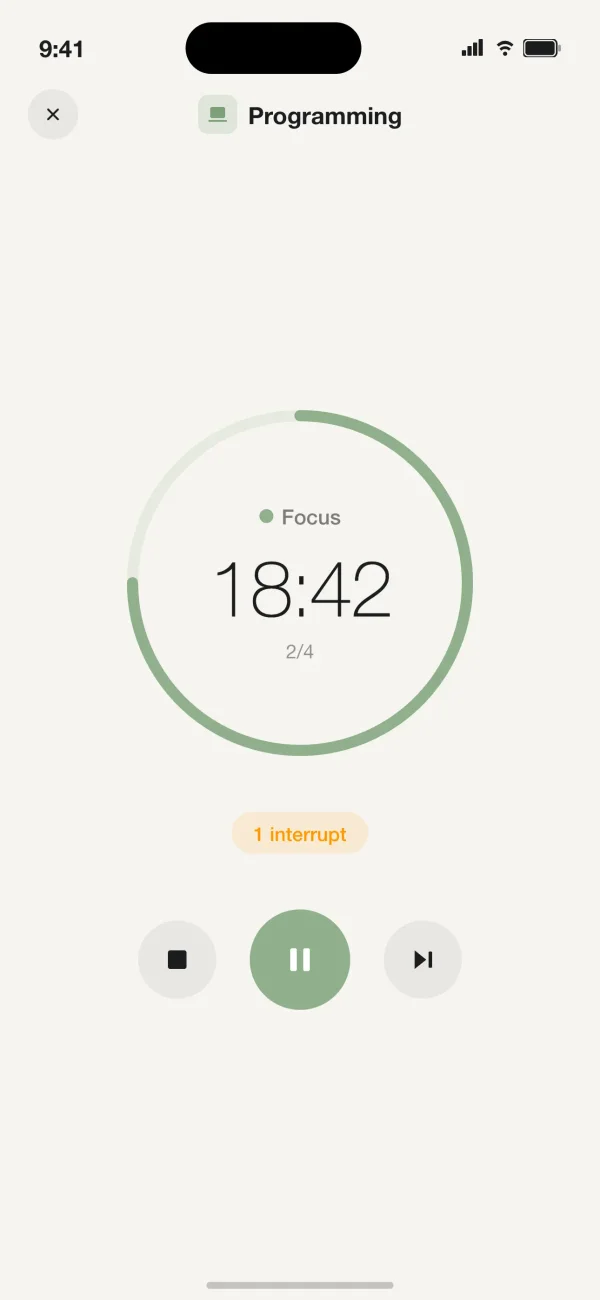
FocusBlocks combines the Pomodoro Technique with time blocking in one beautiful focus timer. Plan your day on a visual timeline, start a Pomodoro with one tap, and see exactly when, what, and how long you focused.
--- Key Features ---
■ Pomodoro Timer
25 minutes of focus, 5-minute break, repeat. After 4 sets, take a longer break. Maximise your productivity with this scientifically proven method. Fully customisable focus, break, and long break durations.
■ Time Blocking
Plan your day with focus blocks. Place tasks on a timeline — morning reading, work sessions, afternoon study. Drag to adjust your schedule easily.
■ Visual Timeline
A beautiful timeline shows your entire day at a glance. See what you should be doing right now. Progress updates in real time.
■ Live Activities
Timer displayed on Lock Screen and Dynamic Island. Check remaining time without opening the app.
■ Home & Lock Screen Widgets
Display today's plan on your home screen. See time until your next block at a glance.
■ Weekly Statistics
Visualise focus time, session count, and completion rate with charts. See exactly how much time you spent on each task.
■ Routine Templates
Apply the same daily schedule with one tap. Save and reuse configurations like "Morning Routine," "Work Mode," or "Exam Prep."
■ Interruption Logging
Record what broke your focus — phone calls, social media, colleagues. Discover improvement areas in your weekly review and gradually build deeper focus.
■ Customisation
Set focus (1–60 min), break (1–30 min), long break (1–60 min), and number of sets. Find the rhythm that works best for you.
--- More ---
・Full dark mode support
・16 languages supported
・Privacy first: all data stored on your device only
---------------------------------
Sage Apps Series
A collection of iOS utility apps designed for simplicity and ease of use. Unified design to make your day a little better.
>> Search "Sage Apps" on the App Store for more
---------------------------------
What’s new
Version 1.0.4 · Oct 14, 2026
• Fixed an issue where the app icon did not change with the color theme.
App privacy
What Yusuke Takeuchi declares on the App Store about how this app handles data.
-
Data used to track you
May be used to track you across apps and websites owned by other companies.
- Usage data
-
Data not linked to you
May be collected but is not linked to your identity.
- Usage data
Privacy practices may vary, for example with the features you use or your age.
Information
- Seller
- Yusuke Takeuchi
- Category
- Productivity
- Version
- 1.0.4
- Updated
- Oct 14, 2026
- Released
- Apr 13, 2026
- Size
- 6.7 MB
- Requires
- iOS 17.0 or later
- Age rating
- 4+
- In-app purchases
- Yes
- Languages
- English, Dutch, French, German, Indonesian, Italian, Japanese, Korean, Polish, Portuguese, Russian, Spanish + 4 more
- Copyright
- © 2026 OwlSoft
You might also like
-
 Untangle - Capture ThoughtsSpeak freely. AI organizes it.
-
 Pomodoro Timer: Focus Blocks25-minute focus, timed breaks
-
 シュッと: 共有から予定を登録Productivity
-
 Pomodoro Focus & White NoiseAd-Free Pomodoro & Focus Timer
-
 FocusFlow TimerFocus, Break, Succeed
-
 Focus One: Pomodoro TimerApp Blocker for Study & Work
-
 Home Stuff InventoryFind where items live
-
 Pomino: Pomodoro Focus TimerStudy, ADHD & Productivity
-
 Pomica - Pomodoro Focus TimerCustom Images, Colors & Fonts
-
 Work Time MonitorA personal hours log