
FocusDown: Face Down Focus
Flip phone down, stay focused
Designed for iPhone
$1.99 · In-app purchases
- Age rating4+
- CategoryProductivity
- Developer春城 贾
- LanguagesEnglish+ 4 more
- Size25.5 MB
Links to the official App Store page
Download.org hosts no file of FocusDown: Face Down Focus. The button opens its official App Store page, published by 春城 贾. Listing last checked on Nov 17, 2026.
Screenshots



About
FocusDown helps you put your phone down — literally.
Start a focus session, place your iPhone face down on a flat surface, and stay away from distractions until the timer ends.
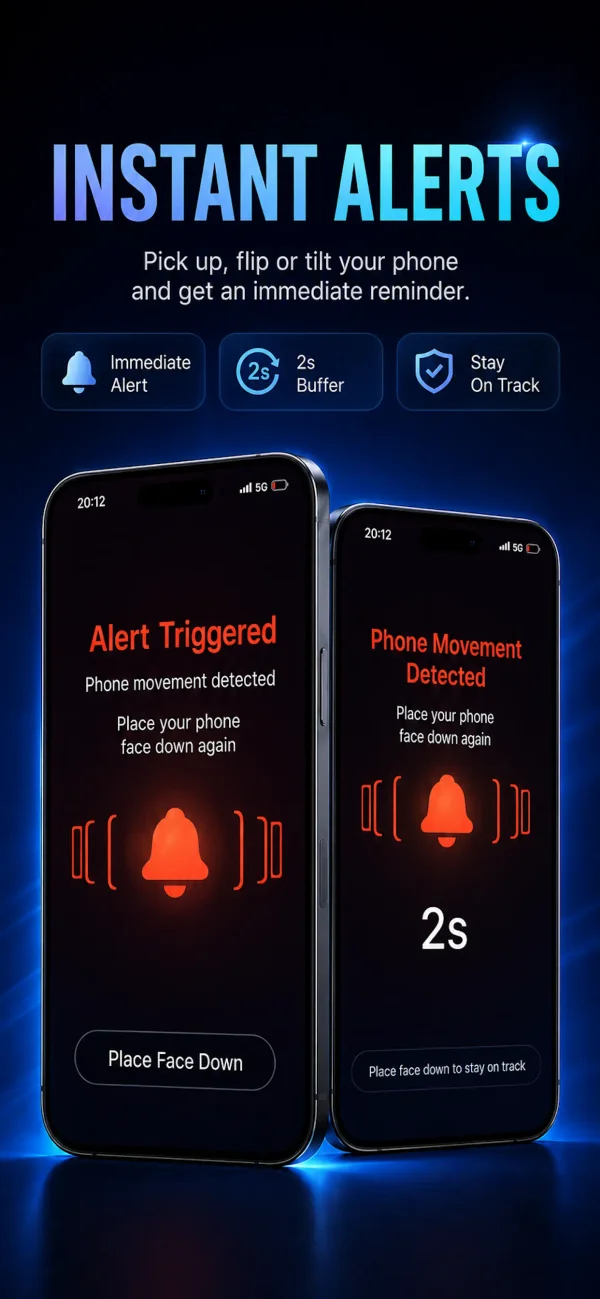
Unlike a normal focus timer, FocusDown turns the simple act of flipping your phone over into a clear commitment. During a session, it helps detect movement, tilting, or picking up the phone and gives you a timely reminder so you can return to focus.
Great for:
* Studying
* Deep work
* Reading
* Exam prep
* Writing
* Meetings
* Phone-free breaks
Main features:
* Face-down focus timer
* Custom session duration
* Movement and tilt reminders
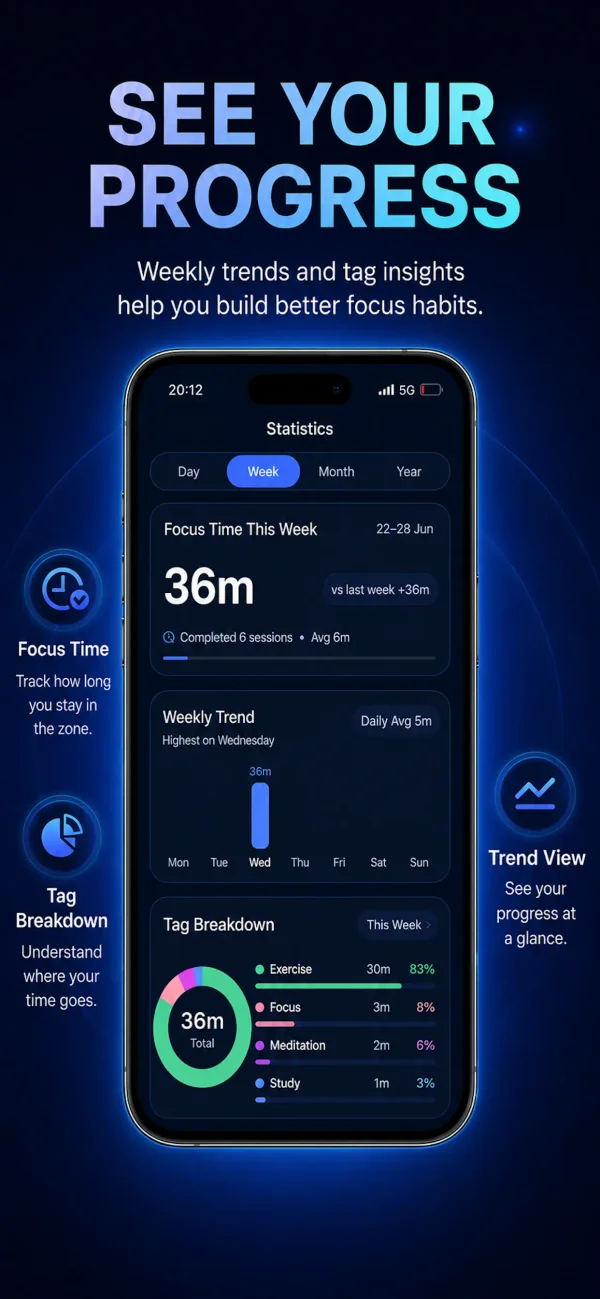
* Focus history
* Daily and weekly statistics
* Achievement badges
* Calm dark interface
How it works:
1. Choose a focus duration.
2. Tap Start.
3. Place your iPhone face down on a flat surface.
4. Stay focused until the session ends.
FocusDown does not block other apps. It helps you build a stronger focus habit by making your phone physically harder to pick up.
Put your phone down. Stay with one thing. Build better focus, one session at a time.
1. This service is a subscription based paid service, which means you will prepay for future subscription usage. You can currently choose to use this service on a quarterly basis. At the end of each subscription period, your subscription will automatically renew by default, unless you cancel the automatic renewal yourself or we cancel the service.
2. Unsubscribe: To cancel the renewal, please cancel at least 24 hours in advance. You can unsubscribe by opening System Settings, clicking on Apple ID, clicking on Subscription, selecting Premium, and then unsubscribing.
3. Restore purchase: If you receive a prompt saying "You have already subscribed to this project" during the payment process and confirm that you have completed the purchase before, you can click "Restore Purchase" in the upper right corner to restore the purchase.
Membership Service Agreement and Automatic Renewal Agreement:
https://gcn1s2rmayw3.feishu.cn/wiki/YgqKwPdJmiH0ulkF92kco1CznCg?from=from_copylink
Privacy Policy:
txhttps://gcn1s2rmayw3.feishu.cn/wiki/SGBIwmUWCiPWoWktE5sclLRgnol?from=from_copylink
What’s new
Version 1.4 · Aug 11, 2026
Further optimized the user experience
App privacy
What 春城 贾 declares on the App Store about how this app handles data.
-
Data not collected
The developer does not collect any data from this app.
Privacy practices may vary, for example with the features you use or your age.
Information
- Seller
- 春城 贾
- Category
- Productivity
- Version
- 1.4
- Updated
- Aug 11, 2026
- Released
- Jun 26, 2026
- Size
- 25.5 MB
- Requires
- iOS 16.0 or later
- Age rating
- 4+
- Price
- $1.99
- In-app purchases
- Yes
- Languages
- English, Japanese, Korean, Simplified Chinese, Traditional Chinese
- Copyright
- © 20260625
You might also like
-
 PhoneDown:Social Detox & FocusScreentime Focus App Block
-
 Focus4Life: Pomodoro TimerFocus timer, tasks & blocking
-
 PhoneDown-Focus Pomodoro TimerBuild focus. Get things done.
-
 Project Planner - 計画管理Productivity
-
 Lazy PandaSmall Habits, Big Changes
-
 Focus Arc: Pomodoro TimerBlock Apps, Build Habits
-
 Plain PomodoroMinimal focus timer
-
 Lockd: Pomodoro TimerPhone Down Focus Timer
-
 TossDay - タスク管理 & タイムラインProductivity
-
 Ember Arc: Goal TrackerADHD Planner & Organizer