- Age rating4+
- CategoryGraphics & Design
- DeveloperDon Stevenson
- LanguagesEnglish
- Size209.3 MB
Links to the official App Store page
Download.org hosts no file of FormWright 3D. The button opens its official App Store page, published by Don Stevenson. Listing last checked on Nov 22, 2026.
Screenshots
About
Make a character. Build a precise prop. Bring it to life.
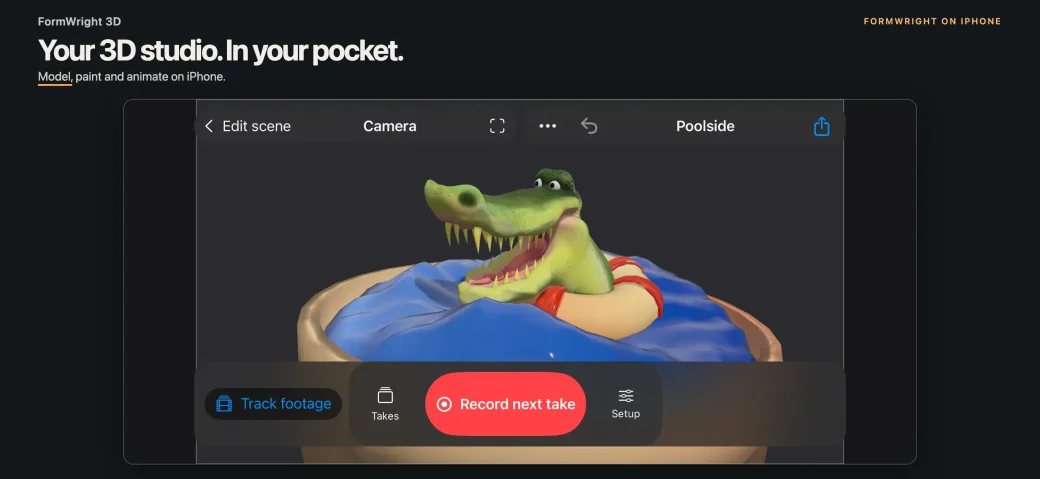
FormWright 3D brings modeling, sculpting, painting and animation together on iPad and iPhone. Move from an idea to a textured model, a performance or a camera take in one local project. One purchase, with no subscription or in-app purchases.
MAKE: SHAPE YOUR IDEA
Model with points, edges and faces, modifiers, instances and symmetry. Sculpt a clay sphere or grow organic forms with Branch Forms. Paint directly on models with texture layers and symmetry, then explore live procedural materials. Retopo Draw on regular iPad layouts helps you lay out loops and strips and refine topology.
MAKE: WORK WITH DIMENSIONS
Use Solid for sketches, circular-arc paths, extrusions, cuts, fillets, chamfers, insets, pockets and repeated patterns. Create Flat, Rounded or Tapered ring blanks with an exact inside diameter, wall thickness and band width in millimeters. Inspect details with close-up navigation. Export exact Solid geometry as STEP, or bake a mesh for Sculpt and Paint while retaining the Solid source.
MOVE: RIG AND ANIMATE
Start with guided Auto Rig, adjust landmarks and weights, and test a pose. Face Auto Rig offers expression starting points for suitable meshes. Use keyframes, curves, ghosts and trails, or record movement in Perform and layer it into your animation. Preview supported rigid-body reactions and bake them to editable keys. Auto rigs and face shapes are editable starting points; results depend on your model and topology.
SHOOT: LIGHT AND SHARE
Set lights, shadows and photo-based environments. Frame camera takes, add imported audio or optional voice recordings, and export video. On supported hardware, explore handheld camera control, mixed reality and body, hand or face motion capture. Footage tracking estimates camera movement and may drift with blur, occlusion or low detail.
A WORKSPACE THAT FITS
Use full-screen iPad controls or compact iPhone panels. Arrange and pin supported panels on regular iPad layouts. Keep photo references nearby. Optional time-lapse captures silent editing snapshots after you start it; recordings stay on this device and can be exported separately.
YOUR PROJECTS, YOUR FILES
Save locally and share editable .da3 projects with referenced assets. Open older .fw3d and .formwright projects as separate copies. Exchange supported geometry, materials and animation through USDZ, GLB, OBJ and FBX; export STL or 3MF for printing. Formats preserve different parts of a scene, with guidance for baking or simplified output.
ONE PURCHASE
No FormWright account, subscription, ads or tracking SDKs. Creative processing stays on your device. Existing owners receive version 1.3 as an update. Your original work can be used in personal or commercial projects; imported assets retain their owners' terms.
BEFORE YOU START
Apple Pencil is optional; hover needs compatible hardware. Retopo Draw needs a regular iPad layout. AR and capture features depend on device capabilities; room scanning needs supported LiDAR hardware. The optional Watch companion provides lightweight previews and orientation control through a paired iPhone; direct Watch-to-iPad control is not included.
Solid uses direct modeling with a read-only feature record. Changing an earlier sketch does not rebuild an extrusion. Ring dimensions remain editable until another Solid operation changes the shape. Full sketch constraints, automatic tangency, revolve and shell are not included. Keep backups before updating important projects; earlier app versions may not open newer project data. Complex geometry and exports can take longer.
Privacy, support and open-source acknowledgments are available in Settings and on the developer website.
What’s new
Version 1.3 · Nov 5, 2026
Version 1.3 helps you move from making a model to bringing it to life.
• Precision ring blanks: Flat, Rounded and Tapered profiles with exact millimeter dimensions, editable sizing and clearer close-up controls.
• Guided Auto Rig and Face Auto Rig, with landmark placement, weight editing, pose tests and expression starting points.
• Expanded timeline keys and curves, layered Perform motion, Quick Moves and editable baked physics reactions.
• Make, Move and Shoot workspace groups, clearer view controls, and movable, pinnable panels on regular iPad layouts.
• Photo references, visual Add tools, and silent, optional time-lapse recordings that you can export separately.
• Editable .da3 project sharing, separate-copy opening of older .fw3d and .formwright files, and clearer import/save progress.
• Sculpting, selection, duplication, playback and project-opening improvements.
One-time purchase; existing owners receive this update. No subscription or in-app purchases.
Auto rigs and expression shapes are starting points that may need adjustment. Ring sizing stays editable until another Solid operation changes the shape. Capture features depend on hardware; supported export formats preserve different parts of your scene. Keep a backup before updating important projects.
App privacy
What Don Stevenson declares on the App Store about how this app handles data.
-
Data not collected
The developer does not collect any data from this app.
Privacy practices may vary, for example with the features you use or your age.
Information
- Seller
- Don Stevenson
- Category
- Graphics & Design
- Version
- 1.3
- Updated
- Nov 5, 2026
- Released
- Sep 27, 2026
- Size
- 209.3 MB
- Requires
- iOS 18.0 or later
- Age rating
- 4+
- Price
- $19.99
- Languages
- English
- Copyright
- © 2026 Don Allen Stevenson III
You might also like
-
 QwartzLow-poly 3D, pixel-painted
-
 Konjur3DBuild on a whim
-
 LowPoly 3D ModelingSculpt, texture and animate
-
 ZPixit3D Voxel Modeling & Pixel Art
-
 Denrim: ForgeLow-Poly 3D Modeling
-
 LUNE 2D AnimationThe joy of animation is back
-
 Poligon: Pixel Art & Low PolySprite, texture & 3D editor
-
 Paper: 3D Drawing StudioDraw, Paint and Sculpt in 3D
-
 WaxModel, sculpt, paint & animate
-
 Pixelart Studio: Sprite MakerFor game art & animation