
FunBIM
Construction app
Designed for iPhone, iPad, iPod touch
Free · In-app purchases
- Age rating4+
- CategoryProductivity
- DeveloperFUNBIM
- LanguagesEnglish+ 2 more
- Size108.1 MB
Links to the official App Store page
Download.org hosts no file of FunBIM. The button opens its official App Store page, published by FUNBIM. Listing last checked on Nov 16, 2026.
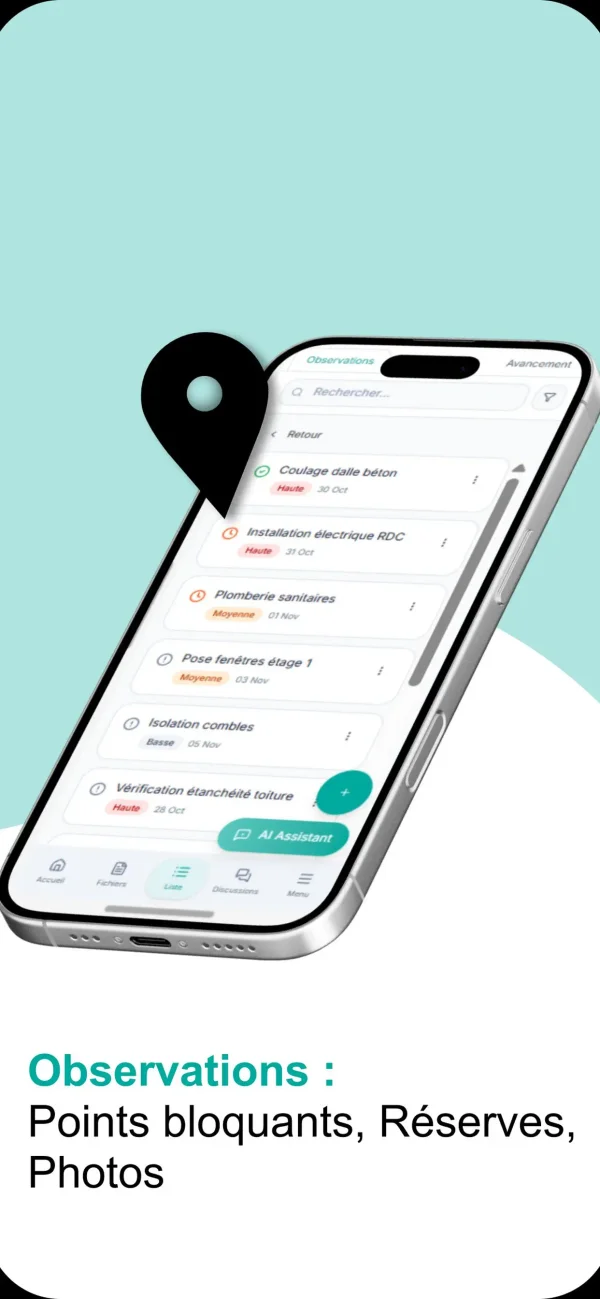
Screenshots



About
Write less, print less and keep everyone in the loop. FunBIM helps you run your construction projects from the job site, online or offline.
ISSUE TRACKING
Pin issues directly on your plans, add photos, assign trades, set due dates and follow each issue through to closure. Send PDF reports to every stakeholder in one tap.
FORMS AND CHECKLISTS
Fill in your PDF forms on site, take photos and sign them on screen. Signatures and field values sync to the web app for everyone on the project.
WORK PROGRESS
Mark on your plans what has been built so far and log quantities. Progress is consolidated project-wide and visible to your whole team.
DOCUMENTS
Import your drawings with version control, annotate PDFs and browse 3D BIM models. Every plan opens on site, even with no network.
BUILT FOR THE JOB SITE
• Works fully offline: your data stays on the device and syncs when you are back online
• Voice input to fill in an observation hands-free
• Comments and notes on every issue
• Dashboards and PDF reports for issues, forms and progress
• Notifications when something changes on your projects
SUBSCRIBE TO COLLABORATE
A subscription unlocks everything that goes through the cloud:
• Multi-user collaboration and project sharing
• Sync across all your devices
• Online report generation and sharing links
• Centralised user and company management
• Single sign-on for your organisation
• Email and phone support
If you subscribe through Apple, payment will be charged to your Apple Account at confirmation of purchase. The subscription renews automatically unless auto-renew is turned off at least 24 hours before the end of the current period; your account is charged for renewal within 24 hours before the end of the period at the displayed price. Manage your subscription or turn off auto-renewal in your Account Settings after purchase. Any unused portion of a free trial is forfeited when you purchase a subscription.
Privacy Policy: https://funbim.com/en/privacy-policy/
Terms of use: https://funbim.com/en/terms/
Support: support@funbim.com
What’s new
Version 3.0.15 · Nov 4, 2026
What's new in version 3.0.15:
• Apple Pencil on iPad: a new drawing tool for plans, with Apple's pens, highlighter, eraser and colors.
• Forms: handwriting in text fields with Apple Pencil (Scribble).
• Forms: the "All forms" list now shows the most recent forms first.
• Improved stability.
• Reliability: improved file uploads and better tracking of technical issues.
App privacy
What FUNBIM declares on the App Store about how this app handles data.
-
Data used to track you
May be used to track you across apps and websites owned by other companies.
- Diagnostics
-
Data linked to you
May be collected and linked to your identity.
- Contact info
- User content
- Identifiers
- Usage data
- Diagnostics
-
Data not linked to you
May be collected but is not linked to your identity.
- Identifiers
Privacy practices may vary, for example with the features you use or your age.
Information
- Seller
- FUNBIM
- Category
- Productivity
- Version
- 3.0.15
- Updated
- Nov 4, 2026
- Released
- Mar 12, 2018
- Size
- 108.1 MB
- Requires
- iOS 15.1 or later
- Age rating
- 4+
- Price
- Free
- In-app purchases
- Yes
- Languages
- English, French, Spanish
- Copyright
- © FunBIM
You might also like
-
 BIM ConnectionProductivity
-
 ResolvingYour workflows, digitized
-
 XYBimProductivity
-
 BatipadProductivity
-
 NEXT-BIM ExplorerAR for BIM Construction & FM
-
 ar.liveTask manager for tradespeople
-
 Best reportField Management & Punch List
-
 Finalcad OneProductivity
-
 EcoStruxure Building EngageProductivity
-
 KSB FlowManagerProductivity